 |
 |
 |
|
 |


|
#1
|
|||
|
|||
 [request]New XP window with only numbers?
now that we have access to the raw XP numbers needed for adventuring and trade skilling.
would anyone be able to make a ui that has only the numbers? Thanks, 
|

|
#2
 03-03-2011, 06:42 PM
|
|||
|
|||
|
there used to be one that didn't work with one of the updates. was something wrong with the way it was sized..i fixed it so that it could be resized and it works for the most part but i don't recall what the name of it was before i did my slight retweek
|
|
#3
03-04-2011, 10:28 AM
|
||||
|
||||
|
Quote:
Thanks, Draven
|



|
#4
03-04-2011, 10:51 AM
|
||||
|
||||
|
I think the OP is referring to the NEW data they added for the raw, non-percentage numbers on the XP bar, ie:
XP: 420300/560000
__________________
"I'm afraid you're guilty of thought-crime. Don't bother getting the door, we'll let ourselves in..." <Donate to DrumsUI> < [DrumsUI] Updater > < [DrumsUI] Full Interface> <
|


|
#5
03-04-2011, 02:35 PM
|
||||
|
||||
|
They did add new game data...
http://www.eq2interface.com/patches/..._gamedata.html <DynamicData actiontype="Experience" Name="Experience" /> <DynamicData actiontype="Experience" Name="ExperienceNextLevel" />
|



|
#6
03-04-2011, 06:02 PM
|
||||
|
||||
|
Quote:
Than adding the tooltip of the 50/100.
|
|
#7
03-05-2011, 01:11 AM
|
|||
|
|||
|
BINGO
this is what i was loking for XP: 420300/560000 They did add new game data... http://www.eq2interface.com/patches/..._gamedata.html <DynamicData actiontype="Experience" Name="Experience" /> <DynamicData actiontype="Experience" Name="ExperienceNextLevel" />
|
|
#9
03-05-2011, 11:31 PM
|
||||
|
||||
|
The default xp bar has the tooltip.
__________________
"I'm afraid you're guilty of thought-crime. Don't bother getting the door, we'll let ourselves in..." <Donate to DrumsUI> < [DrumsUI] Updater > < [DrumsUI] Full Interface> <
|
|
#10
03-06-2011, 01:44 PM
|
|||
|
|||
|
is there anyway
is there anyway to make the window the numbers though instead of the bar?
|-------------| |40000/50000 | then have the tooltip show the pecentage? |-------------| If not then just the window with the numbers?
|
|
#11
03-07-2011, 04:32 PM
|
|||
|
|||
|
or if even easier, would there be a way that the hover-over "tooltip" could always be displayed on top of the xp bar?
and how would one be able to control that font size? i pulled out the UIbuilder and it just got me completely confused. i loaded up the default ui with it and i just cant figure it out.
|
|
#12
03-07-2011, 05:07 PM
|
|||
|
|||
|
Quote:
Silat
|
|
#13
03-07-2011, 06:55 PM
|
|||
|
|||
|
|----------------------------------------------------------|
| advxp Experience/ExperienceNextLevel current % | |----------------------------------------------------------| | cftxp Experience/ExperienceNextLevel current % | |----------------------------------------------------------| | AAXP Current % | |----------------------------------------------------------| as a rough idea. for adv and crafting xp they should be numbers only for the AA xp it is still % based so just a number 1-100% will work no no bars needed really just looking for text. with an easy to read font, not as large as profit used for there xp% display but bigger than tiny tooltip
|
|
#15
05-13-2011, 01:10 AM
|
|||
|
|||
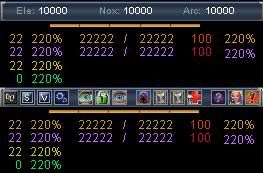 Ok so the same window there, but with a mouse-over the top bar on the bottom pic which pops up a hot button bar. Concentration slots: Hotbuttons: - EQ2 menu - Sound menu - Video menu - Profit Control Center - Show/Hide Illusion - Lock/Unlock all windows - Nightvision - Toggle AFK/LFW (with custom afk message) - Timer 1 - Timer 2 - Effect Monitor - Infocenter - Toggle Soga - Panic Button The XP portion of the window contains: Adventure: Level, % to next level, current XP amount, XP amount of next level, debt, vitality Tradeskill: Level, % to next level, current XP amount, XP amount of next level, debt, vitality AA: Level, % to next level Guild: Level, # to next level Still a work in progress as I have not tested it in game as of yet for obvious reasons.
__________________
 C R A - B R I G A D E 3 - R A I D L E A D E R - [DoV Kill List] | [App To Join] EliteUI  Don't forget to add me to your favorite Mod's list! 
|
|
#16
05-19-2011, 10:46 AM
|
|||
|
|||
|
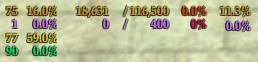
I just can't shake the feeling it's missing something. I can not place my finger on it just yet. I do need to position the "/" over to the left a little more. Other than that I am open to suggestions.
 Val
__________________
C R A - B R I G A D E 3 - R A I D L E A D E R - [DoV Kill List] | [App To Join] EliteUI Don't forget to add me to your favorite Mod's list!
|
 Linear Mode


 |
© MMOUI
vBulletin® - Copyright ©2000 - 2026, Jelsoft Enterprises Ltd. |
 |
