|
| Category: CompilationsQuse UI |
| Interface Information |
|
| Name: |
Quse UI  |
| Author: |
|
| Date: |
03-31-2012 03:09 PM |
| Size: |
1.49 MB |
| Version: |
v4.3 |
| Rate Addon: |
 |
Quse UI
::The EQ2 Edition::
______
Please read the change-log, installation information, and pro-tips sections to ensure you are installing properly!
______
For QuseUI - The Warcraft Edition click HERE
-----------------
Latest Changes:
** DELETE YOUR OLD INSTALLATION **
6/29 - v4.2
- Changed UI font! - MAKE SURE YOU INSTALL THE INCLUDED FONTS
- Increased the font sizes in the maintained window and raid frame by a bit.
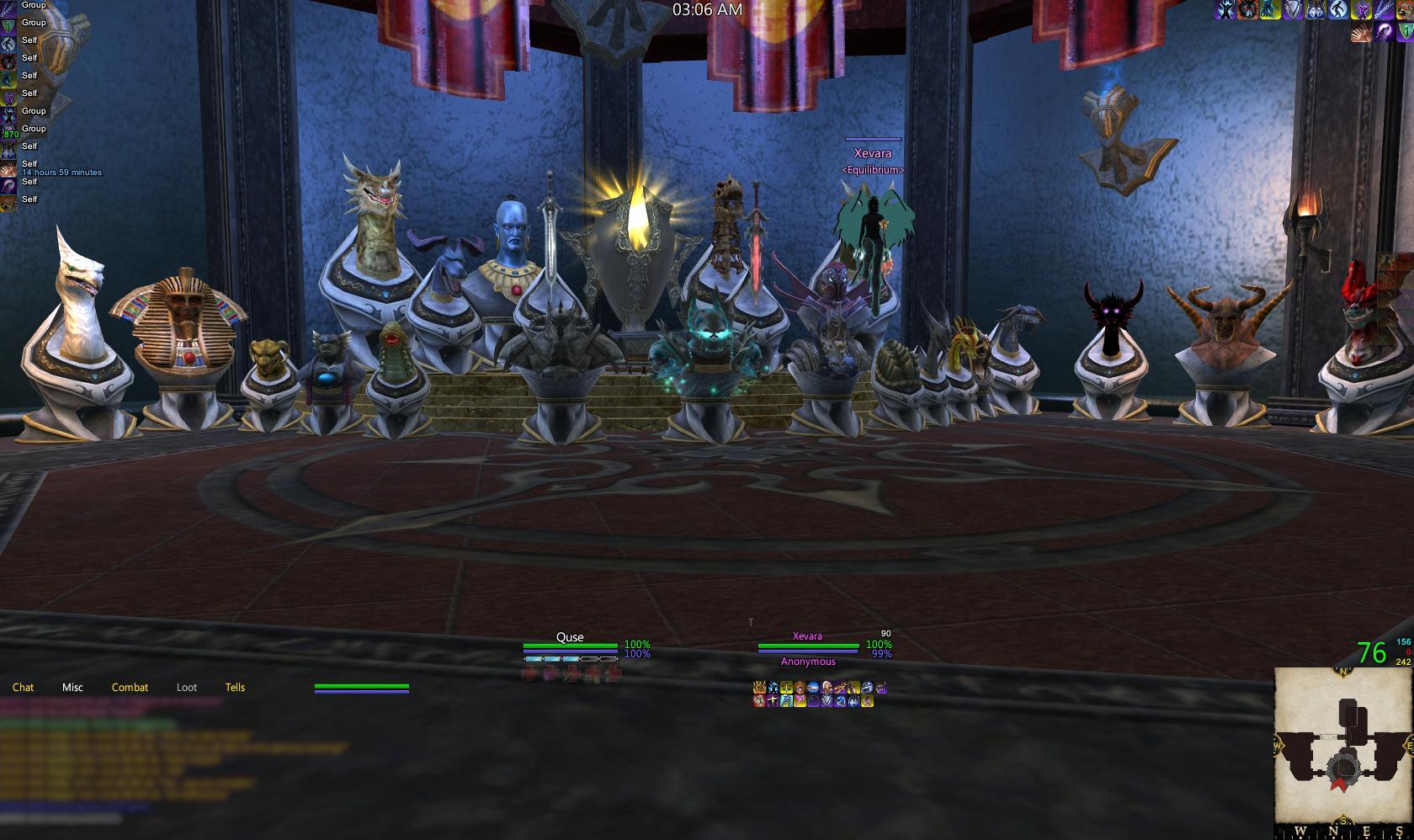
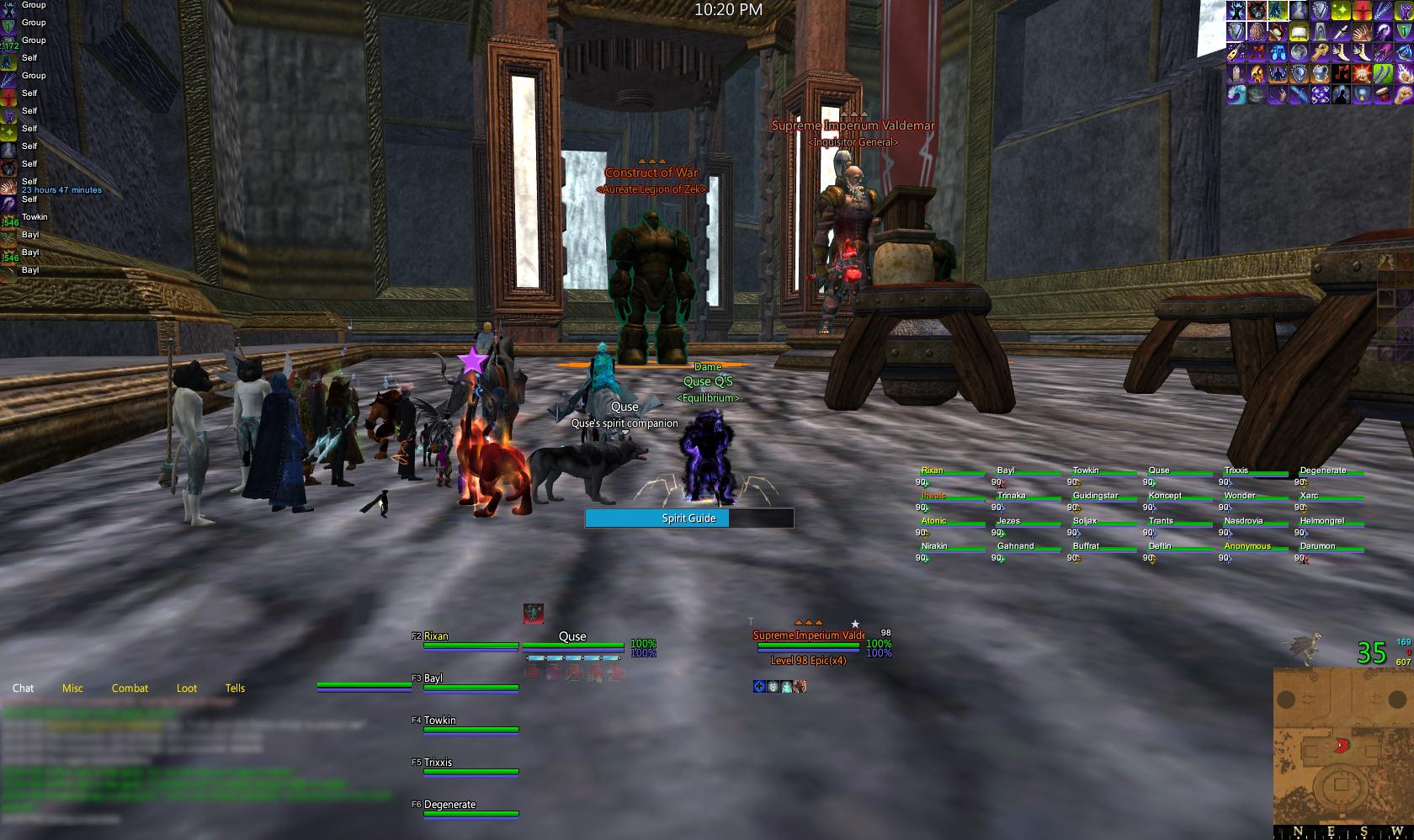
Preview:

Scroll to the bottom to see past changes.
-----------------
Set-up Instructions:
- Create a back-up of your current UI folder and current EQ2.ini file (found in root EQ2 folder)
- Drag all files within the "QuseUI" folder into your root EQ2 folder and drag the two font files inside the "Fonts" folder to your Windows' font folder (or drag to desktop and install them).
- Log-in and choose one of the "QuseUI" UI pre-sets (Windowed with shown/hidden bars, or Fullscreen with hidden/shown bars) once you have fully loaded the game (choosing while the loading won't apply settings)
-- If this isn't the first time logging in, type "/load_uisettings" and choose your desired "QuseUI" pre-set settings.
-- Check "Smooth Fonts" and Uncheck "Use small Serif Font" under Options>User Interface> Game Windows
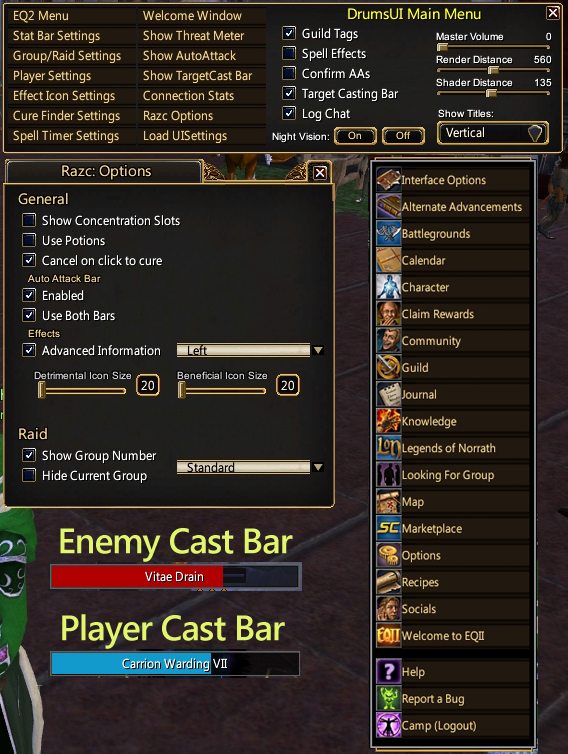
- To open the Razc~ options panel, create a macro in-game with this command: /show_window Custom.Dolt.
- Once in game, if what you see doesn't look like the screenshots included be sure you have installed properly.
-----------------
Interface Pro-Tips:
- The spell timer mod included in this UI pulls the spells placed on hotbar #10 which allows you to easily use the same timer mod for all of your characters without any hassle (see here for further clarification).
-- open hotbar #10 and place any spells you'd like to track on it. Feel free to close/hide the bar afterwards, the spells will still be tracked.
-- open the "_DefilerMonitor_Settings.txt" file in the QuseUI folder and add any procs you'd like to see in the last three spots.
- If you are attempting to install this over another interface in hopes of using both you MUST know what you are doing with the "eq2ui_custom" file. Not installing the one included with this interface or just overwriting your old one will most likely cause elements of either UI to not work.
-----------------
Credits and small bits of info:
(Click author's name for their original files and specific support)
* Updating addons in this compilation is generally a bad idea; most have been modified by myself and you'll break the layout by updating.
Seagoat - Experience bars. *
- Removing frame/titlebar and changing BG/frame opacity will show/hide different experience bars.
EQ2Junkie - Pet window *
Arremis - Compact compass *
Drumstixx - Many, many pieces here and there
- Visit his page for complete info.
gm9 - Profit market window
Samejima - Maintained spell effect window, zoning screen, and autoattack bars - and overall badassery. (raid frames, attack bar, maintained spell window) *
psychedelicious - best target rings on the planet
MaddBomber's Tracking Window *
Zarzu's Hiding Hotbar - allows hotbars to hide unless in combat or on mouseover (set via the windows settings) *
-- Frame and Titlebar is shown at all times, Frame Only is hidden unless in combat or on mouseover, None shows only in combat.
Passatuner's Cleanfont - Cleans up the font.
-- Make sure you install the included fonts if your computer doesn't already have the Segoe UI font installed.
(* = edited, do not update)
-----------------
Change-log:
3/31 - v4.3
-*SHOULD* have everything out of the package that doesn't work anymore (leaving essentially everything but merchant windows, loot, persona, etc...).
Let me know if anything else doesn't work properly.
6/21 - v4.1[color="Silver"]
- Start menu now has an option at the top to open Drums' options menu.
-- Added a quick link in the Drums menu to the Razc options panel.
- New player and target/implied target cast bars.
-- Toggle for the target/implied target cast bar is in the DrumsUI menu.
You may have to resize the player and enemy cast bars to make them look properly. The ideal and best looking size is the smallest they can be resized.
[/COLOR
5/31 - v4.0/4.01
-Updated for GU#60
Many, many changes:
- New Layouts (bars hidden/shown)!
- Thanks to Profe, hotbars now show reuse timers and retain their ability to hide in/out of combat and mouseover (BEST THING EVER).
- Working elements of Razc~ have been integrated into the interface.
-- To open the options panel make a macro in-game with this command: /show_window Custom.Dolt
4/25 - v3.1
- SegoeUI font is now applied to the chat window
- Modified chat window aesthetics, tabs are now transparent and text shadows have been turned back on.
2/28 - v3.0
- Changed UI skin to Darq's Earth theme.
* You must delete your old installation completely, many files were added/removed to change the skin.
2/24 - v2.6
- Destiny of Velious compliant - make sure you delete your old files!
11/15 - v2.5
- Added dx2 NPC Cast Bar.
- Updated a few frames.
- Modified Vex Skin is back with the help of Abbelyn.
10/15 - v2.4.6
- Added enemy cast bar compatible frames and updated persona window.
10/06 - v2.4.5
- Somehow managed to not include a group frame (?!)
-- PLEASE post any issues you have in the comments section, wish I would have known about this earlier =(
9/30 - v2.4.4
- Updated Seagoat's XP bars in the files.
-- Choose "Maximum" to see the Start Button/SC button (resize from the right to hide the SC button).
9/9 - v2.4.3
- Past version had the wrong maintained window, sorry =(
8/31 - v2.4.2
- Experience bar no longer snaps to screen edges.
8/30 - v2.4.1
- Added some changes to icons.
- Changed icon/hotbar shape to squares instead of the rounded look.
8/28 - v2.4
- Razc's maintained window is back!
- Modified the pet window to match the overall frame scheme (name of pet is also hidden).
- Chat windows are hidden unless active/mouseover to clean up the overall look.
- Fixed a small issue with the spell-timer that was causing the spell in slot 1 to not show properly.
- Hid the text over the auto attack bar and moved it to just below the threat meter.
8/23 - v2.3
- Modified Drumstix's Maintained Effects window to be compact and reflect the previous maintained window included in this UI (Razc's window).
-- I'll be uploading fixed UI presets soon, but for now right click the maintained window and show titlebar to see text.
8/22 - v2.2
- Vex Skin removed until/if it gets updated.
-- Skin is now the default blue skin with some elements from Vex, Vang Gurk and Drums' .dds files.
- Small mod additions (All Drums files): Guild, Persona, Examine, Merchant.
- Fixed pre-set layout issues and added files for Fullscreen/Windowed Hidden/Shown Bars (Please read below to understand HOW the bars actually work).
- With the help of Luosky, the spell-timer window now has his multi-character spell timer functionality with the look of Defiler Monitor! - READ BELOW
8/19 - v2.2
- GU 57 compatible!
-- not many changes, layout is a bit different and mods updated.
- New Tracking window: MaddBomber's Tracking Frame
- Replaced Dragowulf's Spell-Timers with Luosky's Multi-Character Spell Timer
- Until EQ2Maps is properly updated I have not uncluded the eq2ui_mainhud_map2 window which means EQ2Maps will not be working.
-- You can update and get the file from the EQ2Map Updater but the compass markers on the map won't appear and it will be gigantic.
* Updated screenshots inc shortly and expect more updates in the coming days as more mods are updated.
8/06 - v2.1.1
- Raid Frame no longer tells channel 4 (whatever yours may be) that you're curing a curse (sorry)
-- There's no need to install everything if you don't want to, just drag the "eq2ui_mainhud_raid.xml" file into the "QuseUI" folder and overwrite the old one.
8/03 - v2.0.0
The UI got a facelift! - New screenshots will be inc.
PLEASE REMOVE OLD QUSEUI INSTALLATION BEFORE INSTALLING THE NEW VERSION
- Comes with three different UI pre-sets: Windowed, Fullscreen, and BarsShown (see hotbar addition below).
- Added Passatuner's CleanFont to clean up text.
-- Check "Smooth Fonts" and Uncheck "Use small Serif Font" under Options>User Interface> Game Windows
- Replaced hotbars with Zarzu's Hiding Hotbar.
-- Hidden by default, choose the "Bars Shown" UI settings file to have them shown all of the time.
- Removed the tips portion of the loading screen (who reads those things anyway!)
7/08 - v2.0.0
Some updates!
- Flipped Mini-Map and Compass positions.
- Van Gurk skin replaced with Dragowulf's Vex Skin.
-- This change alone has impacted a great deal of the overall look of the interface. You'll notice it quite a bit if you already use this interface!
- Target/Implied target match player (a la Drums).
-- I modified them very slightly by removing the "look up" button from the target frame - kept fat handing it.
- Switched to Profit's hotbars for the larger reuse number and grey borders
5/13 - v1.07
- Tracking window facelift!
-- Expanded filter input/background, con filter buttons are larger - new screenshot showing changes.
5/13 - v1.06
- Another really small update (sorry)
-- Edited the tracking window to increase the font size on the window when not moused over (size 12 to 13). Much much friendlier on the eyeballs now!
5/13 - v1.06
- New tracking window and placement; using Kosmo's now since it's incredibly compact and filters alphabetically.
-- check out author credits below for tracking window pro-tips!
5/10 - v1.05
- Cleaned up/slight adjustments of various UI windows.
- Updated group frame
-- Look for small widgets when mousing over the group frame, this toggles an option panel. The quick-cast buttons are by default not used.
3/24 - v1.04
- Won't join any chat/voice channels by default anymore (if you are still in these channels, it would be appreciated if you left them).
3/18 - v1.03
- Fixed the possible disappearance of UI elements while in windowed mode.
3-18 - v1.02
- Ok, really fixed the minimap issue this time.
3/17 - v1.01
- Deleted a few files to hopefully fix the black minimap issue.
Note: If you wish to use a modified addon in this compilation please ask for permission (or credit accordingly). |
| Archive List (Old Versions) |
File Name |
Version |
Size |
Author |
Date |
|
v4.2 |
1.39 MB |
Qupe |
06-29-2011 07:22 PM |
|
v4.1 |
1.34 MB |
Qupe |
06-21-2011 11:11 PM |
|
v4.01 |
1.34 MB |
Qupe |
05-31-2011 03:28 PM |
|
v4.0 |
1.34 MB |
Qupe |
05-19-2011 06:54 PM |
|
v3.2 |
1.64 MB |
Qupe |
04-28-2011 07:10 PM |
|
v3.1 |
1.64 MB |
Qupe |
04-25-2011 04:22 PM |
|
v3.0 |
1.64 MB |
Qupe |
02-28-2011 11:02 PM |
|
v2.6 |
2.04 MB |
Qupe |
02-24-2011 12:21 PM |
|
v2.5 |
2.03 MB |
Qupe |
11-15-2010 11:03 PM |
|
v2.4.6 |
1.97 MB |
Qupe |
10-15-2010 06:43 PM |
|
v2.4.5 |
1.97 MB |
Qupe |
10-06-2010 04:01 AM |
|
v2.4.4 |
1.95 MB |
Qupe |
09-30-2010 08:47 AM |
|
v2.4.3 |
3.22 MB |
Qupe |
09-09-2010 02:06 AM |
|
v2.4.2 |
3.22 MB |
Qupe |
08-31-2010 04:02 PM |
|
v2.4.1 |
3.22 MB |
Qupe |
08-30-2010 02:22 AM |
|
v2.4 |
2.84 MB |
Qupe |
08-28-2010 06:31 PM |
|
v2.3.1 |
2.78 MB |
Qupe |
08-23-2010 02:43 PM |
|
v2.3 |
2.78 MB |
Qupe |
08-22-2010 04:54 AM |
|
v2.2 |
2.50 MB |
Qupe |
08-19-2010 01:35 AM |
|
v2.1.1 |
4.32 MB |
Qupe |
08-10-2010 03:00 AM |
|
v2.1.10 |
4.32 MB |
Qupe |
08-10-2010 01:31 AM |
|
v2.0.0 |
2.59 MB |
Qupe |
07-08-2010 06:03 PM |
|
v1.2 |
2.60 MB |
Qupe |
07-08-2010 05:08 PM |
|
v1.0.7 |
28.79 MB |
Qupe |
05-15-2010 04:13 PM |
|
v1.06 |
28.79 MB |
Qupe |
05-13-2010 06:06 PM |
|
v1.0.6 |
28.79 MB |
Qupe |
05-13-2010 03:26 PM |
|
v1.0.5 |
28.79 MB |
Qupe |
05-10-2010 08:41 AM |
|
v1.0.4 |
3.62 MB |
Qupe |
03-25-2010 09:27 PM |
|
1.0.4 |
3.62 MB |
Qupe |
03-18-2010 04:40 PM |
| File Statistics |
| User Rating: |
|
| Downloads: |
72924 |
| Views: |
144044 |
| Favorites: |
15 |
| Uploaded By: |
|
| Last Modified: |
N/A |
|
|  |
|
 |
|
 03-05-2012, 06:25 PM
|
|
A Grassland Beetle
Server: Antonia Bayle
Forum posts: 64
File comments: 43
Uploads: 1
|
Quote:
Originally posted by Treveran
I've been using the mod for a while, and I was sad to come here and see it's defunct! But I figured I'd take a shot in the dark and ask anyway: I grabbed DrumsUI and pretty much cobbled together your UI. I pulled the Defiler Timers.xml and txt file out of this, placed it in the UI folder and added it to the custom.xml for drums. Unfortunately, it seems this wasn't enough. I've been looking through the QuseUI folder trying to identify what else may be needed, but am having trouble doing so. If you have time, could you let me know what I am missing?
Thanks in advance!
|
This still works if you replace or remove the windows EQ2 has updated (like wherever Merc stuff shows up, probably merchant frames, persona, etc...). The raid frames, target/player should still work - I'm assuming. Luckily, the majority of the windows I've been using in the UI are from Drums, so he's got them up to date.
I'd have to reinstall the client to see whats broken, lost it when my HD died =/ |


|


|
|
03-05-2012, 01:51 PM
|
|
A Coastal Crab
Server: Antonia Bayle
Forum posts: 0
File comments: 1
Uploads: 0
|
I've been using the mod for a while, and I was sad to come here and see it's defunct! But I figured I'd take a shot in the dark and ask anyway: I grabbed DrumsUI and pretty much cobbled together your UI. I pulled the Defiler Timers.xml and txt file out of this, placed it in the UI folder and added it to the custom.xml for drums. Unfortunately, it seems this wasn't enough. I've been looking through the QuseUI folder trying to identify what else may be needed, but am having trouble doing so. If you have time, could you let me know what I am missing?
Thanks in advance!
|
|
|
|
|
12-18-2011, 03:18 PM
|
|
A Coastal Crab
Server: Antonia Bayle
Forum posts: 0
File comments: 4
Uploads: 0
|
Re: Re: New Inventory/Character Window?
Thank you for all your hard work over the years Qu 
Quote:
Originally posted by Qupe
I'd suggest downloading the window included with Drums' UI; the one included in mine is his anyway.
If it hasn't been obvious by the lack of updates, I don't play any longer - and to compound that, my HD died so I don't have the game installed any more =(
|
|
|
|
|
|
12-12-2011, 12:59 AM
|
|
A Grassland Beetle
Server: Antonia Bayle
Forum posts: 64
File comments: 43
Uploads: 1
|
Re: New Inventory/Character Window?
Quote:
Originally posted by MysticAngel
Any chance of a new Inventory window for the new changes of the warders and the mercs?
Please please
|
I'd suggest downloading the window included with Drums' UI; the one included in mine is his anyway.
If it hasn't been obvious by the lack of updates, I don't play any longer - and to compound that, my HD died so I don't have the game installed any more =( |
|
|
|
|
12-09-2011, 06:49 PM
|
|
A Coastal Crab
Server: Antonia Bayle
Forum posts: 0
File comments: 4
Uploads: 0
|
New Inventory/Character Window?
Any chance of a new Inventory window for the new changes of the warders and the mercs?
Please please |
|
|
|
|
10-24-2011, 08:26 PM
|
|
A Coastal Crab
Server: Antonia Bayle
Forum posts: 0
File comments: 1
Uploads: 0
|
For starters I just wanted to say amazing UI. I used this in WoW for my druid and almost every other class as well.. However, I have ran into a small problem with the EQ2 version.. The mini map and main map show nothing, along with the casting bar still having the boarder around it. Maybe I missed how to fix it.. But I will be posting a SS with the problem at hand. Thanks for any help!

Suiche
Last edited by Onhorse : 10-24-2011 at 08:36 PM.
|
|
|
|
|
09-08-2011, 04:35 PM
|
|
A Grassland Beetle
Server: Antonia Bayle
Forum posts: 64
File comments: 43
Uploads: 1
|
Quote:
Originally posted by mo0rbid
Where is the main menu button? :O I've searched forever, pressing F10 doesn't help either
|
Maximize the xp bar/drag it so its larger. I just bound it to a button because its ugly and pointless to have up all the time. |
|
|
|
|
09-03-2011, 01:53 PM
|
|
A Young Mystail Rat
Server: Antonia Bayle
Forum posts: 2
File comments: 1
Uploads: 0
|
Where is the main menu button? :O I've searched forever, pressing F10 doesn't help either
|
|
|
|
|
08-13-2011, 09:42 AM
|
|
A Grassland Beetle
Server: Antonia Bayle
Forum posts: 64
File comments: 43
Uploads: 1
|
Re: Spell timer
Quote:
Originally posted by Dymond
Does the spell timer thing for bar 10 still work?
|
It should, I haven't changed anything with it. |
|
|
|
|
08-09-2011, 12:08 PM
|
|
A Young Mystail Rat
Server: Antonia Bayle
Forum posts: 3
File comments: 1
Uploads: 0
|
Spell timer
Does the spell timer thing for bar 10 still work?
|
|
|
|
|
07-20-2011, 10:17 AM
|
|
Premium Member
Server: Antonia Bayle
Forum posts: 1
File comments: 2
Uploads: 0
|
Re: Re: Resize Casting Bars
Quote:
Originally posted by Qupe
Best (only) way I've found is to cast something that takes a while in f-10 mode - and become ninja quick resizing =/
|
Dang, I was hoping it would be something easier than that. But thanks for the reply! |
|
|
|
|
07-20-2011, 01:00 AM
|
|
A Grassland Beetle
Server: Antonia Bayle
Forum posts: 64
File comments: 43
Uploads: 1
|
Re: Resize Casting Bars
Quote:
Originally posted by kschir
With the newest version I need to resize the casting bars but am such a noob I can't seem to figure out how. I'm sure it's easy, can someone tell me how to do this?
|
Best (only) way I've found is to cast something that takes a while in f-10 mode - and become ninja quick resizing =/
Last edited by Qupe : 07-20-2011 at 01:00 AM.
|
|
|
|
|
07-19-2011, 02:02 PM
|
|
Premium Member
Server: Antonia Bayle
Forum posts: 1
File comments: 2
Uploads: 0
|
Resize Casting Bars
With the newest version I need to resize the casting bars but am such a noob I can't seem to figure out how. I'm sure it's easy, can someone tell me how to do this?
|
|
|
|
|
04-25-2011, 04:24 PM
|
|
A Grassland Beetle
Server: Antonia Bayle
Forum posts: 64
File comments: 43
Uploads: 1
|
Re: examine window
Quote:
Originally posted by dubtron
so something seems to be broken with examine windows after todays update. i went ahead and deleted the eq2_examine.xml or whatever its called, and the corresponding settings file, did a full file scan, and am still having issues.
For items to be examined, i have to first examine a spell on my hotbar to make things work. mounts can't be examined, TS items like manas cant be examined, direct links like guild chat loot doesn't work either.
i figured it was the item notes thing from drums at first but it's something else and i can't seem to figure it out. any help would be supreme.
|
The only time something similar to that has happened to me was when my first couple examine windows somehow made it off the screen. I think I fixed it by disallowing windows off the screen (EQ2 options) and opening examine windows again - maybe, I also might have reset my Uisettings and rebuilt, I can't remember =/ |
|
|
|
|
03-08-2011, 07:33 PM
|
|
A Coastal Crab
Server: Crushbone
Forum posts: 0
File comments: 1
Uploads: 0
|
examine window
so something seems to be broken with examine windows after todays update. i went ahead and deleted the eq2_examine.xml or whatever its called, and the corresponding settings file, did a full file scan, and am still having issues.
For items to be examined, i have to first examine a spell on my hotbar to make things work. mounts can't be examined, TS items like manas cant be examined, direct links like guild chat loot doesn't work either.
i figured it was the item notes thing from drums at first but it's something else and i can't seem to figure it out. any help would be supreme.
|
|
|
|
All times are GMT -5. The time now is 04:07 PM.
|
|