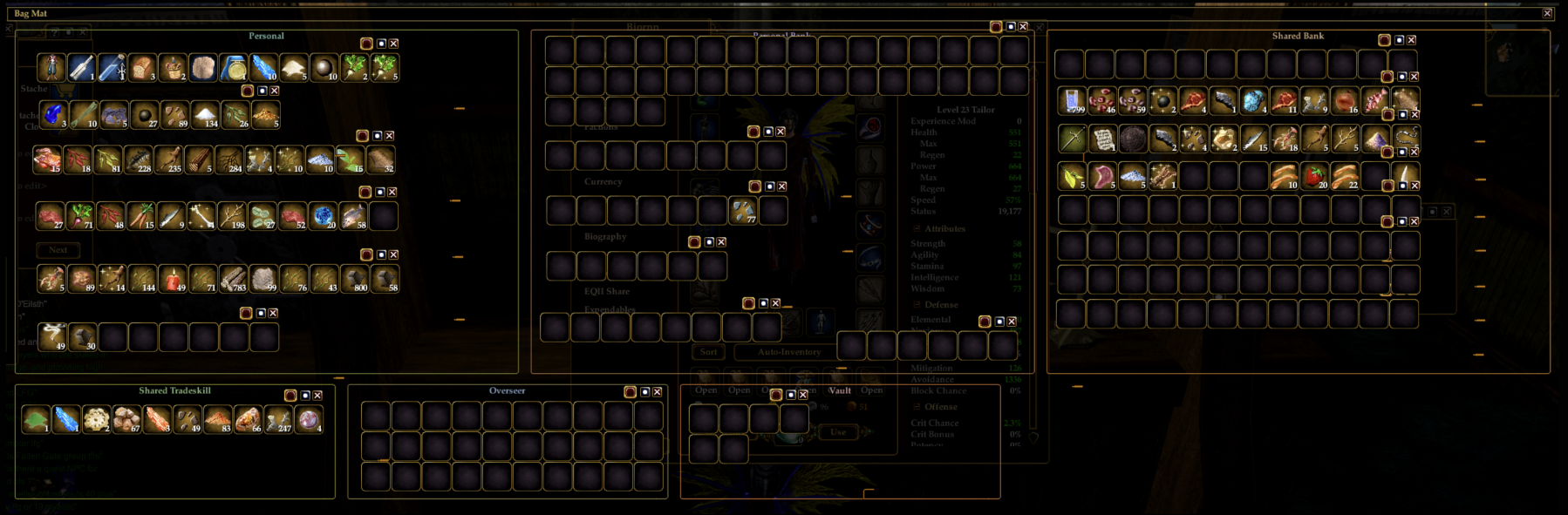
Bagmat - Gridless - Resize Nubs
|
| |
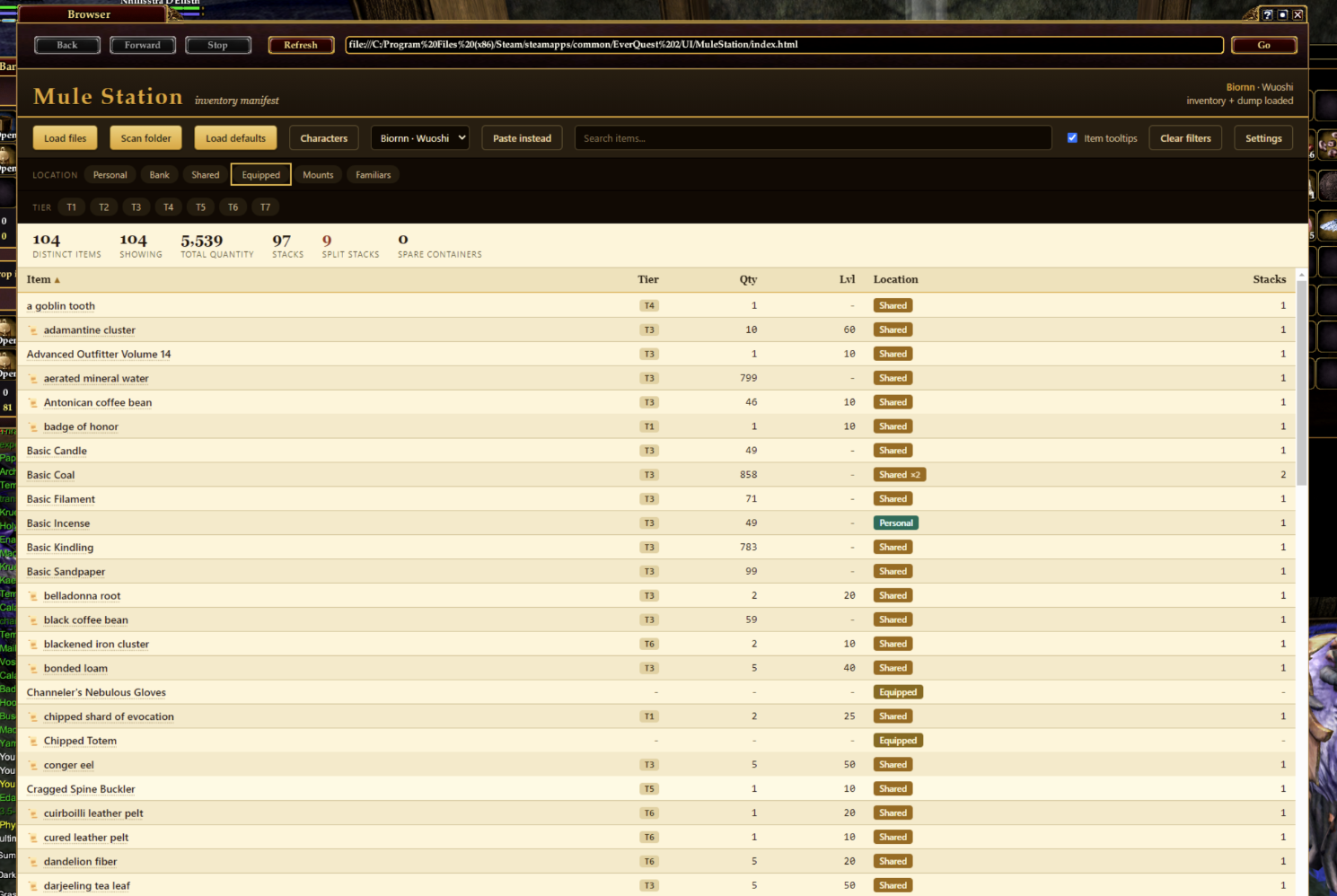
Inventory Manifest (in game)
|
| |
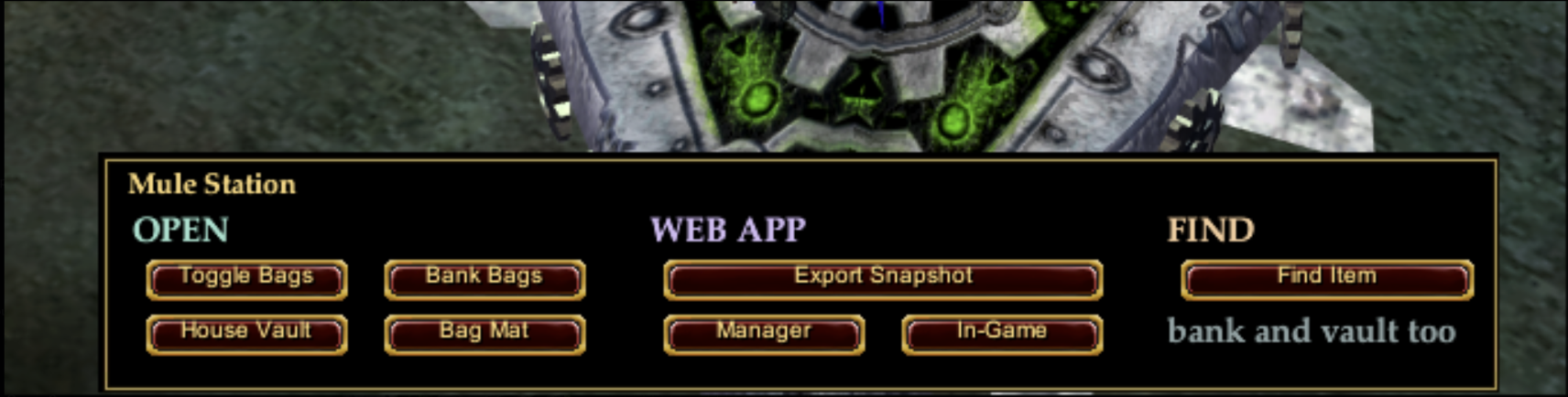
MuleStation in game dock
|
| |
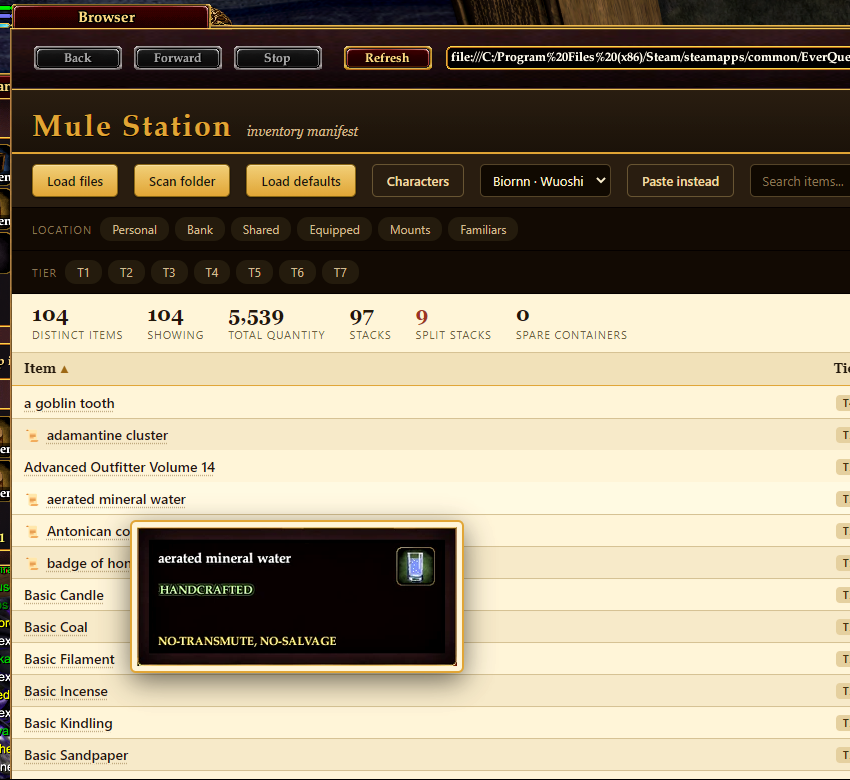
Manifest tooltips
|
| |
Hi all,
I've been a longtime lurker. First time contributer. This was a weekend project to scratch an itch to better organize my inventory. Due to limitations both with EULA & limitations of eq2 itself, it turned into a fun project.
I'm a systems architect, so most of my projects are backend tools I or my team uses. This is my first public project. I was heavy on the backend, but did lean on ai for the frontend. My design skills are lacking.
Anyways...
MuleStation gives your mules and bankers a tidy command center: a small custom panel of one-click inventory actions, a see-through "Bag Mat" you drag bags onto to stage them by location, two bag windows with a corner resize nub, and a separate offline web app that turns your in-game inventory exports into a sortable, searchable manifest (with tier, quantity, and where-it-lives location tags).
Everything is read-only and local. Nothing is automated in the live client and
nothing is uploaded anywhere.
--------------------------------------------------------------------------------
FEATURES
--------------------------------------------------------------------------------
- MuleStation panel: a compact window with three labelled zones.
OPEN Toggle Bags, Bank Bags, House Vault, and the Bag Mat.
WEB APP Export Snapshot (writes your data files) and two launchers that open the manifest web app in your system browser or the in-game browser.
FIND Find Item, which searches all of your inventory at once.
- Bag Mat: a transparent backdrop with colour-coded zones (Personal, Personal Bank, Shared Bank, Shared Tradeskill, Overseer, Vault). Drag bag windows onto a zone to stage them by where they belong. The boxes are click-through; grab the title bar to move, or the X to close.
- Skinned bag windows: the default Bag and Shared Tradeskill Bag get a corner resize nub so you can size them freely.
- Manifest web app (index.html): a sortable, filterable grid of your items showing tier, quantity, level, stack count, and per-layer location tags with split-stack counts. Filter by location or tier, search by name, switch between characters, and optionally hover an item name for its EQ2 wiki tooltip.
--------------------------------------------------------------------------------
REQUIREMENTS
--------------------------------------------------------------------------------
- EverQuest II (Live).
- Custom UI enabled (you are loading a custom skin folder).
- The panel layout was designed at 2560x1440. It still works at other resolutions,
but positions and sizes are tuned for 1440p; you may want to nudge windows.
--------------------------------------------------------------------------------
INSTALL
--------------------------------------------------------------------------------
1. Copy the whole "MuleStation" folder into your EverQuest II UI folder, so you end
up with:
<EverQuest II>\UI\MuleStation\
(It should contain the .xml files and index.html.)
2. In game, run: /loadui
Pick MuleStation from the list and load it.
[Screenshot: /loadui dialog listing MuleStation]
3. EDIT THE MANAGER PATH (one-time setup, required for the web-app launcher
buttons). Open UI\MuleStation\custom_mulestation.xml in a text editor and find
the two lines near the top that contain "index.html" (the CmdMgrExt and CmdMgrInt
handlers). Change the path so it points at THIS folder's index.html on your disk.
The file already lists the common install locations as comments right above those
lines; uncomment the one that matches your install, or write your own. Notes:
- EQ2's file:// links need an ABSOLUTE path, so this cannot be automatic.
- Spaces in the path must be written as %20.
- Keep the single quotes around the URL.
Save the file, then in game run /loadui and reload MuleStation.
4. Summon the panel: /show_window Custom.MuleStation
(You can bind that to a hotkey or a macro if you like.)
5. Dismiss the panel: /hide_window Custom.MuleStation
(Same Deal)
--------------------------------------------------------------------------------
HOW TO USE
--------------------------------------------------------------------------------
OPEN zone
Toggle Bags Opens or closes all of your personal bags.
Bank Bags Opens or closes all bank bags.
House Vault Opens the house vault.
Bag Mat Opens the colour-coded staging backdrop. Drag your bag windows onto the matching zones.
WEB APP zone
Export Snapshot Writes BOTH data files the manifest app reads: a location file
(<Server>_<Char>_Inventory.txt) in your EverQuest II folder, and an item dump (invdump.txt) under your logs folder. Run thisw henever you want to refresh the manifest.
Manager Opens index.html in your system browser (best rendering).
In-Game Opens index.html in the in-game browser.
FIND zone
Find Item Opens the game's item finder, which searches bags, bank, shared bank, and house vault.
Resize nub
The skinned Bag and Shared Tradeskill Bag windows have a small nub in the
bottom-right corner; drag it to resize the window.
--------------------------------------------------------------------------------
THE WEB APP (manifest)
--------------------------------------------------------------------------------
Open it with the Manager or In-Game buttons, or just double-click index.html.
- First run shows a short walkthrough.
- Load your data with "Load files" (pick the two exported .txt files), "Scan folder" (point it at your EverQuest II folder and it finds them), or "Paste instead".
- The grid shows each item once, merged across your bags, with tier, quantity, level, stack count, and location tags. A tag like "Shared x2" means two stacks in that layer; hover the location cell for the per-bag breakdown, and hover the Stacks cell for the individual stack sizes.
- Filter by Location or Tier with the chips, search by name, and switch characters with the dropdown.
- "Item tooltips" (off by default) lets you hover an item name to see its EQ2 wiki image. It is the only feature that reaches outside your machine.
- Settings let you set a stale-data threshold, a per-character dump filename pattern, and copy/paste your settings between the in-game and external browsers.
--------------------------------------------------------------------------------
KNOWN LIMITATIONS
--------------------------------------------------------------------------------
- One dump per server at a time. The standard Export writes a generic invdump.txt, so the app attributes it to whichever character you exported most recently. Export per character, or set a per-character dump pattern in Settings.
- The Manager path must be edited once to match your install (see INSTALL step 3); EQ2 file:// paths must be absolute and cannot be made relative.
- The in-game browser cannot auto-read local files, so "Load defaults" only works with a copy of index.html sitting in your EverQuest II folder opened in a normal browser. In-game, use Load files, Scan folder, or Paste.
- Layer attribution for duplicated bag names is best-effort.
--------------------------------------------------------------------------------
CREDITS
--------------------------------------------------------------------------------
MuleStation is original work, but a lot of people lit the path. Thank you to:
- Daybreak Game Company, for EverQuest II and its default UI, which these windows
are built on and which sanctions custom UI modding.
- jeffjl, whose bag-button mods (raid looter buttons, and Toggle Bag) showed the
OnShow "command emitter" trick and the single-quote technique that make the
one-click buttons and the web-app launchers possible.
- ger, for the original frameless, no-dead-space bag concept that inspired the
resize-nub bag windows and the Bag Mat (concept only).
- Deathbane27, Jaxel, and Sinbad, for the position-persistent "stay put" bag idea
that shaped how the Bag Mat stages windows by location.
- abbelyn, for the OnShow auto-action pattern that the command emitters follow.
- uberfuzzy, for the bag-window action-button precedent.
- The documentation that made the command research possible: the EQ2i wiki
(eq2.fandom.com), ZAM/Fanbyte, the EQ2Emu wiki, Kendricke's UI writeups, EQ2
Traders Corner (Niami Denmother), eq2wire.com, and the official everquest2.com.
If a name is missing or miscredited here, it is an oversight, not a slight; please
let me know and I will fix it. You guys rock.
|