|
| Category: UtilitiesProfitUI Quick-Raid Buttons configuration tool |
| Patch & Add-on List |
File Name |
Version |
Size |
Author |
Date |
Type |
|
1.4.1 |
550.99 Kb |
|
11-09-2013 09:24 PM |
Addon |
|
1.4.1 |
303.66 Kb |
|
11-09-2013 09:23 PM |
Addon |
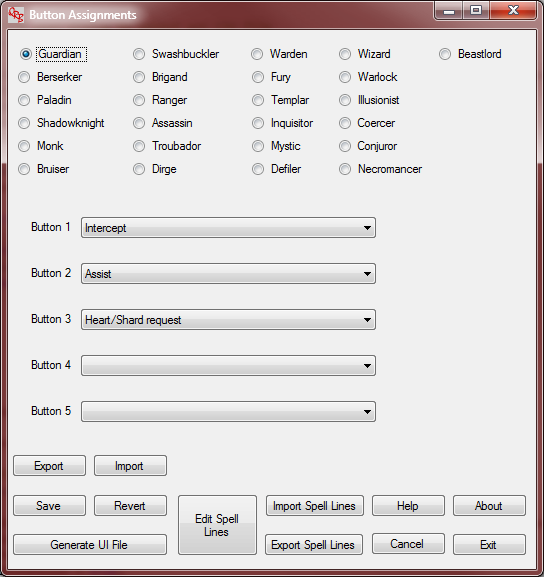
Button Assignments form
|
| |
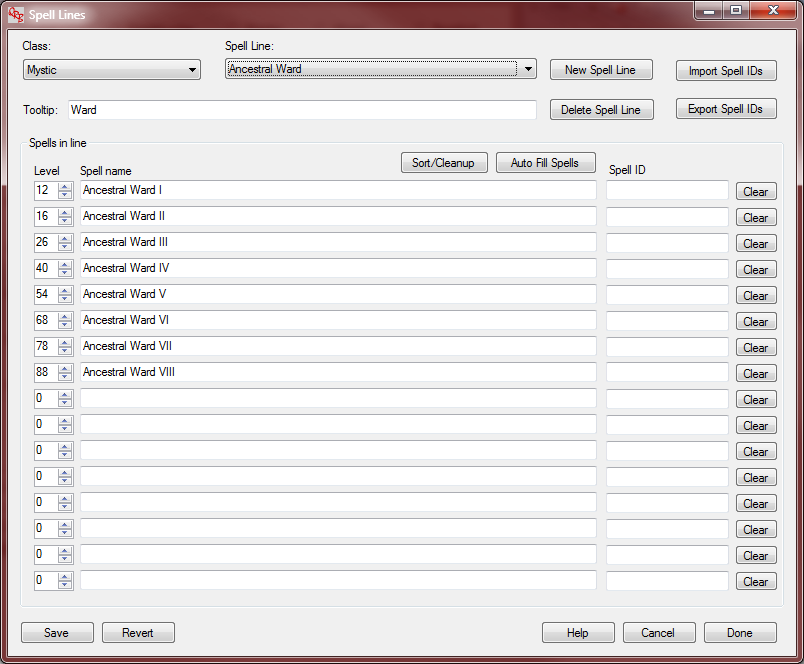
Spell Lines form
|
| |
Version 1.4.2: Fixed a crash bug and cleaned up a potential glitch in the installer.
Version 1.4: Added support for the new Channeler class introduced in Tears of Veeshan.
Version 1.3: Added the ability to open and save different storage files, so you can maintain multiple configurations easily. Cleaned up the UI using a menu bar instead of all those buttons. Cleaned up handling of spell IDs.
Version 1.2: Added the ability to associate spell IDs with spell names and use the numeric IDs in the ProfitUI XML file. Added the ability to import and export spell IDs/names, spell lines and button assignments to CSV (comma-separated value) files. Included pre-made XML and CSV files for the button assignments and spell lines Profit uses in it's default QRB configuration file.
Version 1.1: Made the Auto Fill Spells button work. It now fills in blank entries with ones that continue the level and suffix number sequence of the existing spells. If there's no non-level-0 spells filled in, it uses the spell line name as the base spell name and starts numbering from level 1, suffix 'I'. It's not perfect because of the weirdness of spell levels in T1 and some of T2, but it should save considerable typing. Also added Help buttons that go to the appropriate section of the help file for each form. The installer should upgrade a 1.0 installation, but if it gives you trouble you can uninstall 1.0 and do a clean install of 1.1 without losing any of your stored work.
Installation instructions: - Unzip the QRBInstaller.zip file
- Run the QRBInstaller.exe program inside it to install the utility
QRBInstaller.exe is a standard InstallShield installer, and will add the utility and it's help file to the Program menu under the QuickRaidButtons group. The help file describes how to use the tool. The basic idea's simple: you edit spell lines and use that form to create the lists of spells and commands in each line, one set of lines per class, and then for each class you assign a spell line to the 5 available quick-raid buttons and generate the _ProfitUI_QuickRaidButtons.txt file to drop into your UI/ProfitUI folder.
The utility stores all it's information in an XML file in your user AppData/QuickRaidButtons folder. It doesn't forget about spell lines just because they're not assigned to a button. You can put arbitrary macro commands in by using level 0 for them and putting the command text (including %T for the name of the target you're casting on and %I for the target's target) as the spell text. /cancel_spellcast would be a popular command, as would /gsay and /raidsay. The XML isn't too complex, and there's a sample (QRBStorage.xml) in the Examples folder until the program's installation directory (Programs (x86)/QuickRaidButtons).
The utility's written in C#/.Net, and you'll need the .Net 4.0 framework installed to use it. You'll need to get the framework separately from Microsoft, but that's not too hard and if you're running the EQ2Map updater you've already got what you need.
If something unexpected happens, the program dumps out exception information in AppData/QuickRaidButtons/Crash.log. That'll be useful information to send me to help debug problems.
The program's licensed under the GPL v3 or any later version. If you go to http://technical.silverglass.org/code/profitui-qrb-tool you can find the installer zipfile plus: - QuickRaidButtons.zip:a plain zipfile of the installation, you can unzip it into a folder and run it from there.
- QuickRaidButtons_src.zip: an archive of the Visual Studio 2010 solution with all the source files and the InstallShieldLE project to create the installer.
I'd recommend the installer so you can cleanly uninstall the program if you want. The other two on the Web site would mostly be of interest to developers wanting to see the code. Note: I'm not sure the InstallShieldLE project is entirely portable to another user's machine, it may hard-code paths on my machine in it's configuration. I'll upload the two zipfiles as add-ons so they're available directly from EQ2Interface.
If you need the .Net framework, you can find .Net 4 here:
http://www.microsoft.com/en-us/downl....aspx?id=17851
and if you need more links to other versions:
http://msdn.microsoft.com/en-us/vstudio/aa496123.aspx |
| Archive List (Old Versions) |
File Name |
Version |
Size |
Author |
Date |
|
1.4.1 |
1.24 MB |
tknarr |
11-09-2013 09:23 PM |
|
1.4 |
1.24 MB |
tknarr |
11-09-2013 08:42 PM |
|
1.3 |
1.14 MB |
tknarr |
03-03-2013 02:57 PM |
|
1.2 |
1.13 MB |
tknarr |
01-06-2013 04:00 AM |
|
1.1 |
1.09 MB |
tknarr |
09-12-2012 12:03 PM |
|
1.0 |
1.09 MB |
tknarr |
09-09-2012 01:52 PM |
| File Statistics |
| User Rating: |
|
| Downloads: |
45017 |
| Views: |
77098 |
| Favorites: |
0 |
| Uploaded By: |
|
| Last Modified: |
N/A |
|
|  |
|
 |
|
 01-13-2014, 02:31 PM
|
|
A Griffon
Server: Unrest
Forum posts: 849
File comments: 10
Uploads: 5
|
Re: Error When I click the install
Quote:
Originally posted by Sweetbomb
" Error 1728. There is a problem with this Windows Installer package. A DLL requried for this install to completed could not be run. Contact your support personnel or package vendor. Action ISSetALLUsers,entry:SetAllUsers,library:C:\User\...\MSIE02.tmp"
|
Do you have the .Net 4.0 framework installed? Links to it and other versions of the .Net framework are provided at the bottom of the page. |


|


|
|
01-13-2014, 01:13 PM
|
|
A Brown Bear
Server: Unkown
Forum posts: 8
File comments: 5
Uploads: 0
|
Error When I click the install
Howdy,
I downloaded the installer and tried to run the install. Below is the error the I received when I started the install..
" Error 1728. There is a problem with this Windows Installer package. A DLL requried for this install to completed could not be run. Contact your support personnel or package vendor. Action ISSetALLUsers,entry:SetAllUsers,library:C:\User\...\MSIE02.tmp"
My system is as follows:
Windows 8.1
16GB RAM
if you need anything else from me please let me know.
Thanks for any help.
|
|
|
|
|
12-02-2013, 07:22 PM
|
|
A Mist Grinnin
Server: Everfrost
Forum posts: 75
File comments: 24
Uploads: 0
|
Woot! Looks like it's all set up now. Seems to be running fine and I don't see anything in the Crash.log now either.
Thanks so much for the quick response! Now, it looks like I have some setting up to do!
|
|
|
|
|
12-02-2013, 05:48 PM
|
|
A Griffon
Server: Unrest
Forum posts: 849
File comments: 10
Uploads: 5
|
Quote:
Originally posted by Suziekew
Thanks for the quick response! Clicking the .exe file directly produces the same result but there was a Crash.log, as follows:
12/2/2013 11:01:33 AMSystem.NullReferenceException: Object reference not set to an instance of an object.
at QuickRaidButtons.Program.Main() in C:\Users\tknarr\Documents\Visual Studio 2010\Projects\EQ2QuickRaidButtons\QuickRaidButtons\Program.cs:line 64
|
OK, I can't upload here yet but over lunch I did a quick patch. See if installing the package in the zipfile at this link fixes the problem:
http://arachnae.silverglass.org/~tkn...BInstaller.zip |
|
|
|
|
12-02-2013, 02:41 PM
|
|
A Griffon
Server: Unrest
Forum posts: 849
File comments: 10
Uploads: 5
|
Quote:
Originally posted by Suziekew
Thanks for the quick response! Clicking the .exe file directly produces the same result but there was a Crash.log, as follows:
12/2/2013 11:01:33 AMSystem.NullReferenceException: Object reference not set to an instance of an object.
at QuickRaidButtons.Program.Main() in C:\Users\tknarr\Documents\Visual Studio 2010\Projects\EQ2QuickRaidButtons\QuickRaidButtons\Program.cs:line 64
|
Thanks. That tells me what's wrong, and I should be able to fix that and upload a 1.4.2 update with the correction tonight. |
|
|
|
|
12-02-2013, 02:04 PM
|
|
A Mist Grinnin
Server: Everfrost
Forum posts: 75
File comments: 24
Uploads: 0
|
Thanks for the quick response! Clicking the .exe file directly produces the same result but there was a Crash.log, as follows:
12/2/2013 11:01:33 AMSystem.NullReferenceException: Object reference not set to an instance of an object.
at QuickRaidButtons.Program.Main() in C:\Users\tknarr\Documents\Visual Studio 2010\Projects\EQ2QuickRaidButtons\QuickRaidButtons\Program.cs:line 64
|
|
|
|
|
12-02-2013, 12:42 PM
|
|
A Griffon
Server: Unrest
Forum posts: 849
File comments: 10
Uploads: 5
|
Quote:
Originally posted by Suziekew
I don't know what I've done wrong but I installed this on two computers and, when I click the shortcut, it behaves as if it's loading, then just stops and nothing happens. I do have eq2map updater and it works fine so the .net framework is in place. What else can I check to get it to work?
Thanks in advance for any help.
|
First thing is to go into your user folder's AppData folder (C:\users\ yourusername\AppData) and down into the Roaming\QuickRaidButtons folder. See if there's a .log file there with information in it about an exception or crash. If there is one, can you post it so I can see what it says? As a second check, go to C:\Program Files (x86)\QuickRaidButtons and run the QuickRaidButtons.exe file there directly. If that works, the shortcut might be messed up. |
|
|
|
|
12-02-2013, 12:25 PM
|
|
A Mist Grinnin
Server: Everfrost
Forum posts: 75
File comments: 24
Uploads: 0
|
I don't know what I've done wrong but I installed this on two computers and, when I click the shortcut, it behaves as if it's loading, then just stops and nothing happens. I do have eq2map updater and it works fine so the .net framework is in place. What else can I check to get it to work?
Thanks in advance for any help.
|
|
|
|
|
01-14-2013, 01:13 PM
|
|
A Griffon
Server: Unrest
Forum posts: 849
File comments: 10
Uploads: 5
|
Re: Re: Re: nice start, can it come preloaded with all classes spells?
Quote:
Originally posted by raenarys
As an alternative idea, is there a way to load in the exiting Profit UI defaults?
|
I put up 1.2 a bit ago, with the ability to import and export button assignments, spell lines and spell IDs. It's got a copy of QRBStorage.xml pre-loaded with the Profit default configuration, and importable CSV files with Darqwood's spell lines and the Profit defaults.
I'm working on a 1.3 version that moves less-used functions up to a menu bar instead of that clutter of buttons, and adds the ability to open different storage files so you can maintain more than one configuration at a time. |
|
|
|
|
11-12-2012, 11:11 AM
|
|
A Young Mystail Rat
Server: Antonia Bayle
Forum posts: 5
File comments: 11
Uploads: 0
|
Re: Re: nice start, can it come preloaded with all classes spells?
As an alternative idea, is there a way to load in the exiting Profit UI defaults?
|
|
|
|
|
10-30-2012, 05:47 PM
|
|
A Griffon
Server: Unrest
Forum posts: 849
File comments: 10
Uploads: 5
|
Re: nice start, can it come preloaded with all classes spells?
Quote:
Originally posted by raenarys
This looks like a nice tool. Would it be possible for it to come pre-loaded with all class spells in the "New Spell Line"?
Does this also mean I need to manually type I, II, III, IV, V, VI, etc?
|
It could, but to do that I'd first need to create all those spell lines. That's a lot of work, and since I'm not familiar with a lot of classes I've no idea which lines people would actually use and which are pointless for this purpose. If people want to contribute, I'd certainly be willing to add spell lines (trimmed down to just the spells, no slash commands because different people will likely want different ones). The relevant XML file would be in your user folder, AppData, QuickRaidButtons, the QRBStorage.xml file. Just make a note about which classes are set up and which shouldn't be looked at.
As for filling in the numbers, that's what the auto-fill button is for. Fill in the first spell (bare or with the "I") and hit the "Auto Fill Spells" button. You'll likely need to edit levels and delete some at the end, but that's faster than typing in spell names. After you're done and have your slash commands put in, hit the "Sort/Cleanup" button to organize everything. |
|
|
|
|
10-30-2012, 03:05 PM
|
|
A Young Mystail Rat
Server: Antonia Bayle
Forum posts: 5
File comments: 11
Uploads: 0
|
nice start, can it come preloaded with all classes spells?
Hi!
This looks like a nice tool. Would it be possible for it to come pre-loaded with all class spells in the "New Spell Line"?
When I launched the tool, I anticipated being able to select the spell line to insert in for the HotKey to be generated.
Does this also mean I need to manually type I, II, III, IV, V, VI, etc?
Thanks again for the tool!!
|
|
|
|
All times are GMT -5. The time now is 11:47 AM.
|
|