EQ2Interface.com
Search Downloads


Go Back   EQ2Interface > Featured Projects > eXtremeUI

Category: eXtremeUIeXtremeUI 2010
Interface Information
Download
Landiin's Portal Bug Reports Feature Requests
How do I install this? (FAQ)
Name: eXtremeUI 2010   Popular!
Author:
Date: 03-14-2010 02:03 PM
Size: 301.70 Kb
Version: 1.09
Rate Addon: 5 out of 5 with 4 votes  
Patch & Add-on List
File Name
Version
Size
Author
Date
Type
1.0
3.70 Kb
03-22-2010 06:47 PM
Addon
Pictures
Click to enlarge 

Views: 0
Size: 443.13 Kb
Dimensions: 1680 x 1000
1680x1050 (what the UI was designed for)
 
Click to enlarge 

Views: 0
Size: 22.55 Kb
Dimensions: 372 x 202
Quick Launch pop-out
 
Click to enlarge 

Views: 0
Size: 145.44 Kb
Dimensions: 1237 x 597
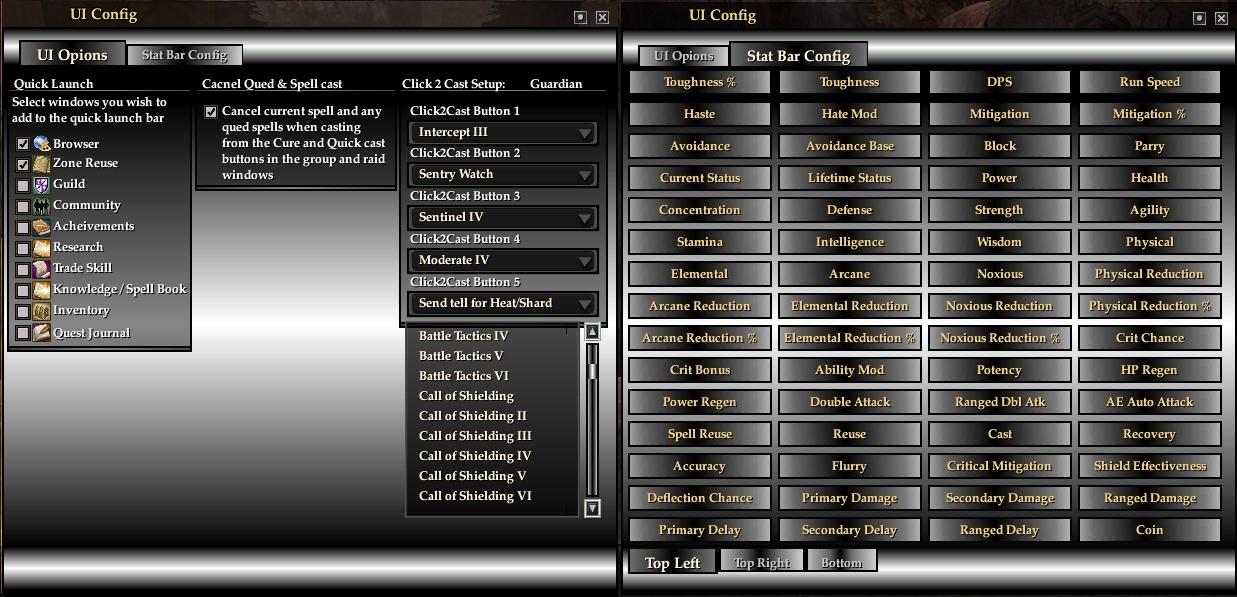
Settings Window, All settings are saved per char in game.
 
Description
eXtreme 2010

Being I have to update a UI myself now (thanks allot gm9) I might as well let you guys debug it and make me make it better.

Post Any issues or questions here.

Update notes can be viewed here.

Here is the run down.

Features:
  • Player Window: has the much loved Player -> Target -> Implied setup.

    Player:
    • Click to Cure for all 5 detrimentals.
    • Click to cast to reply: Allows you to cast a spell/ability onto the last person that sent you a tell. Settable in the in game UIConfig window.
    • Heath and Power bars with percents.

    Target:
    • Click to assist by clicking on the target's name
    • Power and Health bars with percents.
    • Target's hate meters.
    • Auto Attack timer bars for primary, secondary and ranged.
    • Melee or ranged attack icon indicator.

    Implied Target:
    • Click to target by clicking on the implied target's name.
    • Health and Power bars with percents.
    • Implied target hate meters.

    Group Window:
    • Click to Cure for all 5 detrimentals.
    • Click to Cast: Selected up to 5 spells/abilities to cast on a player vie the in game UIConfig window.
    • Is set up in a horizontal layout that fills from the center out.

    Raid Window:
    • Click to Cure for all 5 detrimentals for each member.
    • Click to Cast: Select up to 5 spells/abilities to cast on a player vie the in game UIConfig window.

  • Market Window can be put in a side by side faction for easy price compaire and what not.
  • Journal Window allows you to look up quest for active and completed quest. (eq2iki, allak and google)
  • Acitve Quest window has three look buttons. (eq2wiki, Allak and google)
  • Quick launch pop-out: where u can configure windows you frequently may use.
  • UI Configure Window allows you to:
    • Set Quick Launch windows
    • Set if you want to cancel any qued or casting spells when you press a c2cure or c2cast button.
    • Set spells to cast for all 5 click to cast buttons and the click to cast replay.
    • Saves all settings within the game per character basis. No need to edit files out side of the game.

To Install:
  • Find your correct EverQuest2 Directory.
  • Extreact file contents into you EverQuest2 Directory.
  • Don't fail

Spell/CA list that are up-to-date. If a class is not list, it means that it may not be updated for T9.
  • Guardian
  • Illy
  • Dirge

Oh yea, all spells and CA except for Guardian and Dirge (the classes I play) only go to 80. Also I have not got spells in for all fighters except guard and all scouts except dirge. In the zip you will find a folder names ClassSpellList, these are just pulled from eq2i. If you want to add or fix your classes plz use this format and post in the eXtremeUI from and they'll be added sooner.

International players, Your just frakked unless you provide spell ID for the spells/ca.

Thanks to gm9, Drums, zonks and many more for help and ideas.

Peace~
Archive List (Old Versions)
File Name
Version
Size
Author
Date
1.07
298.96 Kb
Landiin
03-11-2010 09:34 AM
1.06
438.70 Kb
Landiin
03-05-2010 07:06 PM
1.05
438.97 Kb
Landiin
02-27-2010 01:06 PM
1.04
438.96 Kb
Landiin
02-26-2010 01:36 AM
File Statistics
User Rating:
5 out of 5 with 4 votes
Downloads: 3257
Views: 19907
Favorites: 7
Uploaded By:
 
Last Modified: N/A

View Pictures. Download Now! Post A Comment
Remove Ads


Post A Reply
Author Comments Comment Options
Old 07-26-2010, 12:03 PM  
Yzyh
A Coastal Crab

Server: Antonia Bayle
Forum posts: 1
File comments: 1
Uploads: 0
How can I deinstale this UI ?

Last edited by Yzyh : 07-26-2010 at 12:07 PM.
Yzyh is offline Report comment to moderator   Reply With Quote Reply With Quote
Old 07-22-2010, 11:19 AM  
Landiin
Slayer of clock cycles
Featured Artist

Server: Oasis
Forum posts: 3287
File comments: 26
Uploads: 24
I never check feed back as stated in the post post bug/issue in the correct place. LTFR I guess is what I am saying:P

As far as not being able to use the premade uisettings file; I can't help you there, if you can't figure out how to move windows around then you are better off not even using extreme. I don't cater to retarded people sorry.

The UI should work fine. Nothing is broke on mine and no update should of broke it. If you have windows that are not working and you want to use this UI I suggest you post in the correct place.

Good day!

Last edited by Landiin : 07-22-2010 at 11:20 AM.
Landiin is offline Report comment to moderator   Reply With Quote Reply With Quote
Old 06-27-2010, 10:33 AM  
Conj
A Young Mystail Rat
 
Conj's Avatar

Server: Antonia Bayle
Forum posts: 4
File comments: 3
Uploads: 0
I too have recently downloaded this program. I'm getting the same error messages as stated below. If you click them off three times it works with the wiki or lootdb link. Another problem I'm having is I cant see what I'm typing in chat. I've tried windowed, full screen and every size option it gives. Whatever I type overwrites the bottom line of the chat window. Just need to add an additional line and have it left blank. Im not sure how you would do that but that's what's happening.
Conj is offline Report comment to moderator   Reply With Quote Reply With Quote
Old 06-20-2010, 09:14 PM  
kaialani
A Young Mystail Rat

Server: Antonia Bayle
Forum posts: 3
File comments: 5
Uploads: 0
Hey there, just thought id say i love the look of this mod. I use a strange resolution of 1360x768 and when i install this, its literally all over the place. Not sure how on earth I am supposed to fix anything. So I uninstalled it, came here checked the messages and it appears this interface is broken.
kaialani is offline Report comment to moderator   Reply With Quote Reply With Quote
Old 06-04-2010, 06:45 PM  
DjThaPimp
A Crazed Gnoll

Server: Antonia Bayle
Forum posts: 21
File comments: 15
Uploads: 0
Is it safe to assume that this UI is partially broken still? I really like the look from what I see, looks crisp and I like the color scheme, hopefully it gets fixed, would like to try it out.
DjThaPimp is offline Report comment to moderator   Reply With Quote Reply With Quote
Old 05-20-2010, 07:55 PM  
sacremon
A Brown Bear

Server: Blackburrow
Forum posts: 8
File comments: 8
Uploads: 0
Looks like the patch on 5/20 broke the XML used in this mod. It essentially refuses to function now.
sacremon is offline Report comment to moderator   Reply With Quote Reply With Quote
Old 05-08-2010, 06:59 PM  
Dificeman
A Young Mystail Rat

Server: Unkown
Forum posts: 2
File comments: 1
Uploads: 0
error message

Whenever I click to pull up info on a quest via zam or wiki now I get an error message.

The program can't start because MSVCP71.dll is missing from your computer. Try reinstalling the program to fix this problem.

I have reinstalled the Ui and still same message. Not sure if the Ui hasnt been updated or if something got screwed up somehow.
Dificeman is offline Report comment to moderator   Reply With Quote Reply With Quote
Old 05-01-2010, 11:31 AM  
Geckoz3
A Coastal Crab

Server: Antonia Bayle
Forum posts: 1
File comments: 1
Uploads: 0
Update please
Geckoz3 is offline Report comment to moderator   Reply With Quote Reply With Quote
Old 04-02-2010, 04:08 PM  
Dageth
A Coastal Crab

Server: Antonia Bayle
Forum posts: 0
File comments: 1
Uploads: 0
Can't move exp/top bar

The issue I am having is I cannot move the top stat/exp bar it is stuck about 3 inches form the top of the screen and nothing i do to make it movable works. Also it is not going the full length of my screen with the resi at 1680-1050. Any ideas as to what may be the issue?


I got it fixed, was an issue with eq2 not the UI.
The fix was simple, Options > UI > Game Windows > Reset Location for All Windows. This sent the top and bottom stat bars back to where they belonged and fixed the issue with not being able to move them.

Last edited by Dageth : 04-02-2010 at 05:22 PM.
Dageth is offline Report comment to moderator   Reply With Quote Reply With Quote
Old 04-02-2010, 02:21 PM  
vern
A Young Mystail Rat

Server: Antonia Bayle
Forum posts: 4
File comments: 1
Uploads: 0
Yeah i have this exact same issue... playing on Unrest US server
vern is offline Report comment to moderator   Reply With Quote Reply With Quote
Old 03-30-2010, 05:32 PM  
Landiin
Slayer of clock cycles
Featured Artist

Server: Oasis
Forum posts: 3287
File comments: 26
Uploads: 24
Quote:
Originally posted by Dechau
Zone to zone and when I load a new Char, have not notised about BG's yet, but I will look for it..

I'm used to it now, so I just hit the configuration everytime I've zoned and stats are back
I can't reproduce this at all. What language are you playing in?
Landiin is offline Report comment to moderator   Reply With Quote Reply With Quote
Old 03-28-2010, 11:42 PM  
Dechau
A Griffon
 
Dechau's Avatar

Server: Splitpaw
Forum posts: 120
File comments: 29
Uploads: 0
Quote:
Originally posted by Landiin
Zone from zone to zone, from and to Battle Grounds or form Char to Char? I can not reproduce this Zone to Zone.
Zone to zone and when I load a new Char, have not notised about BG's yet, but I will look for it..

I'm used to it now, so I just hit the configuration everytime I've zoned and stats are back
Dechau is offline Report comment to moderator   Reply With Quote Reply With Quote
Old 03-17-2010, 03:07 PM  
Landiin
Slayer of clock cycles
Featured Artist

Server: Oasis
Forum posts: 3287
File comments: 26
Uploads: 24
Quote:
Originally posted by Tyranious
The quick stat icon bar on the bottom left of the menu keeps disappearing after I use the UIconfig. I have to keep relogging the game to reset the bar to use the icons. What's the issue with that? Couldn't figure out why that has been happening. I did about 4 fresh installs too.

*EDIT*

Also is the click to cure working on the Self player target window? I'm clicking the detrimental cure icons but nothing is happening.
There shouldn't be anything on the bottom left but the start button.

C2C working fine for me.

Post a pic of your setup in the issues link above would be helpful and/or your uisettings file.

Last edited by Landiin : 03-17-2010 at 03:10 PM.
Landiin is offline Report comment to moderator   Reply With Quote Reply With Quote
Old 03-15-2010, 02:05 PM  
Tyranious
A Coastal Crab

Server: Antonia Bayle
Forum posts: 0
File comments: 1
Uploads: 0
The quick stat icon bar on the bottom left of the menu keeps disappearing after I use the UIconfig. I have to keep relogging the game to reset the bar to use the icons. What's the issue with that? Couldn't figure out why that has been happening. I did about 4 fresh installs too.

*EDIT*

Also is the click to cure working on the Self player target window? I'm clicking the detrimental cure icons but nothing is happening.

Last edited by Tyranious : 03-15-2010 at 02:06 PM.
Tyranious is offline Report comment to moderator   Reply With Quote Reply With Quote
Old 03-15-2010, 02:54 AM  
Landiin
Slayer of clock cycles
Featured Artist

Server: Oasis
Forum posts: 3287
File comments: 26
Uploads: 24
Quote:
Originally posted by Dechau
Yea that's what happening for me
Zone from zone to zone, from and to Battle Grounds or form Char to Char? I can not reproduce this Zone to Zone.
Landiin is offline Report comment to moderator   Reply With Quote Reply With Quote
Post A Reply

 
Category Jump:
Search this Category:
 

All times are GMT -5. The time now is 04:13 AM.


Our Network
EQInterface | EQ2Interface | War.MMOUI | WoWInterface | VGInterface | LoTROInterface | MMOInterface