|
| Category: Complete Sets[DrumsUI] Full Interface |
| Interface Information |
|
| Name: |
[DrumsUI] Full Interface  |
| Author: |
|
| Date: |
11-22-2015 04:26 PM |
| Size: |
9.98 MB |
| Version: |
v2.0.7 |
| Rate Addon: |
 |
| Patch & Add-on List |
File Name |
Version |
Size |
Author |
Date |
Type |
|
12.10.2025 |
405.54 Kb |
|
12-10-2025 04:12 PM |
Patch |
|
2020-04-14 |
8.78 MB |
|
04-14-2020 01:53 PM |
Patch |
|
1.0 |
5.12 Kb |
|
11-21-2013 07:17 AM |
Addon |
Overview Screen #1
|
| |
Overview Screen #2
|
| |
[DrumsUI] Full Interface
Game Update: ToT+
** Updater version **: here
Description:
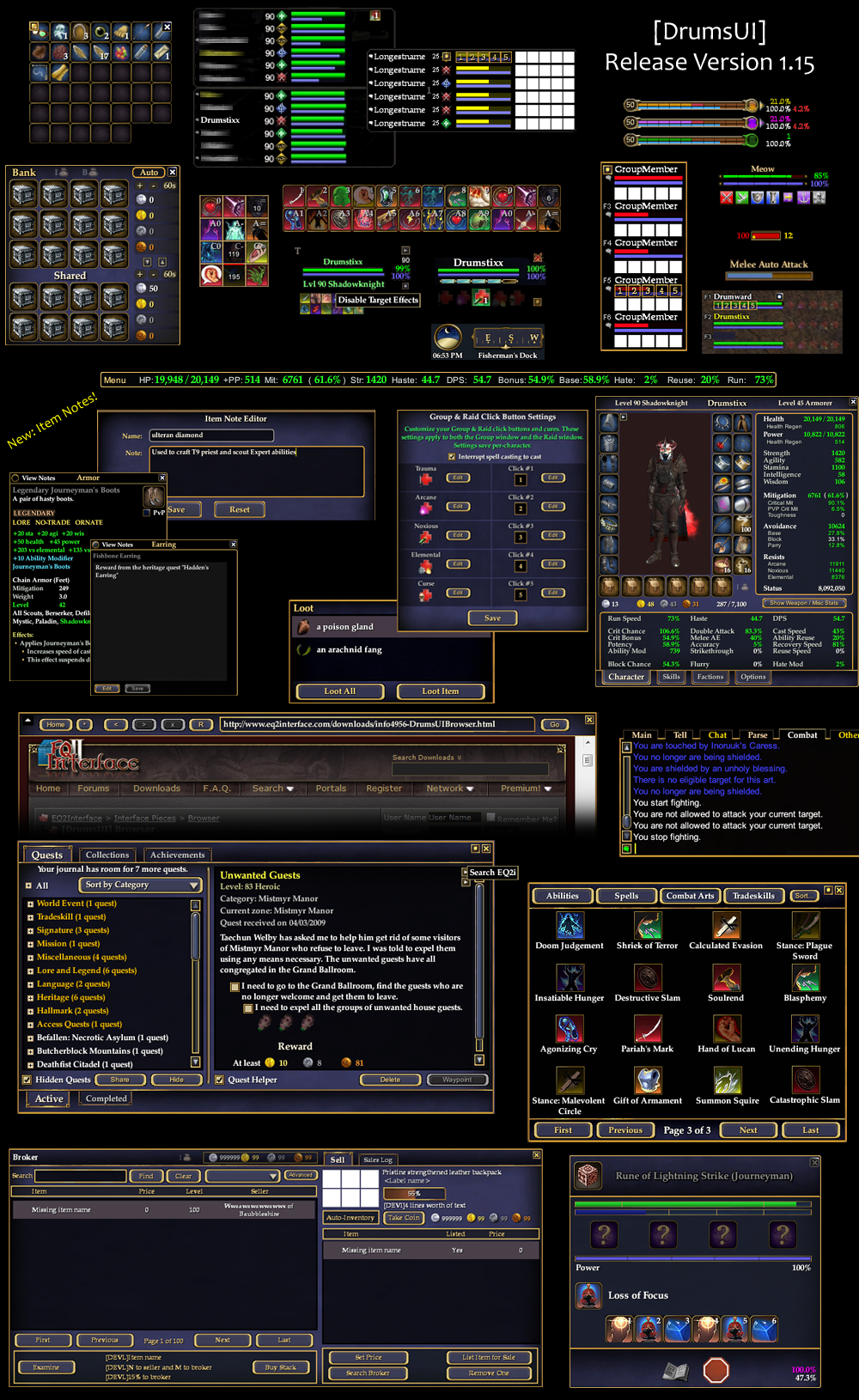
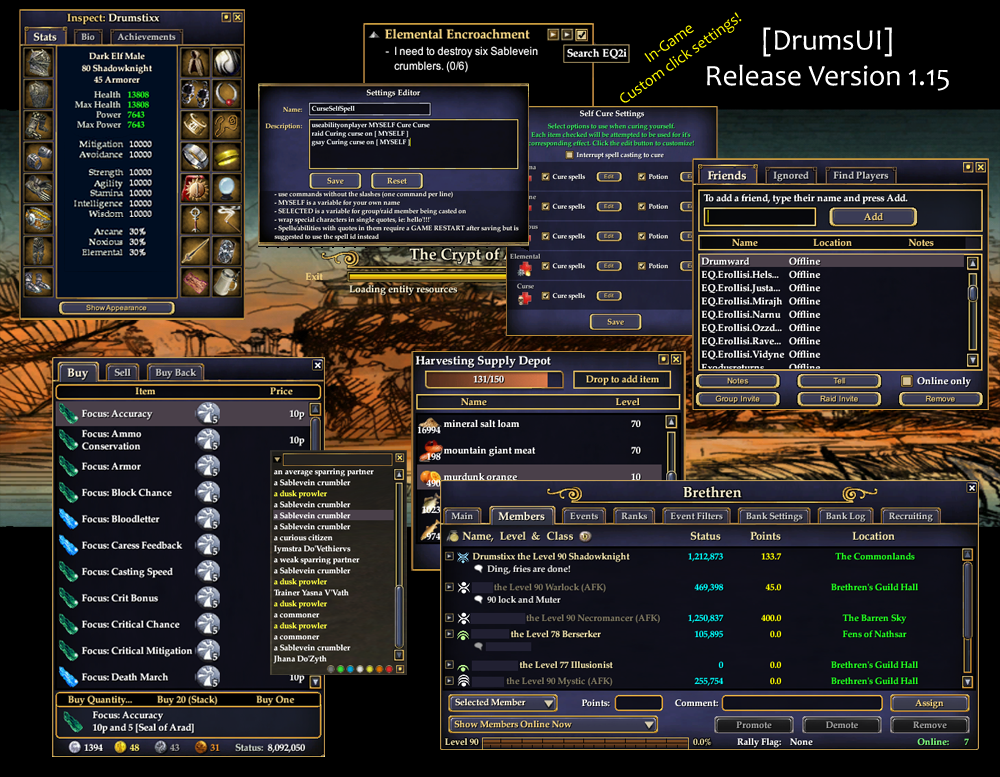
After several years of EQ2 UI modding, individual releases, and user requests, the DrumsUI is finally released as a full UI download. The DrumsUI's purpose is to add features to the standard interface windows while also saving screen space and eliminating unnecessary extras. This UI started out as personal modifications and has slowly evolved into user requested ideas as well as features combined with existing ideas.
The DrumsUI includes several settings (Self Cure window, Stat bar Window, Group/Raid Quick casts and cures) that are set up to be customizable from in-game and save both between sessions and different characters. When you first use the DrumsUI pieces, the default settings will be selected.
*Note: Included are some slightly edited map icons (originally created by gurkoz) and the skinnable map POI file.
View this topic on how to revert to default icons!:
http://www.eq2interface.com/forums/s...ad.php?p=92843
- Note: The InfoCenter is fully compatible with the DrumsUI. However, it is not included in this zip!
Installation Notes:
- How To: Install A Custom UI
- eq2.ini goes in your EverQuest 2 Installation folder.
- DrumsUI folder goes in your EverQuest 2/UI/ folder.
UNINSTALL YOUR OLD VERSION FIRST!
It's not likely to cause issues, but some files have changed and some have been removed!
But save these files to backup your Quick Button settings, Item Notes, and Spell Timers:
- /POI/drumsui_textsettings.xml
- /POI/drumsui_itemnotes.xml
- /POI/drumsui_spelltimer.xml
Extra Notes:
- See the "Alternatives" folder in the DrumsUI folder to access some window variations. (eg. Tiny Group, Group with pet bars, Right-sided maintained, bottom-aligned voice chat, etc.)
- Copy and rename any of the below to use a supplied layout:
* DrumsUI_1280x1024_layout.xml
* DrumsUI_1440x900_layout.xml
* DrumsUI_1680x1050_layout.xml
To: serverName_characterName_eq2_uisettings.xml (ie: Blackburrow_Drumstixx_eq2_uisettings.xml)
Remember that the supplied UIsettings file won't have all your chat settings configured, so be sure to re-configure your options!
Credits & Includes:
Update Log:
v2.07 - 2015.11.22
- Update [Colors]: Updated image files to the latest expansion updates for all DrumsUI Color variants.
- Update [Merchant]: Added new tab for expansion compatibility.
- Update [Experience]: Changed the PVP XP bar to the Tithe XP bar.
- Update [Examine]: Updated the Examine Item window to support the Prestige update for the expansion.
- Update [Persona]: Added the new Restore Items page to the window.
- Update [StatBar]: Increased width of the Resist stats.
v2.06 - 2015.03.15
- Update [Journal]: Added the Mission Timers tab. (thanks Dhalkar for contribution; modified layout a bit)
- Update [Persona]: Fixed tooltips not working. Removed PVP Doublecast. Added Disabled to AutoAttack dropdown options Added XP Mod text to Stats Area. (thanks Dhalkar for XP Mod addition and ideas)
- Fix [Player]: Increased HP and Mana text width for Full Range display. (thanks Dhalkar for contribution)
- Update [Persona]: Added "Sets" button and content for AoM release. Appearance sets temporarily inaccessible from the UI. Added togglebox for Spell Effects Filtering for the Effects window.
- Update [Guild]: Updated icons for AoM release.
- Update [Raid]: Adjusted level text to display up to level 100.
v2.05 - 2014.09.28
- Update [Merchant]: Added "Show Only Equipped" checkbox to the Reforge/Restore tab
- Fix [StatBar]: Fix for WDB stats loading
- Fix [Global]: Adjusted loading code for anything using the name "cmd" as it conflicted with new /cmd_apply_adorn game update
v2.04 - 2014.09.14
- Update [StatBar] Quick fix for SWB stat toggling/dynamic data mismatch.
v2.04 - 2014.09.14
- Update [Persona]: Added Weapon Damage Bonus and Spell Weapon Damage Bonus stats to window
- Update [StatBar]: Added Weapon Damage Bonus and Spell Weapon Damage Bonus options
- Update [Tradeskills]: Added the "Show hidden" checkbox for Recipes (GU change)
- Update [Examine]: Updated code for adornment update (GU change)
- Fix [TargetCasting]: Character switching init code updated
- Fix [STI]: Character switching init code updated
- Fix [CureFinder]: Character switching init code updated
v2.03 - 2014.02.23
- New [Guild]: New "Hide notes" checkbox added for Members page. Useful for hiding information while Live Streaming.
- New [CastingMacros]: A new Casting Macros page is available in the DrumsUI Main Menu. These options will allow you to trigger commands when a Casting bar is detected with a matching name (gsay, raidsay, etc).
- Update [MainMenu]: The DrumsUI Main Menu now includes settings for all the DrumsUI custom settings, and has recieved a face lift. A dropdown is used to navigate the multiple settings.
- Update [SpellTimer]: You can now save up to 30 spells per character to track. Options now edited within the DrumsUI Main Menu window. Settings button auto opens to related page.
- Update [Group]: Options now edited within the DrumsUI Main Menu window. Settings button auto opens to related page.
- Update [Raid]: Options now edited within the DrumsUI Main Menu window. Settings button auto opens to related page.
- Update [Player]: Options now edited within the DrumsUI Main Menu window. Settings button auto opens to related page.
- Update [Effects]: Options now edited within the DrumsUI Main Menu window. Settings button auto opens to related page.
- Update [CureFinder]: Options now edited within the DrumsUI Main Menu window.
- Update [Map]: DrumsUI custom icons are no longer included by default. See Alternative file zip.
- Update [Market]: Added Channeler to Class list. Lots of updates to items and presets (Thanks to mortis42)
- Update [Examine]: Item Notes are now edited directly in the window. This is part of the DrumsUI 2.0 update.
- Update [Persona]: New side-tab selection for selecting pages. No more slide-in menu. Merc tab updated to latest patch.
- Update [StatBar]: EQ2 button added for the EQ2 Menu. The "UI" button now opens the DrumsUI Main Menu. Options now edited within the DrumsUI Main Menu window.
- Update [TargetCasting]: Window now more reliably opens/stays closed between Characters with different options.
- Update [SelfTargetImplied]: Window now more reliably opens/stays closed between Characters with different options.
v1.46b - 2013.11.12
- Fix [Persona]: Fixed unclickable subpages.
v1.46 - 2013.11.12
- This is partial update (to get main features working). Gfx fixes and other misc updates coming in the next update.
- Update [Persona] Window now features a fly-in menu to access previously accessed tabs. Now uses a list similar to default UI which will only show beastlord/channeler options when on those classes.
v1.45 - 2013.10.09
- Update [Browser] Updated Browser favorites, submitted by user "konan" of EQ2Interface (thank you!).
- Update [Colors]: - Update [Colors]: Updated some missing elements related to the UI.
- Update [Broker]: Added "Broker Credits" text to the bottom of the Buy page for non-Gold members. Updated Market_Favorites1 submitted by user "konan" of EQ2Interface (Thank you!).
- Update [Persona]: Removed Bag Sort button by popular demand (use /sort_bags otherwise). Added 2 missing Tradeskill stats.
- Update [StatBar]: Expanded several stat text widths to accomodate new stat growth.
- Fix [Group]: Pet HP bar and "P" target text will now only show if you have a pet summoned.
v1.44 - 2013.05.06
- Update [Container]: Harvest container has new Hide checkbox (GU67).
- Update [Journal]: Journal window updated with new Daily Mission tab. Active Quest window also updated. Click the icon next to the Daily Objective to hide/show the quest details.
- Update [Colors]: Color DDS files updated to support GU67 graphic file changes.
v1.43 - 2013.05.06
- Update [Examine]: Removed Xanadu search button, added u.eq2wire button, and re-organized the button order.
- Update [Inspect]: Changed u.eq2wire tab into a buttton that pops up the in-game browser window.
- Fix [Journal]: Collection tab functionality return to working order.
- Fix [Persona]: Fixed the Weapon/Spell weapon buttons from moving. Fixed Housing tab template row size.
v1.42 - 2013.04.30
- Update [Colors]: UI color alternatives now included this version.
- Update [Journal]: New Daily Objectives tab (GU66). Toggle quest helper checkbox is now clickable.
- Update [Pet]: Pet AutoAssist button added (GU66).
v1.41 - 2013.04.12
- Update [Container]: Increased icon/row size to support higher stack size text.
- Update [Persona]: Search button is back. Re-sized buttons a bit to fit everything.
v1.40 - 2013.02.26
- Updates for Feb 26th patch. Will update notes later on.
v1.39e - 2013.01.16
- Update [Container]: Updated Container window for Jan 15th patch (permission tab).
v1.39d - 2012.12.18
- Update [Container]: Updated Container window for Dec 18th patch (deposit all, search, dropdown selection).
v1.39c - 2012.12.13
- Update [Examine]: Updated tooltips for Dec 13th patch.
v1.39b - 2012.12.03
- Fix [Tradeskill]: Window sizing fix.
v1.39 - 2012.12.03
- Update [Colors]: DrumsUI color schemes restored to working order (all updated for CoE).
- Update [Tradeskill]: Tradeskill window updated for CoE.
- Update [Examine]: Added xp bar for green adornments (CoE Update).
- Update [SpellTimer]: Spell Timer now includes Stacks dynamic data for new abilities (CoE).
- Update [Persona]: Increased width of HP and Power ranges text.
v1.38 - 2012.11.13
- Update [Colors]: Temporarily defaulted all color options to Black with Gold borders. CoE updates and extreme time constraints are the main cause. Will have Colors updated soon and things back to normal.
- Update [HarvestDepot]: Added Quanity sort button (CoE update).
- Update [Knowledge]: Updated research "speedup" button to match expansion updates (CoE update).
- Update [Maintained]: Added "Stacks" text to maintained icons (Coe update).
- Update [Merchant]: Added icon for ProSabien SC for item list (CoE Update).
- Update [Persona]: Added "Krono" section to the Currency tab. Added new tradeskill stats to Tradeskill table (Coe updates). Added new dropdown menu to Mercenary page (CoE updates).
- Update [Target/Implied]: Target distance text added (CoE update). Option is toggled from default Options window (Name and Chat Bubble category). Move effect toggle icon from right to left in windows.
- Update [Tradeskill]: Temporarily reverted Tradeskill window to completely default (CoE updates). Will update DrumsUI version when I have more time.
v1.37 - 2012.09.23
- Update [AutoAttack]: There are now icons indicating if you have your Melee auto or Ranged Auto turned on/off.
- Update [Merchant]: Search bar and filter checkboxes added (SOE addition).
- Update [Examine]: Examine windows should no longer popup off-screen. They will be centered horizontall or vertically if the game attempts to open them partially or entirely off-screen.
- Update [InspectPlayer]: New EQ2u tab that will attempt to show the player's EQ2u profile. Inpsect window gear layout now mimics the Inventory/Character window.
For the rest of the patch notes, view this topic.
|
| Archive List (Old Versions) |
File Name |
Version |
Size |
Author |
Date |
|
v2.0.6 |
5.90 MB |
Drumstix42 |
03-15-2015 09:55 PM |
|
v2.0.5 |
5.77 MB |
Drumstix42 |
09-27-2014 11:32 PM |
| File Statistics |
| User Rating: |
|
| Downloads: |
129178 |
| Views: |
908843 |
| Favorites: |
111 |
| Uploaded By: |
|
| Last Modified: |
N/A |
|
|  |
|
 |
|
 07-19-2024, 03:10 PM
|
|
A Berserk Golem
Server: Antonia Bayle
Forum posts: 57
File comments: 17
Uploads: 0
|
I know this is a longshot but this UI is still working for the most part on Origins, just had to delete the quest journal UI and everything else more or less works.
However, there's one minor but annoying issue: in the click to cast section, it never saves the changes i make. I put in the spells I want but the next time I log in they're back to some other spells for some reason. Anyone know where I can find these settings so that maybe I can change them for good?
|


|


|
|
05-21-2016, 09:15 AM
|
|
A Crazed Gnoll
Server: Splitpaw
Forum posts: 24
File comments: 3
Uploads: 0
|
Resolve + Fervor problem
Since there is no more support we can not see Fervor and Resolve on our main window if you are using DrumsUI. One way to overcome this problem is to just delete "eq2ui_mainhud_persona.xml" file under your DrumsUI folder. But this brings you the default interface's character window which I hate. (but you can still use other components of DrumsUI.
So,I have altered the xml file and added those 2 stats in it. Since I can not upload my file to those forums I wanted to tell you my solution. - Find the "eq2ui_mainhud_persona.xml" file in your DrumsUI folder
- Right click on it and choose to "open with" notepad. (Take a backup in case you fail)
- Search (Ctrl+F) for a stat like accuracy, potency, etc. When you find it, you will see that this line begins with "<text" and ends with "text>"
- After one of those "text>" press enter a few times and open some empty space. Remember do not open a line before that "text>"
- Copy and paste the script below in that empty space
<Text AbsorbsInput="false" DynamicData="/GameData.Stats.Resolve" DynamicDataFilter="0004" Font="/TextStyles.Normal.NormalStyle" Location="18,107" Name="Label_Resolve" PackSize="x,x" ScrollExtent="92,16" Size="92,16" TextColor="#C7CFC7">:a8d7734c95cc9e2a:Resolve</Text>
<Text DynamicData="/GameData.Stats.Resolve" Font="/TextStyles.Normal.NormalStyle" Location="103,107" Name="Value_Resolve" PackLocation="x,x" PackSize="x,x" ScrollExtent="46,16" Size="46,16" TextAlignment="Right">:a8d7734c884382ba_13:10000</Text>
<Text AbsorbsInput="false" DynamicData="/GameData.Stats.Fervor" DynamicDataFilter="0004" Font="/TextStyles.Normal.NormalStyle" Location="318,67" Name="Label_Fervor" PackSize="x,x" ScrollExtent="92,16" Size="92,16" TextColor="#C7CFC7">:a8d7734c95cc9e2a:Fervor</Text>
<Text DynamicData="/GameData.Stats.Fervor" Font="/TextStyles.Normal.NormalStyle" Location="403,67" Name="Value_Fervor" PackLocation="x,x" PackSize="x,x" ScrollExtent="46,16" Size="46,16" TextAlignment="Right">:a8d7734c884382ba_13:10000</Text>
I Hope this helps to someone 
Last edited by ozbatov : 05-30-2016 at 01:59 PM.
|
|
|
|
|
03-18-2016, 05:54 PM
|
|
A Young Mystail Rat
Server: Unkown
Forum posts: 2
File comments: 1
Uploads: 0
|
Re: Re: Unrecoverable Font size change noticed?
Quote:
Originally posted by Drumstix42
You could try opening the eq2ui_journals_quest.xml and search for all & delete all instaces of the following:
Code:
ShrinkFontToFit="true"
|
This worked well! Tyvm!
I've also noticed that in the ToT instance Palace Event Heroic, that my raid/group settings clear. When I close EQ2 and restart they show up again. Not sure why Palace does this when other instances do not.
Anyone else see this, or have an idea what might be causing it? |
|
|
|
|
03-10-2016, 07:26 PM
|
|
A Griffon
Server: Antonia Bayle
Forum posts: 3287
File comments: 591
Uploads: 44
|
Re: Unrecoverable Font size change noticed?
Quote:
Originally posted by Hiza
Hello all,
Another user had pointed this out to me, and I have seeing it on my system as well and thought we would post a note here to see if anyone had any insight.
We notice that as the UI loads normally everything is fine, no differences noted anywhere. But if you open your Journal, then Mission Timers tab you will notice the list is fine as is. Once you scroll down the font shrinks by about 50% and stays that way. Then as you look thru your Options, CA's, Spells, anything with font other that chat, the size is all the same. Using the Small Font check box does not change, San Serif check box also only changes chat fonts. Only fix so far is to loadui the default UI, and then loadui back to drums to get it to clear.
Thanks!
|
You could try opening the eq2ui_journals_quest.xml and search for all & delete all instaces of the following:
Code:
ShrinkFontToFit="true"
|
|
|
|
|
01-30-2016, 02:27 PM
|
|
A Young Mystail Rat
Server: Butcherblock
Forum posts: 5
File comments: 17
Uploads: 0
|
Unrecoverable Font size change noticed?
Hello all,
Another user had pointed this out to me, and I have seeing it on my system as well and thought we would post a note here to see if anyone had any insight.
We notice that as the UI loads normally everything is fine, no differences noted anywhere. But if you open your Journal, then Mission Timers tab you will notice the list is fine as is. Once you scroll down the font shrinks by about 50% and stays that way. Then as you look thru your Options, CA's, Spells, anything with font other that chat, the size is all the same. Using the Small Font check box does not change, San Serif check box also only changes chat fonts. Only fix so far is to loadui the default UI, and then loadui back to drums to get it to clear.
Thanks!
|
|
|
|
|
08-13-2015, 05:43 AM
|
|
A Young Mystail Rat
Server: Antonia Bayle
Forum posts: 2
File comments: 8
Uploads: 0
|
Hello.
I'm having a problem with this UI where my map and minimap show no POIs. They show only quest icons.
|
|
|
|
|
06-12-2015, 09:48 PM
|
|
A Young Mystail Rat
Server: Najena
Forum posts: 4
File comments: 1
Uploads: 0
|
Anyone have a DrumsUI layout file for 1920x1080?
Just getting back to the game after a couple of years and wondering if anyone has a 1920x1080 .xml layout file?  |
|
|
|
|
05-06-2015, 03:55 AM
|
|
A Brown Bear
Server: Crushbone
Forum posts: 14
File comments: 3
Uploads: 0
|
Re: Re: AA Window & Respecs
Quote:
Originally posted by Drumstix42
Hey there.
DrumsUI does not have a custom AA window. It is in fact is just the default AA window, and uses no custom files.
|
Yeah I figured it out, for some reason there was an eq2ui_mainhud_achievements.xml file in my DrumsUI folder. I've deleted it and the problem is resolved.
Not sure why it was there though. |
|
|
|
|
05-04-2015, 07:31 PM
|
|
A Griffon
Server: Antonia Bayle
Forum posts: 3287
File comments: 591
Uploads: 44
|
Re: AA Window & Respecs
Quote:
Originally posted by flameweaver
Tuesday's changes to the AA system allowing individual points to pulled out of the tree have broken the Drums AA window. Can't pull a single point out of a tree and can't even roll back to specific point in a build - as per pre patch. Putting the AAs into build mode and clicking on an AA point to rollback to, does nothing other than to just click the point. It's as if there is no longer an action associated with the click. Reverting to default UI shows that a new window should pop up with a choice to remove or rollback to that point.
As a quick fix I guess I could remove the Drums AA window, but not sure which one I should remove. Can anyone specify which until this gets fixed.
Cheers.
Also Bugged this as #465
|
Hey there.
DrumsUI does not have a custom AA window. It is in fact is just the default AA window, and uses no custom files. |
|
|
|
|
05-03-2015, 02:55 AM
|
|
A Brown Bear
Server: Crushbone
Forum posts: 14
File comments: 3
Uploads: 0
|
 AA Window & Respecs
Tuesday's changes to the AA system allowing individual points to pulled out of the tree have broken the Drums AA window. Can't pull a single point out of a tree and can't even roll back to specific point in a build - as per pre patch. Putting the AAs into build mode and clicking on an AA point to rollback to, does nothing other than to just click the point. It's as if there is no longer an action associated with the click. Reverting to default UI shows that a new window should pop up with a choice to remove or rollback to that point.
As a quick fix I guess I could remove the Drums AA window, but not sure which one I should remove. Can anyone specify which until this gets fixed.
Cheers.
Also Bugged this as #465
|
|
|
|
|
04-05-2015, 11:31 PM
|
|
A Griffon
Server: Antonia Bayle
Forum posts: 3287
File comments: 591
Uploads: 44
|
Quote:
Originally posted by orfic
Love the interface, having a problem. I made a mystic and set up the 5 spells in the group window for click casting on group members. They work perfectly for me, but whenever I click on any of the same buttons on my mercenary, in the F2 slot, nothing happens. I tried select him first and clicking them, nothing. I hid myself from the list so the merc would be in the first position but still nothing.
What am I supposed to do to get the 5 quick cast spells to work for the group members other than myself? Thanks!
The command in the editor is like this:
useabilityonplayer SELECTED "Bounty of the Virtuous"
With different spell names of course. Work on me, not on my merc.
Edit: Just noticed I was getting the message: "Denva could not be found in your group or raid." But he is, since I am clicking on the group buttons.
|
I believe it's an issue with Merc's that have a space in their name. |
|
|
|
|
04-05-2015, 04:25 PM
|
|
A Coastal Crab
Server: Antonia Bayle
Forum posts: 1
File comments: 11
Uploads: 0
|
Love the interface, having a problem. I made a mystic and set up the 5 spells in the group window for click casting on group members. They work perfectly for me, but whenever I click on any of the same buttons on my mercenary, in the F2 slot, nothing happens. I tried select him first and clicking them, nothing. I hid myself from the list so the merc would be in the first position but still nothing.
What am I supposed to do to get the 5 quick cast spells to work for the group members other than myself? Thanks!
The command in the editor is like this:
useabilityonplayer SELECTED "Bounty of the Virtuous"
With different spell names of course. Work on me, not on my merc.
Edit: Just noticed I was getting the message: "Denva could not be found in your group or raid." But he is, since I am clicking on the group buttons.
Last edited by orfic : 04-05-2015 at 04:29 PM.
|
|
|
|
|
03-16-2015, 06:37 AM
|
|
A Brown Bear
Server: Permafrost
Forum posts: 8
File comments: 28
Uploads: 0
|
Stat Bar Settings not loading
Omg lol ... Thanks for that link Drums. Guess what, both were spec'd to experimentation. Knew I hated experimentation hah. That'll teach me to try it again. Was kinda freaking out when a third character started not saving settings recently ....guess what, just set her to experimentation. Thanks so much, was really driving me nuts ...love your stat bar, want it working proper )
-Fadani
/cheers Drums
|
|
|
|
|
03-16-2015, 12:57 AM
|
|
A Griffon
Server: Antonia Bayle
Forum posts: 3287
File comments: 591
Uploads: 44
|
Re: Stat Bar Settings not loading
Quote:
Originally posted by Fadani
Heya Drums,
I'm still having that problem with the latest version of the stat bar. Thinking of just using the old. Could you tell me what the file names are for the Stat Bar window?
Thanks, Fadani
|
Check out the last 3 posts on this thread:
http://www.eq2interface.com/forums/s...ad.php?t=17944
Reply to that thread to see if that helps you or doesn't. |
|
|
|
|
03-16-2015, 12:37 AM
|
|
A Brown Bear
Server: Permafrost
Forum posts: 8
File comments: 28
Uploads: 0
|
Stat Bar Settings not loading
Heya Drums,
I'm still having that problem with the latest version of the stat bar. Thinking of just using the old. Could you tell me what the file names are for the Stat Bar window?
Thanks, Fadani
|
|
|
|
All times are GMT -5. The time now is 02:09 PM.
|
|