|
| Category: MiscellaneousBuff Immunity Timers/Notification(JCap/Gravitas) |
|
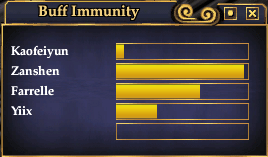
Bar Timer Display
|
| |
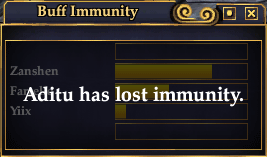
Bar Timer Display with expiration
|
| |
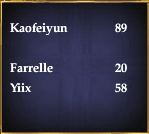
Text Only Display
|
| |
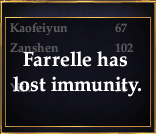
Text Only Display with expiration
|
| |
Buff Immunity Timers/Notification v2.10 by Aditu of Permafrost (ACT Author) aditu@maine.rr.com
Changes:
The display can now be configured to be progress bars or text only count downs. You can attach macro commands to starting timers for things such as tells or chat notifications. Fixed a bug where non-active timers would get offset by new timers so they would sometimes cause blank alerts. Fixed a bug where sometimes the UI would ignore a needed UI event(by spamming it now *shrug*), causing the timer to freeze at the beginning.
Buff Immunity Timers/Notification v2.01 by Aditu of Permafrost (ACT Author) aditu@maine.rr.com
Changes:
Fixed two bugs that would cause the timers to pause when casting a non-detected spell or cause detection to fail if over 15 minutes had passed between casts.
Buff Immunity Timers/Notification v2.0 by Aditu of Permafrost (ACT Author) aditu@maine.rr.com
Changes:
This mod has been almost entirely redesigned to avoid methods that would lead to client crashes.
Buff Immunity Timers/Notification v1.1 by Aditu of Permafrost (ACT Author) aditu@maine.rr.com
Changes:
Forced timer bars to resize as a multiple of the immunity duration to ensure accurate timing. Added a button to quick resize to 2x a 120s timer.
Buff Immunity Timers/Notification v1.0 by Aditu of Permafrost (ACT Author) aditu@maine.rr.com
Synopsis:
The purpose of this UI mod is to create timers for buff immunities that are applied for things like Jester's Cap or Gravitas. The immunity icon is only easily visible to the recipient of the original buff and not the caster.
The UI will display five timers displayed as a character name and a progress bar of the time elapsed. Once the immunity time elapses the progress bar will have reached full where the timer will be reset for future use and an overlay will appear for four seconds saying a specific character has lost their immunity.
The timer window is not required to be visible at all times to make use of it. If kept hidden, it will still track the immunity timers and automatically show itself for the duration of the overlay alert then hide itself once again. In either case an audio alert will sound during this time as well, identical to the sound when attuning an inventory item.
Installation:
This is a "Custom" UI mod in which it does not replace any other UI piece. It is standalone in which it is not dependent on having any other UI piece installed already.
That said, you *are* required to be using a non-default UI in order to view this UI piece. If you are using Default as your current UI, you will need to create a new UI folder for this mod as you cannot simply copy it into the Default folder and have it function. If you fall into this category, please follow this guide to set up a non-Default UI folder. http://www.eq2interface.com/forums/f...q_new_faq_item
As this is a "Custom" namespace UI mod, you will either need to have a "eq2ui_custom.xml" file to add this file's reference to, or use a new one. If you do not already have this file, one is included in the download archive. If you do already have it, do not overwrite it, open it in a text editor and after the first Page tag(probably line 3) add the following:
Code:
<Include>eq2ui_custom_buffimmunity.xml</Include>
The default settings for the mod is to monitor "Jester's Cap" and set the immunity timer for 120 seconds. If you are a Dirge with Gravitas, you will have to edit the UI mod file and on line six replace "Jester's Cap" with "Gravitas". Gravitas immunity is affected by song duration mods, so you may have to account for that.
You can change how the mod displays the time remaining by changing TextOnlyTimers to/from true/false. If MacroCommands's IsActive property is set to true, it will execute the commands on the following lines when a new timer starts. If the commands contain ' TargetPlayer', it will be replaced by the name of the player the timer belongs to. (Useful for tells or tracking chat channels)
Usage:
Once the UI mod is installed, by default it is not visible. To show the mod window, type or put into an EQ2 macro: (CASE SENSITIVE)
Code:
/show_window Custom.BuffImmunity
|
| Archive List (Old Versions) |
File Name |
Version |
Size |
Author |
Date |
|
2.01 |
5.33 Kb |
EQAditu |
10-05-2009 03:17 PM |
|
2.0 |
5.30 Kb |
EQAditu |
10-02-2009 10:27 AM |
|
1.1 |
5.20 Kb |
EQAditu |
12-06-2008 05:11 AM |
|
1.0 |
5.17 Kb |
EQAditu |
12-03-2008 10:51 AM |
| File Statistics |
| User Rating: |
|
| Downloads: |
944 |
| Views: |
9435 |
| Favorites: |
15 |
| Uploaded By: |
|
| Last Modified: |
11-01-2009 06:03 PM by EQAditu |
|
|  |
|
 |
|
11-10-2009, 04:43 AM
|
|
A Griffon
Server: Nagafen
Forum posts: 899
File comments: 244
Uploads: 20
|
Re: Re: autoshow?
Quote:
Originally posted by EQAditu
I would have to overwrite one of the Default UI windows to do that. Custom UI mods have no idea when the game loads and EQ2 doesn't save visibility settings for them. The best I could do would be to detect that the first time you cast a spell or something.
|
Uhh you should be able to when the game loads to detect through the OnTextChanged event.
|
|
|
11-07-2009, 07:31 PM
|
|
A Griffon
Server: Permafrost
Forum posts: 127
File comments: 109
Uploads: 7
|
Quote:
Originally posted by daos
wonder whether the mod to work in languages other than English. I tried to use the English and Russian names of spells, but could not get an adequate job.
log in Russian
|
The spell name given to the settings must match the spell name in the casting bar and in the maintained window icon. I don't know what character encoding you must use so that EQ2 might read the setting correctly, if it's even possible.
|
|
|
11-07-2009, 07:23 PM
|
|
A Griffon
Server: Permafrost
Forum posts: 127
File comments: 109
Uploads: 7
|
Re: autoshow?
Quote:
Originally posted by yabbagabb
hi,
first of all, i'd thank your work. this mod is awesome for sundays-only-troubs like me. =]
my question would be, is there a chance to modify the code to autoload the mod?
the ideal would be if coude would be able to detect the character name you log on, and show/hide the window.
any chance to make this happen? =)
|
I would have to overwrite one of the Default UI windows to do that. Custom UI mods have no idea when the game loads and EQ2 doesn't save visibility settings for them. The best I could do would be to detect that the first time you cast a spell or something.
|
|
|
11-07-2009, 03:24 PM
|
|
A Young Mystail Rat
Server: Runnyeye
Forum posts: 4
File comments: 2
Uploads: 0
|
autoshow?
hi,
first of all, i'd thank your work. this mod is awesome for sundays-only-troubs like me. =]
my question would be, is there a chance to modify the code to autoload the mod?
the ideal would be if coude would be able to detect the character name you log on, and show/hide the window.
any chance to make this happen? =)
|
|
|
11-07-2009, 06:09 AM
|
|
A Coastal Crab
Server: Antonia Bayle
Forum posts: 0
File comments: 1
Uploads: 0
|
wonder whether the mod to work in languages other than English. I tried to use the English and Russian names of spells, but could not get an adequate job.
log in Russian
|
|
|
11-01-2009, 06:02 PM
|
|
A Griffon
Server: Permafrost
Forum posts: 127
File comments: 109
Uploads: 7
|
Quote:
Originally posted by Graulf
I am running Profit UI and i can't seem to get this to work. I simply get a black box on the screeen and meddling with it doesn't get any bars or anything to appear the least. I have no knowledge of coding whatsoever so what may seem obvious to some is nonsense to me. So the you-installed-it-wrong answer helps me little i'm afraid.
This is how my eq2ui_custom thing looks now, after i tried to put the needed text in it. Where have i gone wrong?
{...}
If this is not wrong, any suggestions to as where i have messed up?
Seems like a really nice tool and i'd love to get it to work.
|
The include line needs to be one line up so that it is inside the Page tag instead of outside of all tags.
I never understood why gm9 made that file so confusing. A valid XML file must have only one root element but he makes two. Surprised EQ2 never crashed loading that file.
|
|
|
11-01-2009, 06:48 AM
|
|
A Coastal Crab
Server: Unkown
Forum posts: 0
File comments: 1
Uploads: 0
|
I am running Profit UI and i can't seem to get this to work. I simply get a black box on the screeen and meddling with it doesn't get any bars or anything to appear the least. I have no knowledge of coding whatsoever so what may seem obvious to some is nonsense to me. So the you-installed-it-wrong answer helps me little i'm afraid.
This is how my eq2ui_custom thing looks now, after i tried to put the needed text in it. Where have i gone wrong?
<?xml version="1.0" encoding="utf-8"?>
<Page IgnoreTab="false" ismodule="true" Name="Custom" PackSize="1,1" PackSizeProp="0002/0003,0002/0003" ScrollExtent="1024,768" Size="1024,768" Visible="false">
<include>_ProfitUI_custom.xml</include>
</Page>
<Include>eq2ui_custom_buffimmunity.xml</Include>
<Namespace Name="ProfitUI_Styles">
<include>_ProfitUI_Styles.xml</include>
</Namespace>
If this is not wrong, any suggestions to as where i have messed up?
Seems like a really nice tool and i'd love to get it to work.
Last edited by Graulf : 11-01-2009 at 06:51 AM.
|
|
|
10-25-2009, 02:48 PM
|
|
A Coastal Crab
Server: Antonia Bayle
Forum posts: 0
File comments: 7
Uploads: 0
|
Re: Re: If troubador and dirge are at the same accounts.
Quote:
Originally posted by EQAditu
Unfortunately it's not as easy as changing the file name. The mod has some internal references to itself to cover up some oddities about UI events.
If you change the last part of the filename from "buffimmunity" you'll have to change the XML file in four places to match. So pick your name, "buffimmunity2" would be fine and do a Find & Replace on the file for "BuffImmunity" and change it to "BuffImmunity2". To access that file, you'd use "/show_window Custom.BuffImmunity2".
|
Thank you very much  It works well now 
|
|
|
10-25-2009, 02:32 PM
|
|
A Griffon
Server: Permafrost
Forum posts: 127
File comments: 109
Uploads: 7
|
Re: If troubador and dirge are at the same accounts.
Quote:
Originally posted by roki
Nice UI. I have both troubador and dirge using the same UI mode, can I just copy eq2ui_custom_buffimmunity.xml to another name, and change text for dirge? If it works, how can I write the command in game? thanks a lots
|
Unfortunately it's not as easy as changing the file name. The mod has some internal references to itself to cover up some oddities about UI events.
If you change the last part of the filename from "buffimmunity" you'll have to change the XML file in four places to match. So pick your name, "buffimmunity2" would be fine and do a Find & Replace on the file for "BuffImmunity" and change it to "BuffImmunity2". To access that file, you'd use "/show_window Custom.BuffImmunity2".
|
|
|
10-25-2009, 02:03 PM
|
|
A Coastal Crab
Server: Antonia Bayle
Forum posts: 0
File comments: 7
Uploads: 0
|
If troubador and dirge are at the same accounts.
Nice UI. I have both troubador and dirge using the same UI mode, can I just copy eq2ui_custom_buffimmunity.xml to another name, and change text for dirge? If it works, how can I write the command in game? thanks a lots 
|
|
|
10-15-2009, 09:29 PM
|
|
A Griffon
Server: Permafrost
Forum posts: 127
File comments: 109
Uploads: 7
|
Usually the blank window indicates the mod wasn't properly included in the eq2ui_custom.xml file as the installation notes state. For whatever reason, Profit people have the most trouble putting it in the right place.
|
|
|
10-15-2009, 04:28 PM
|
|
A Coastal Crab
Server: Antonia Bayle
Forum posts: 0
File comments: 1
Uploads: 0
|
Quote:
Originally posted by EQ2Staven
My problem appears to be graphics related. It comes up but everything is black. With a little modification to window settings i can see the bars, but when I cast JC on myself, you can't see anything but black.
Ok, not a graphics proplem. It was a "I didn't do just as Aditu told me to do to make it work right" error on my part. Working great now.
|
I have the same problem, what did you do to fix it? thanks.
|
|
|
10-08-2009, 01:37 PM
|
|
A Griffon
Server: Permafrost
Forum posts: 127
File comments: 109
Uploads: 7
|
Quote:
Originally posted by Eowaubeth
awesome changes. A switch to not display the immunity lost window but just ding though would be cool or ability to display that window for purpose of placement on screen since it tends to pop up over my spelltimers window.
Also addition of the tell thing into your click to buff mod would be great. Where it sends a tell to the player who is set to get hate etc.
|
The problem with only the audio alert is that there's no way to know who the alert was for if you were not looking for it ahead of time. As the screenshots show, the alert "window" is always centered on its parent window... so moving that parent window will change where the alert is as well.
As for my buffing script... I can look at it, but it's not set up nearly as well for the purpose of adding chat commands into it.
|
|
|
10-08-2009, 01:09 PM
|
|
A Griffon
Server: Najena
Forum posts: 176
File comments: 45
Uploads: 0
|
awesome changes. A switch to not display the immunity lost window but just ding though would be cool or ability to display that window for purpose of placement on screen since it tends to pop up over my spelltimers window.
Also addition of the tell thing into your click to buff mod would be great. Where it sends a tell to the player who is set to get hate etc.
|
|
|
10-05-2009, 09:00 PM
|
|
A Griffon
Server: Najena
Forum posts: 176
File comments: 45
Uploads: 0
|
installed edited to use gravitas and still nothing. Timer doesn't start and shows name of a person I cast on ages ago.
Loved this before but looks like I'll need to simply time it some other way
Also only shows 1 person doesn't add immunity if I cast to a 2nd or 3rd person.
Last edited by Papabard : 10-05-2009 at 09:00 PM.
|
|
|
All times are GMT -5. The time now is 01:41 AM.
|
 |