|
| Category: Player window[DrumsUI] Player (c2c) |
|
In-game, mouse over window
|
| |
Cure Button Settings overview
|
| |
Window layout diagram
|
| |
Game Update #53 Compatible
Description:
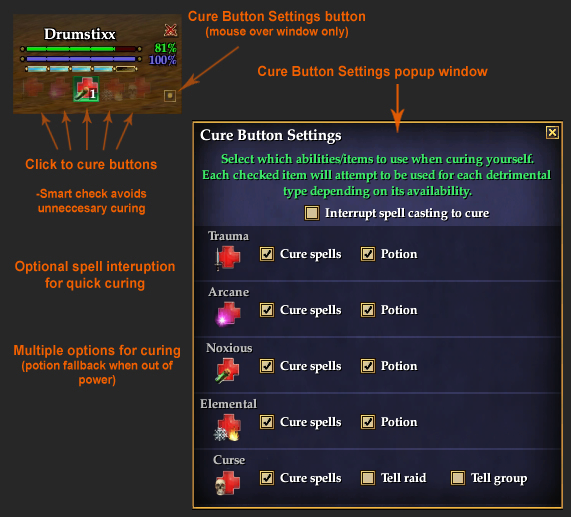
This mod adds HP and Power percentages to the default player window, is sizable horizontally, and has "click-to-cure" functions added to the status effect icons. Click-to-cure button settings are accessed via the mouse-over button in the bottom, right-hand corner.
Click-to-cure buttons are using smart curing, in that they will ONLY cast a potion or a cure if that debuff currently has a counter. This is to save yourself from using extra potions. This also goes for the Curse button if you choose to click the option to send a message to raid. You can spam the cure buttons and they will only cast if you have something to cure on that corresponding button.
** Note: Currently the Cure Button Settings do NOT save between sessions. This will be updated in future to save when possible. The default settings are shown in the picture to the right.
Window options:- Cure button settings windows allows you to customize your curing setup.
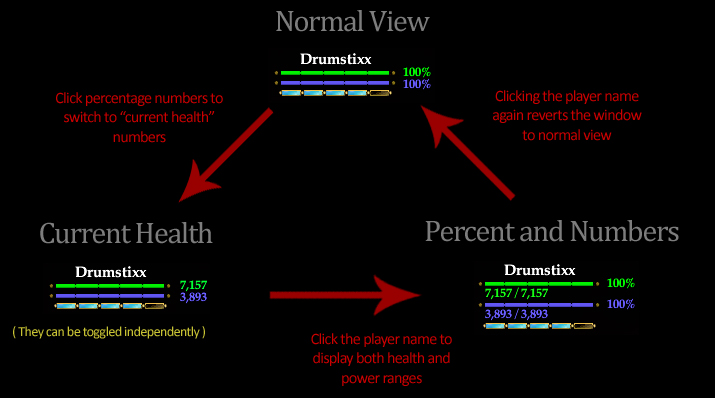
- Click health/power percentages to switch to current health/power display
- Click player name to display full health/power ranges under their corresponding bars.
Cure Settings options:- Cure spells
- Trauma: Cure
- Arcane: Cure, Cure Arcane
- Noxious: Cure, Cure Noxious
- Elemental: Cure, Cure Elemental
- Curse: Cure Curse
- Potion: Dedicated T8 Potion for each type
- Tell raid: /raidsay Curse on me (me will display your character name)
- Tell group: /groupsay Curse on me (me will display your character name)
Installation Notes:
- How To: Install A Custom UI
- eq2ui_mainhud_player.xml goes in your CustomUI folder.
- DrumsUI_CureButtonSettings.xml goes in your CustomUI folder.
- eq2ui_custom_optional.xml goes in your CustomUI folder.
Extra Install Notes:
- rename eq2ui_custom_optional.xml to eq2ui_custom.xml if you do not already have this file.
- If you already have a eq2ui_custom.xml add the following to yours:
Code:
<include>DrumsUI_CureButtonSettings.xml</include>
Update Log:
2009.11.19
- Slight re-design of Cure Button Settings window
- Added more Cure spell options
- Player window should now dependently open the Settings window
2009.11.09
- Cure buttons completely re-done and now customizable via the options button
- Detrimental effect icons now show very transparent placeholders
2009.09.23
- Added mentor level (GU#53) when mousing over the window
- Fixed Cure Arcane c2c
2008.09.12
- Updated Cure buttons, and fixed their tooltips
2008.06.29
- Updated for new "Cure" ability
- Now able to switch percentages into numbers by clicking them
- Clicking the player name now shows health and power ranges
- Added tooltips with new functions, as well as over Click-to-cure buttons
2008.04.14 #2
- Moved the buttons back above the icons (oops!)
2008.04.14
- Updated for Game Update #44 to include curse icon and button
2008.03.09
- Initial release
|
| File Statistics |
| User Rating: |
|
| Downloads: |
2609 |
| Views: |
18466 |
| Favorites: |
41 |
| Uploaded By: |
|
| Last Modified: |
11-19-2009 08:12 PM by Drumstix42 |
|
|  |
|
 |
|
11-09-2009, 03:32 PM
|
|
A Griffon
Server: Blackburrow
Forum posts: 1681
File comments: 222
Uploads: 39
|
New version updated with Cure Button Options. Settings are editable on the fly, and can even be disabled completely if wanted. Canceling spell casts to cure is also an option.
Enjoy.
Last edited by Drumstix42 : 11-09-2009 at 03:32 PM.
|
|
|
09-04-2009, 12:18 PM
|
|
A Coastal Crab
Server: Antonia Bayle
Forum posts: 0
File comments: 1
Uploads: 0
|
Cant get the C2C to work,
It tells me on when crafting,, and I should be able to Cure Arcane!!
Help
|
|
|
06-25-2009, 02:54 AM
|
|
A Coastal Crab
Server: Unrest
Forum posts: 0
File comments: 1
Uploads: 0
|
Howdy Drum, I really like your mods and I use quite a few of them. I was wondering about the progress of the player window with the C2C using potions. Thanks for the great mods you make and thanks in advance for your reply.
/bow,
Strongheart
80 Paladin
Butcher Block
|
|
|
04-06-2009, 02:56 AM
|
|
A Griffon
Server: Blackburrow
Forum posts: 1681
File comments: 222
Uploads: 39
|
Quote:
Originally posted by Draxknor
Thanks for everything... but the problem I have it that when I click to cure, I get... ONLY WHEN CRAFTING...
I'm a Ranger using potions so.. you got anything so that I could fix that.. ??
Thanks
Drax
|
I haven't updated this mod for GU51 yet. I only listed as compatible with the live update so that users will know they don't need to worry about it being broken.
New version is in the works.
|
|
|
04-05-2009, 11:37 AM
|
|
A Coastal Crab
Server: Unkown
Forum posts: 0
File comments: 1
Uploads: 0
|
Thanks for everything... but the problem I have it that when I click to cure, I get... ONLY WHEN CRAFTING...
I'm a Ranger using potions so.. you got anything so that I could fix that.. ??
Thanks
Drax
Last edited by Draxknor : 04-05-2009 at 12:53 PM.
|
|
|
01-20-2009, 09:38 AM
|
|
A Young Mystail Rat
Server: Antonia Bayle
Forum posts: 3
File comments: 5
Uploads: 0
|
Quote:
Originally posted by Drumstix42
This will be coming in my next mod(s) update. Probably around when GU51 goes live.
My computer is down atm, as is my subscription. Waiting on new parts.
|
Ok
I'll wait with anticipation 
|
|
|
01-19-2009, 04:41 AM
|
|
A Griffon
Server: Blackburrow
Forum posts: 1681
File comments: 222
Uploads: 39
|
Quote:
Originally posted by Aerendor
Hello,
could you add a Click to use potions to your mod ?
Beside that, it is a nice add
|
This will be coming in my next mod(s) update. Probably around when GU51 goes live.
My computer is down atm, as is my subscription. Waiting on new parts.
|
|
|
01-18-2009, 02:02 PM
|
|
A Young Mystail Rat
Server: Antonia Bayle
Forum posts: 3
File comments: 5
Uploads: 0
|
Hello,
could you add a Click to use potions to your mod ?
Beside that, it is a nice add 
|
|
|
11-26-2008, 05:11 PM
|
|
A Griffon
Server: Blackburrow
Forum posts: 1681
File comments: 222
Uploads: 39
|
Re: What I meant was vertically resize player window...
Quote:
Originally posted by Mareid
...not the ts window. That one is already vertically resizable
|
Aye read my message again. I was talking about this player window, but I just noted about the TS window at the end.
The extra space in the player window is for the debuffs. But I can still make it resizable for those of us who can't cure them anyway.
|
|
|
11-26-2008, 04:39 PM
|
|
A Dervish Cutthroat
Server: Antonia Bayle
Forum posts: 35
File comments: 18
Uploads: 0
|
What I meant was vertically resize player window...
...not the ts window. That one is already vertically resizable
|
|
|
11-23-2008, 03:47 PM
|
|
A Griffon
Server: Blackburrow
Forum posts: 1681
File comments: 222
Uploads: 39
|
Re: any chance you could make it vertically resizable?
Quote:
Originally posted by Mareid
I love the simplicity and cleanness of this window, but the extra space at the bottom of the window that I can't close up means I can't put it where I really want it, right at the top of my spell bars. I know that means the percentages would overlap but I would live with that. P.S. I love your tradeskill mod, it's the best! Could you make it vertically resizable as well as horizontally?
|
Thank you for the feedback. Note that if you resize this player window vertically you would not be able to see when your character has debuffs on you. I know that this is only important for those of us that can actually cure!
I shall take your idea and see if I can't implement it. It should be easy enough 
And the trade skill window shall be seeing updates soon.
|
|
|
11-22-2008, 08:31 AM
|
|
A Dervish Cutthroat
Server: Antonia Bayle
Forum posts: 35
File comments: 18
Uploads: 0
|
any chance you could make it vertically resizable?
I love the simplicity and cleanness of this window, but the extra space at the bottom of the window that I can't close up means I can't put it where I really want it, right at the top of my spell bars. I know that means the percentages would overlap but I would live with that. P.S. I love your tradeskill mod, it's the best! Could you make it vertically resizable as well as horizontally?
Last edited by Mareid : 11-22-2008 at 04:54 PM.
|
|
|
09-28-2008, 05:20 AM
|
|
A Young Mystail Rat
Server: Antonia Bayle
Forum posts: 4
File comments: 13
Uploads: 0
|
Re: Re: Necromancer - Cure Arcane
Quote:
Originally posted by Drumstix42
I don't have any smart class recognition in there yet. I previously had it try to cast both at once, but the mod has been going through some changes.
I may get this fixed up next update
|
Thanks for the reply.
|
|
|
09-27-2008, 08:03 PM
|
|
A Griffon
Server: Blackburrow
Forum posts: 1681
File comments: 222
Uploads: 39
|
Re: Necromancer - Cure Arcane
Quote:
Originally posted by MrSmite
Any chance on getting the "Click to Cure" feature to work with classes that
don't have the generic "Cure" spell?
My Necro has "Cure Arcane" but when I click on the Arcane Debuff, I get
the following error:
"That spell is no longer available"
I'm assuming it's due to the fact that it is looking for the generic "Cure" spell.
Is it possible to detect class type and change the spell cast?
|
I don't have any smart class recognition in there yet. I previously had it try to cast both at once, but the mod has been going through some changes.
I may get this fixed up next update
|
|
|
09-27-2008, 02:07 PM
|
|
A Young Mystail Rat
Server: Antonia Bayle
Forum posts: 4
File comments: 13
Uploads: 0
|
Necromancer - Cure Arcane
Any chance on getting the "Click to Cure" feature to work with classes that
don't have the generic "Cure" spell?
My Necro has "Cure Arcane" but when I click on the Arcane Debuff, I get
the following error:
"That spell is no longer available"
I'm assuming it's due to the fact that it is looking for the generic "Cure" spell.
Is it possible to detect class type and change the spell cast?
|
|
|
All times are GMT -5. The time now is 02:33 PM.
|
 |