EQ2Interface.com
Search Downloads


Go Back   EQ2Interface > Interface Pieces > Player window

Category: Player window[DrumsUI] Player
Interface Information
Download
Drumstix42's Portal Bug Reports Feature Requests
How do I install this? (FAQ)
Name: [DrumsUI] Player   Updated this week!   Popular!
Author:
Date: 03-15-2010 06:02 PM
Size: 11.82 Kb
Version: 2010.03.15
Rate Addon: 5 out of 5 with 4 votes  
Pictures
Click to enlarge 

Views: 0
Size: 216.75 Kb
Dimensions: 571 x 517
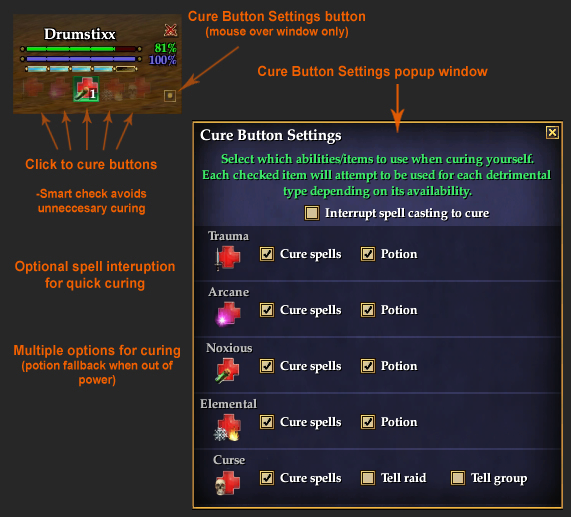
Cure Button Settings overview
 
Click to enlarge 

Views: 0
Size: 88.55 Kb
Dimensions: 715 x 398
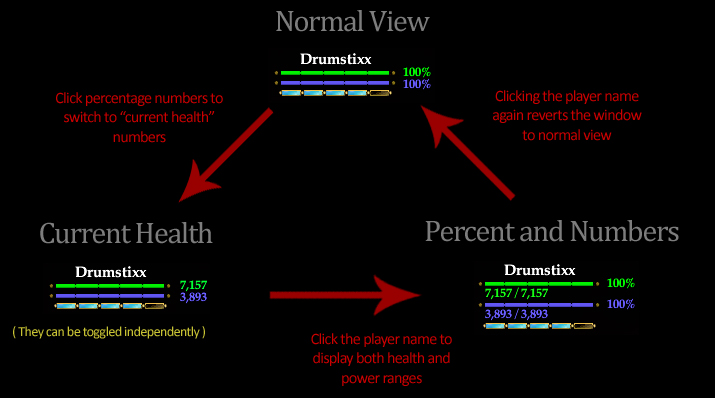
Window layout diagram
 
Click to enlarge 

Views: 0
Size: 7.78 Kb
Dimensions: 163 x 77
Updated version: 2010-02-25
 
Description
Game Update #55 Compatible


Description:
This mod adds HP and Power percentages to the default player window, is sizable horizontally, and has "click-to-cure" functions added to the status effect icons. Click-to-cure button settings are accessed via the mouse-over button in the bottom, right-hand corner.

Click-to-cure buttons are using smart curing, in that they will ONLY cast a potion or a cure if that debuff currently has a counter. This is to save yourself from using extra potions.

A hover-shown button display on the bottom-right of the window. This brings up the options window to define all your Quick Cure buttons. These abilities save by character name and are unique to each. After you set your abilities once, it's recommended to fully restart EQ2 if you plan to switch characters and then switch back. This is a code limitation. Once you fully re-log after setting abilities, they will save indefinitely.


See this topic for detailed information:
http://www.eq2interface.com/forums/s...ad.php?t=13801


Window options:
  • Cure button settings windows allows you to customize your curing setup.
  • Click health/power percentages to switch to current health/power display
  • Click player name to display full health/power ranges under their corresponding bars.


Installation Notes:
- How To: Install A Custom UI
- DrumsUI/*.* goes in your CustomUI/DrumsUI/*.* folder.
- POI/*.* goes in your CustomUI/POI/*.* folder.
- eq2map_ignorelist.xml goes in your CustomUI folder.
- eq2ui_custom.xml goes in your CustomUI folder.
- eq2ui_mainhud_player.xml goes in your CustomUI folder.
- eq2ui_popup_add_poi.xml goes in your CustomUI folder.


If you already have a eq2ui_custom.xml you need to add these includes:

Code:
<include>DrumsUI/Settings/DrumsUI_ClickButtonSettings.xml</include>
<include>DrumsUI/Settings/DrumsUI_PlayerCureWindow.xml</include>
<include>DrumsUI/Settings/DrumsUI_TextSettings.xml</include>


Update Log:
2010.03.15
- Zip updated with correct files and initialization


2010.02.25
- Updated for Sentinel's Fate
- Player window now matches group window look
- Now includes functionality of DrumsUI Full Release

2009.11.19
- Slight re-design of Cure Button Settings window
- Added more Cure spell options
- Player window should now dependently open the Settings window

2009.11.09
- Cure buttons completely re-done and now customizable via the options button
- Detrimental effect icons now show very transparent placeholders

2009.09.23
- Added mentor level (GU#53) when mousing over the window
- Fixed Cure Arcane c2c

2008.09.12
- Updated Cure buttons, and fixed their tooltips
2008.06.29
- Updated for new "Cure" ability
- Now able to switch percentages into numbers by clicking them
- Clicking the player name now shows health and power ranges
- Added tooltips with new functions, as well as over Click-to-cure buttons

2008.04.14 #2
- Moved the buttons back above the icons (oops!)
2008.04.14
- Updated for Game Update #44 to include curse icon and button
2008.03.09
- Initial release
Archive List (Old Versions)
File Name
Version
Size
Author
Date
2010.02.25
32.13 Kb
Drumstix42
02-25-2010 05:23 PM
File Statistics
User Rating:
5 out of 5 with 4 votes
Downloads: 3447
Views: 23708
Favorites: 45
Uploaded By:
 
Last Modified: N/A

View Pictures. Download Now! Post A Comment
Remove Ads


Post A Reply
Author Comments Comment Options
Old 03-11-2010, 02:10 PM  
Jonaroth
A Young Mystail Rat

Server: Antonia Bayle
Forum posts: 4
File comments: 2
Uploads: 0
oh great to know! thats good.. I was afraid my post wouldn't be seen for week(s)... keep up the good work Drumstix, your UI is the best.
Jonaroth is offline Report comment to moderator   Reply With Quote Reply With Quote
Old 03-11-2010, 01:14 PM  
Drumstix42
A Griffon
 
Drumstix42's Avatar
Interface Author - Click to view interfaces

Server: Blackburrow
Forum posts: 1862
File comments: 263
Uploads: 41
Quote:
Originally posted by Pyroman
Having these same problems as well.
As noted below this individual piece is still needing an update. Probably won't be able to get it uploaded until tomorrow. Sorry again for the delay. Cheers!

Last edited by Drumstix42 : 03-11-2010 at 01:15 PM.
Drumstix42 is online now Report comment to moderator   Reply With Quote Reply With Quote
Old 03-11-2010, 10:04 AM  
Pyroman
A Berserk Golem
Interface Author - Click to view interfaces

Server: Crushbone
Forum posts: 57
File comments: 6
Uploads: 3
Quote:
Originally posted by Jonaroth
I just downloaded this tonight (3-10-2010) and i'm getting the "can only do while crafting" error, also in my chat log it says "this item no longer exists or is not in your inventory"... im lvl 90 and should be using the new potions, i think its trying to use the old lvl 80 potions... im a coercer, so i have to use potions for everything but arcane.

also, sometimes when i bring up the settings dialog, it won't let me press "save", it's grayed out and I have to log out my character to fix it. and when i try and press "edit" to chose what new spell/potion i want it to use, it brings up some map UI waypoint dialog, makes no sense...

any ideas? or a fix?
Having these same problems as well.
Pyroman is offline Report comment to moderator   Reply With Quote Reply With Quote
Old 03-11-2010, 01:00 AM  
Jonaroth
A Young Mystail Rat

Server: Antonia Bayle
Forum posts: 4
File comments: 2
Uploads: 0
I just downloaded this tonight (3-10-2010) and i'm getting the "can only do while crafting" error, also in my chat log it says "this item no longer exists or is not in your inventory"... im lvl 90 and should be using the new potions, i think its trying to use the old lvl 80 potions... im a coercer, so i have to use potions for everything but arcane.

also, sometimes when i bring up the settings dialog, it won't let me press "save", it's grayed out and I have to log out my character to fix it. and when i try and press "edit" to chose what new spell/potion i want it to use, it brings up some map UI waypoint dialog, makes no sense...

any ideas? or a fix?
Jonaroth is offline Report comment to moderator   Reply With Quote Reply With Quote
Old 03-05-2010, 06:52 AM  
Frisco
A Grove Wisp

Server: Oasis
Forum posts: 28
File comments: 10
Uploads: 0
Thank you, Thank you Thank you
Frisco is offline Report comment to moderator   Reply With Quote Reply With Quote
Old 03-04-2010, 04:40 PM  
Drumstix42
A Griffon
 
Drumstix42's Avatar
Interface Author - Click to view interfaces

Server: Blackburrow
Forum posts: 1862
File comments: 263
Uploads: 41
Quote:
Originally posted by Frisco
is there any way to make window stay in Numbers and percents view all the time

Ever time i log out it goes back to default view
Yeah, these currently are set to save as they were created a while ago. I'll try to fit these into the current update for savable options.
Drumstix42 is online now Report comment to moderator   Reply With Quote Reply With Quote
Old 03-04-2010, 11:32 AM  
Frisco
A Grove Wisp

Server: Oasis
Forum posts: 28
File comments: 10
Uploads: 0
is there any way to make window stay in Numbers and percents view all the time

Ever time i log out it goes back to default view


Thanks
love the UI
Frisco is offline Report comment to moderator   Reply With Quote Reply With Quote
Old 01-19-2010, 07:18 PM  
Drumstix42
A Griffon
 
Drumstix42's Avatar
Interface Author - Click to view interfaces

Server: Blackburrow
Forum posts: 1862
File comments: 263
Uploads: 41
Re: player C2C

Quote:
Originally posted by dr_colt
I love the player c2c, is there anyway to make a group and raid window with the c2c with the call out for the group and raid window. my wife raid heals and would love it if the ui would call out that she is casting cure curse on a raid/group member.
I'll see about making an option to implement this feature. The Full Release already has curse calls, but not curing others. (used to for non-healers to tell group/raid that they are cursed)
Drumstix42 is online now Report comment to moderator   Reply With Quote Reply With Quote
Old 01-19-2010, 06:38 PM  
dr_colt
Guild ******

Server: Crushbone
Forum posts: 0
File comments: 1
Uploads: 0
player C2C

I love the player c2c, is there anyway to make a group and raid window with the c2c with the call out for the group and raid window. my wife raid heals and would love it if the ui would call out that she is casting cure curse on a raid/group member.
dr_colt is offline Report comment to moderator   Reply With Quote Reply With Quote
Old 11-09-2009, 02:32 PM  
Drumstix42
A Griffon
 
Drumstix42's Avatar
Interface Author - Click to view interfaces

Server: Blackburrow
Forum posts: 1862
File comments: 263
Uploads: 41
New version updated with Cure Button Options. Settings are editable on the fly, and can even be disabled completely if wanted. Canceling spell casts to cure is also an option.

Enjoy.

Last edited by Drumstix42 : 11-09-2009 at 02:32 PM.
Drumstix42 is online now Report comment to moderator   Reply With Quote Reply With Quote
Old 09-04-2009, 11:18 AM  
zaeriak
A Coastal Crab

Server: Antonia Bayle
Forum posts: 0
File comments: 1
Uploads: 0
Cant get the C2C to work,

It tells me on when crafting,, and I should be able to Cure Arcane!!

Help
zaeriak is offline Report comment to moderator   Reply With Quote Reply With Quote
Old 06-25-2009, 01:54 AM  
Strongheart
A Coastal Crab

Server: Unrest
Forum posts: 0
File comments: 1
Uploads: 0
Howdy Drum, I really like your mods and I use quite a few of them. I was wondering about the progress of the player window with the C2C using potions. Thanks for the great mods you make and thanks in advance for your reply.

/bow,

Strongheart
80 Paladin
Butcher Block
Strongheart is offline Report comment to moderator   Reply With Quote Reply With Quote
Old 04-06-2009, 01:56 AM  
Drumstix42
A Griffon
 
Drumstix42's Avatar
Interface Author - Click to view interfaces

Server: Blackburrow
Forum posts: 1862
File comments: 263
Uploads: 41
Quote:
Originally posted by Draxknor
Thanks for everything... but the problem I have it that when I click to cure, I get... ONLY WHEN CRAFTING...

I'm a Ranger using potions so.. you got anything so that I could fix that.. ??

Thanks

Drax
I haven't updated this mod for GU51 yet. I only listed as compatible with the live update so that users will know they don't need to worry about it being broken.

New version is in the works.
Drumstix42 is online now Report comment to moderator   Reply With Quote Reply With Quote
Old 04-05-2009, 10:37 AM  
Draxknor
A Coastal Crab

Server: Unkown
Forum posts: 0
File comments: 1
Uploads: 0
Thanks for everything... but the problem I have it that when I click to cure, I get... ONLY WHEN CRAFTING...

I'm a Ranger using potions so.. you got anything so that I could fix that.. ??

Thanks

Drax

Last edited by Draxknor : 04-05-2009 at 11:53 AM.
Draxknor is offline Report comment to moderator   Reply With Quote Reply With Quote
Old 01-20-2009, 08:38 AM  
Aerendor
A Young Mystail Rat
 
Aerendor's Avatar

Server: Antonia Bayle
Forum posts: 3
File comments: 5
Uploads: 0
Quote:
Originally posted by Drumstix42
This will be coming in my next mod(s) update. Probably around when GU51 goes live.

My computer is down atm, as is my subscription. Waiting on new parts.
Ok

I'll wait with anticipation
Aerendor is offline Report comment to moderator   Reply With Quote Reply With Quote
Post A Reply

 
Category Jump:
Search this Category:
 

All times are GMT -5. The time now is 01:26 AM.


Our Network
EQInterface | EQ2Interface | War.MMOUI | WoWInterface | VGInterface | LoTROInterface | MMOInterface