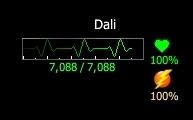
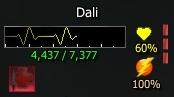
A modified player window which features an EKG style animation to indicate your current health. The window elements are arranged to be as compact as possible while still providing a quick overview of your current status.
The detrimental effect icons are "click-to-cure" buttons with built in support for Priest classes (using the "Cure" spell), Mage classes (using the "Cure Arcane" spell), class based cure abilities (e.g. Indomitable Will for Bruisers), and cure potions (can select the level to use in the options). There is a configurable option to cancel the current spell before curing (for immediate cures).
You can choose whether or not you wish to use the class cure spell before using a potion. This does not apply to the priest Cure spell or the mage Cure Arcane spell. The cure spell will always be used first for priests and mages.
There is a "detriment check" when using the click-to-cure buttons so that your cure spell/potion will not be wasted if there is not an active detrimental effect on you.
The cure button options can be accessed by moving the mouse over the effects icons (at the bottom of the window) and clicking the Options button (triangle in the lower right corner) that appears.
The cure button options will be saved per character (each character can have different settings) and will persist through camping.
NOTE:
Currently the Class Ability cure feature only supports Bruisers (Indomitable Will) as this is the only class I play which has such an ability.
If you would like to see support for other classes and/or abilities, feel free to leave a comment noting the class and ability name (and
indicate if the ability has multiple levels i.e. II, III, IV, etc.).
NOTE:
The "Cure", "Cure Arcane", and "Indomitable Will" spells/abilities are called by name so may not work properly on non-english clients but the cure potions are called by item ID so they
should work properly in all languages (though I haven't tested them in a non-english client).
The Player window is arranged as follows:
- Player Name is displayed at the top of the window
- Heart Beat animation below the player name.
At full HP, it takes approximately 3 seconds for the heart beat line to run the full length of the display.
The heart beat line will shrink (horizontally, right to left) and change color in accordance with your current HP
- Current HP/Max HP numeric value above the animation.
- Current Power/Max Power numeric value below the animation.
- "In Combat" icon appears to the left of the Current/Max Power numbers.
- PVP icon appears to the right of the Current/Max Power numbers.
- Battleground Icon appears to the right of the Current/Max Power numbers (same location as the PVP icon)
- Current Player HP Percentage is shown to the right of the heart beat animation.
The heart icon will change color in relation to your current HP (Green/Yellow/Red).
- Current Power Percentage is displayed to the right of the heart beat animation, just below the Current HP Percentage.
(The power icon does not do anything)
- Current Concentration is indicated by a vertical column of blocks that appear on the far right of the window, from top to bottom.
Hover over them to see the details - i.e. what it is and who it is applied to. Right click to access context menu (to cancel).
- Current Effects are displayed in the area below the heart beat display.
- Effects icons are click-to-cure buttons (that do not change your target).
- Hover over the Effects icon area to show the Cure Options button (to open the Cure Options window)
Player Cure Options window:
- Cancel Casting
- Will clear your casting queue and cancel the spell/combat art currently being cast
- Use class Cure
- Will try to use your class specific cure ability before using a potion (see note about currently supported classes)
- Does not apply to Priest class Cure spell. The Priest Cure spell will always be tried first if you are a priest.
- Does not apply to Mage class Cure Arcane spell. The Mage Cure Arcane spell will always be tried first if you are a mage and the detriment is Arcane.
- Class Cure Lvl
- Select the level of your class cure ability to use (only applies to those abilities which have multiple levels - e.g. Indomitable Will)
- Cure Potion Level
- Choose which quality level of Cure Potions you wish to use (some potions such as lvl 1 potions are not included)
- Cure Options are saved per character and will persist between sessions
Changelog
v1.6:
- Added Target Range (Distance to target) display
v1.5:
- Updated cure potion options to include the new (with Skyshrine) Robust (level 90+) cure potions
V1.4:
- Fixed a bug which could cause it to try use a cure potion quality level other than the one selected.
- Updated the click to cure button options page and embedded it in the Player window. It is no longer a separate window.
- Fixed a few spelling/grammar errors.
- A small facelift (cleaned up some element positioning and styles)
- Trimmed some fat from the code and better organized it to reduce the memory footprint of the mod.
V1.3:
- Added Cure Potion support to the click-to-cure buttons
- Added a detriment check to the click-to-cure buttons (will not cast cure/use potion unless a detrimental effect is active)
- Added support for Priest classes - Will attempt to use the "Cure" spell before using a potion (for all detriments)
- Added support for Mage classes - Will attempt to use the "Cure Arcane" spell before using a potion (for Arcane only of course)
- Added support for class based cure spells/abilities:
Bruiser - Will attempt to use Indomitable Will for Arcane or Trauma before using a potion (can be disabled in settings)
(More classes may be supported in the future.)
- Added a Settings window to enable/disable features and select potion quality level to use (saves between sessions and per character)
- Added Mentor Level indicator
- Added Battlegrounds indicator
V1.2:
- Added "Curse" effect icon/button
- Changed click to cure buttons to stop switching targets on use
- Updated "Cure" command(s) to reflect the unified cure button change
- Minor tweaks to the element positioning and code.
V1.1:
- Moved Current/Max HP numeric value above the animation - was previously below the animation.
- Added Current/Max Power numeric value - below the animation.
- Added "Click to Cure" to player effects icons.
V1.0: Release
Credits
This mod was directly inspired by the Forry Target Heart Beat EQ1 UI Mod made by Forry
(
http://www.eqinterface.com/downloads...php?s=&id=2570).
All credit for the original concept and design of the heartbeat animation goes to Forry.
I just adapted the animation code to EQ2, updated the graphics (to DDS format and added the icons), and put it all in a player window.
Credit is also due to the many other UI authors from whose work I have learned (and borrowed) many of the concepts and techniques
employed in this UI mod.




 02-24-2008, 12:24 PM
 New Update


 Only thing is as a caster which I play most I would love to see numerical display of power also either alongside or below the HP.


