 |
 |
 |
|
 |


|
|||||||


|  |
| |||||||||||||||||||||||||||||||||||||||||||||||||||||||||||||||||||||||||||||||||||||||||||||||||||||||||||


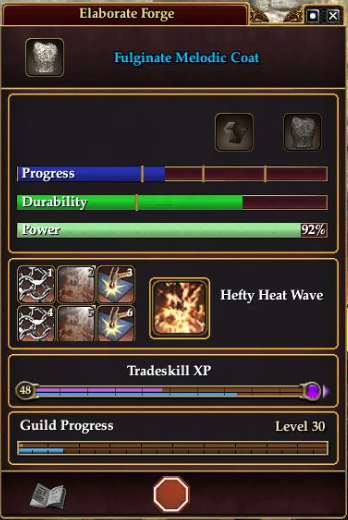
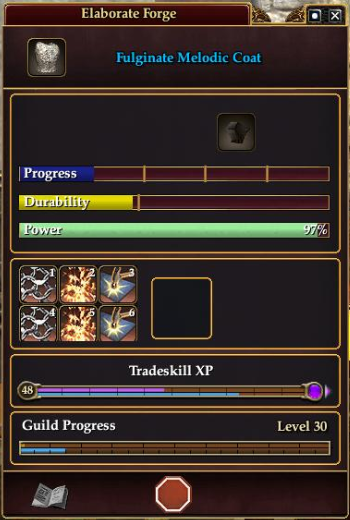
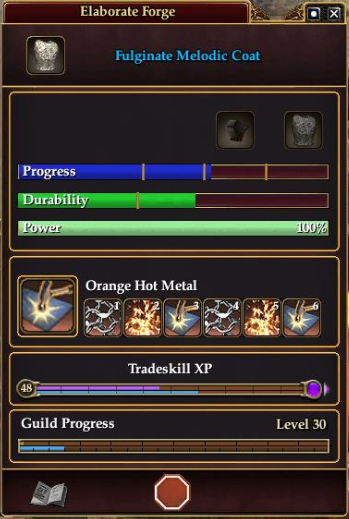


 |
|
 11-25-2012, 02:04 AM
|
||||
|
A Forest Scavenger
Server: Antonia Bayle
Forum posts: 17
File comments: 24
Uploads: 6
|
Quote:
|
|||


|


|

|
11-22-2012, 05:43 PM
|
|||
|
A Griffon
Server: Antonia Bayle
Forum posts: 100
File comments: 79
Uploads: 0
|
This is extremely minor but something I have never found a solution to. In the TS window: How do I get rid of the NUMPAD text overlay on the reactive buttons? I can remove it when I drag them to the hotbar, but can not remove that text from the buttons "in" the TS window.
I see screenshots of several TS windows without that text and have scoured the options for a solution but nogo! Thx  Last edited by Accredo : 11-22-2012 at 05:44 PM. |
||
|
|
|
|
11-18-2012, 03:04 PM
|
|||
|
A Forest Scavenger
Server: Antonia Bayle
Forum posts: 17
File comments: 24
Uploads: 6
|
Added missing mass production dropdown for prepare screen to v4.0.4.
This appears when you have the mass production tradeskill AA, and it was not immediately apparent that it was missing. |
||
|
|
|
|
11-16-2012, 08:47 PM
|
|||
|
A Forest Scavenger
Server: Antonia Bayle
Forum posts: 17
File comments: 24
Uploads: 6
|
Added straight icon style to v4.0.2
|
||
|
|
|
|
11-15-2012, 05:03 PM
|
||||
|
A Young Mystail Rat
Server: Splitpaw
Forum posts: 2
File comments: 2
Uploads: 0
|
Quote:
Thanks again! |
|||
|
|
|
|
11-15-2012, 04:28 PM
|
||||
|
A Forest Scavenger
Server: Antonia Bayle
Forum posts: 17
File comments: 24
Uploads: 6
|
Quote:
I can whip something up and include it in a sub folder of the zip file for v 4.0.2 by tomorrow. I personally don't use the straight style, but I understand the need. Brushfire, |
|||
|
|
|
|
11-15-2012, 10:54 AM
|
|||
|
A Young Mystail Rat
Server: Splitpaw
Forum posts: 2
File comments: 2
Uploads: 0
|
I may be missing something simple, but how do you make it go into "Alternate Straight Icon Style"? Thanks in advance
 |
||
|
|
|
|
04-15-2011, 04:45 PM
|
|||
|
A Young Mystail Rat
Server: Unkown
Forum posts: 2
File comments: 1
Uploads: 0
|
Update anytime soon?
Was hoping there would be an update coming
|
||
|
|
|
|
03-30-2011, 03:09 PM
|
|||
|
A Sea Turtle
Forum posts: 30
File comments: 10
Uploads: 0
|
Oh, I wish you great success. I really miss you tradeskill window. If you want someone to beat on it and try and break it, let me know. My clumsiness is sure to stress it to the max. ;-)
John |
||
|
|
|
|
03-03-2011, 03:15 PM
|
|||
|
A Young Mystail Rat
Server: Unrest
Forum posts: 5
File comments: 1
Uploads: 0
|
You have my thanks!
Truly appreciate you preparing to spend your weekend working on this mod, by the sound of it!
I'm using another mod in the meantime just to get "Enter" to begin a combine, but it only makes me miss your mod more. (For one thing, I discovered that "Enter" did more than begin, it also ended on a ill-timed button press.)  Thanks so much for getting this beloved mod Velious compatible! <3 |
||
|
|
|
|
03-01-2011, 03:45 PM
|
|||
|
A Forest Scavenger
Server: Antonia Bayle
Forum posts: 17
File comments: 24
Uploads: 6
|
I just wanted to reassure everyone who is waiting on this, that I have a preliminary version of the single wide tradeskill window with G15 key layout. The single wide with default reaction key layout is not far behind. The major work will being to reconstruct the double wide version of this UI, it is more complex logically than the standard width version. I hope to have something for you all not long after this weekend.
Brushfire |
||
|
|
|
|
02-27-2011, 01:04 PM
|
|||
|
A Sea Turtle
Forum posts: 30
File comments: 10
Uploads: 0
|
Thank you for an excellent add-in
Wanted to thank you for the excellent trade crafting replacement. I've been using it for quite a while now and had been taking it for granted. With the DoV expac, it broke and I now realize just how dependent I am on your interface piece. I'm hoping that you will be releasing a DoV compliant version of the Neverquest Tradeskill plug in the near future.
Again, thank you for all the work you have done to help make trade skilling less painful. Regards, John "Red" Newton |
||
|
|
|
|
08-22-2010, 10:29 AM
|
|||
|
A Forest Scavenger
Server: Antonia Bayle
Forum posts: 17
File comments: 24
Uploads: 6
|
Uploaded Version 3.0.1 to address the clipping at the bottom of the reaction skill icons.
This was purely cosmetic and did not affect functionality, but if it bothers you, go ahead and update. |
||
|
|
|
|
08-20-2010, 06:33 PM
|
|||
|
A Forest Scavenger
Server: Antonia Bayle
Forum posts: 17
File comments: 24
Uploads: 6
|
I finished streamlining the mod btw. First major update for the layout in 2 years.
I added a guild level bar, this was a by-product of doing writs to level my wife's guild to 30. I found it frustrating to keep opening the guild window just to see how far I'd gotten. Also, I added an alternate view for people who prefer all their buttons in one row. It's not for me, but I can see how you could be polarized one way or another. In addition I removed the maintained spells icons. I was hesitant to do this, but the new reaction spell icons have very good contrast. In addition I found that the maintained spells display was less useful than it had been previously, making the window unnecessarily large. I used the space this freed up to add the guild progress while cutting about 40 pixels off the overall height of the window. Last edited by Brushfire : 08-20-2010 at 06:34 PM. |
||
|
|
|
|


All times are GMT -5. The time now is 10:56 AM.
 |
© MMOUI
vBulletin® - Copyright ©2000 - 2026, Jelsoft Enterprises Ltd. |
 |
