EQ2Interface.com
Search Downloads


Go Back   EQ2Interface > Compilations

Category: CompilationsGroup, Player and Raid (warden, mystic, defiler, dirge)
Interface Information
Download
How do I install this? (FAQ)
Name: Group, Player and Raid (warden, mystic, defiler, d...
Author:
Date: 05-14-2008 09:39 AM
Size: 675.50 Kb
Version: 1.40
Rate Addon: 5 out of 5 with 3 votes  
Patch & Add-on List
File Name
Version
Size
Author
Date
Type
1.41
9.34 Kb
05-21-2008 11:59 PM
Addon
1.31
2.67 Kb
04-13-2008 05:52 PM
Patch
1.3
2.39 Kb
02-28-2008 09:19 AM
Addon
Pictures
Click to enlarge 

Views: 0
Size: 5.40 Kb
Dimensions: 152 x 99
 
Click to enlarge 

Views: 0
Size: 17.27 Kb
Dimensions: 412 x 175
 
Description
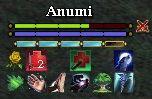
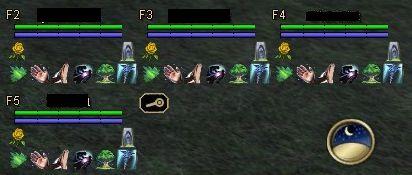
UI for Heals, saves and click to cure for each member in group and self.

Same as base eq2 interfaces with extra icons/buttons for spells. Includes group/raid messages for some spells. Is as user organizable as the base eq2 group window, ie 1x5, 2x3, 3x2 or 5x1. Please note that buttons and icons in the group, player and raid window don't show reuse timer information. I have looked to see if it could be done but as of the moment I don't believe it can.

New version has tranquility, click to follow (on the 'F' number) plus specific group and player ui's for Mystic and Defiler.

There are several batch files included in the download. Put them in the same custom ui folder as the xml files. They (the batch files) copy the appropriate xml file to the proper name that eq2 will utilize. EQ2_Default.bat removes any group or player ui so that you revert to the eq2 default ui's. EQ2 won't pick up the changed ui's until you either restart from desktop or use the /loadui command. Be warned that using /loadui can mess up hotbars and secondary chat windows. To make your life easier you can right click any of the bat files and create shortcut then place the shortcuts somewhere easy to find and use (like your desktop)

NB the clock is not part of the ui that is just where I have it under my group window.

Version, 1.20 - Updated to work with LU44. This is only partially tested as I had to rush it out and wont have time till the weekend to test properly.

Includes click to cure for cure curse. I had to juggle icons to make the new effect fit so have dropped the least used one for each caster type (at least for my gameplay style). I have included the click to cure for potions directly in this file now, not as a separate add on.

The raid window is a modification of ones already in use on EQ2 Interface, altered to my requirements.

Added user lvl to each person in the group window so that you can see when their level is debuffed.

Also included are numberous coding improvements that make button behaviour more consistant as well as either spell interrupts to cast saves and keep target or queue spells but switch targets for those spells that dont need to be cast instantly. (I found spell queuing more important than preventing target switching so have made mine that way). I have bugged an issue with switching targets cancelling queued spells and if SOE decide to fix it then I can do both. Also included is a complete upgrade of all spells to T8, found some instances where there were still T7 spells in use.

Mystic and Defiler UI makes the assumption that you are AA spec'd for Ritual and Ritual of Alacrity.

Version 1.30 - Added percent health and power for player window, fixed a spell name in warden group and player, adjusted alignment of boxes on player windows

Version 1.31 - Fix to Warden Player. Was using wrong dynamic data and was showing player 'F2' detrimental effects. Only the warden xml file is in the patch above, replace your existing xml file with it.

Version 1.4 - Update for LU45, all detrimental effects on the Healer UI's now cast the same cure (except for curses). Raid window for healers, replaced the 3 primary cures with the new single cure, your original cure all and an instant heal/ward depending on class. This is a complete refresh so no lower numbered versions are needed.

Enjoy
Archive List (Old Versions)
File Name
Version
Size
Author
Date
1.30
505.60 Kb
caoimhin
04-11-2008 01:01 AM
1.20
504.88 Kb
caoimhin
04-09-2008 01:53 PM
File Statistics
User Rating:
5 out of 5 with 3 votes
Downloads: 592
Views: 6727
Favorites: 9
Uploaded By:
 
Last Modified: 05-22-2008 11:23 AM by caoimhin    

View Pictures. Download Now! Post A Comment
Remove Ads


Post A Reply
Author Comments Comment Options
Old 05-28-2008, 03:36 AM  
Taxet
Just Me!
 
Taxet's Avatar
Premium Member

Server: Grobb
Forum posts: 58
File comments: 10
Uploads: 0
Mystic

Mystic spell not right
you have Ancient Balm
Its Ancestral Balm now
just for you next update

Last edited by Taxet : 05-28-2008 at 03:37 AM.
Taxet is offline Report comment to moderator   Reply With Quote Reply With Quote
Old 04-09-2008, 01:57 PM  
caoimhin
Aka Anumi, Omulu
Interface Author - Click to view interfaces

Server: Crushbone
Forum posts: 72
File comments: 5
Uploads: 4
Fury window

Easiest way for Fury would be to take the warden ui and change all the spell names in the buttons to be fury ones, icons should be the same for both classes.
caoimhin is offline Report comment to moderator   Reply With Quote Reply With Quote
Old 10-22-2007, 06:58 AM  
Daruma
A Brown Bear

Server: Permafrost
Forum posts: 8
File comments: 1
Uploads: 0
Hail and well met,

Wonderful group window... with... uh... only one problem from my point of view...

I'm a Fury... any way you could show me; in post or PM, anything... how to change this to be "Fury Friendly?"

Thanks.

Take care.
Daruma is offline Report comment to moderator   Reply With Quote Reply With Quote
Old 10-19-2007, 06:43 AM  
sorinth
A Berserk Golem

Server: Najena
Forum posts: 58
File comments: 2
Uploads: 0
is there any way to have it auto detect the class then set up the correct spells? I play both a warden and a high lvl mystic so the spells would be completely different for both toons (and then on my melee characters they would either not need anything or they would be buffs or taunts or something).
sorinth is offline Report comment to moderator   Reply With Quote Reply With Quote
Old 10-07-2007, 02:05 PM  
caoimhin
Aka Anumi, Omulu
Interface Author - Click to view interfaces

Server: Crushbone
Forum posts: 72
File comments: 5
Uploads: 4
Re: how to change the buttons

anything with an apostrophe in the name of the spell you have to use a little trick to get it to work

if you look at the lines for nature's touch or nature's regrowth, they will give you an example. They have to be on a separate line otherwise it doesn't get interpreted right, and you have to quot around the spell name with the ampersand quot semicolon (With the symbols for the first and last part and no spaces. I can't type it in here as it tends to show up as ")

As for sow, if you have the player window you can copy what is in there and replace one of the existing icon and button lines in the group window with the button and icon line for sow (make sure you remove the target_none ; and target_self ; , that is in there for self as without it you can sow your pet). Also change the location numbers in both lines to match the location number of the 2 lines you are replacing in the group window. You will have to do it in 5 places, once for each group member.
caoimhin is offline Report comment to moderator   Reply With Quote Reply With Quote
Old 09-16-2007, 02:20 PM  
planejane82
A Coastal Crab

Server: Antonia Bayle
Forum posts: 0
File comments: 1
Uploads: 0
how to change the buttons

anyone know how to change the buttons to there lower level versions, like greater chloroplast to greater regrowth etc. i tried to change the names in the xml file but the only one i can get to work is greater regrowth i can't get nature's caress or embrace to work.


Okay after reading all the post i see where he tells ya how to do it. Thanks this you ui is Great!

Last edited by planejane82 : 09-22-2007 at 08:04 AM.
planejane82 is offline Report comment to moderator   Reply With Quote Reply With Quote
Old 09-11-2007, 09:05 PM  
sorinth
A Berserk Golem

Server: Najena
Forum posts: 58
File comments: 2
Uploads: 0
sow anyone??

this mod is great!!!!! the only thing we are missin in a sow button... any way we could add one in???
sorinth is offline Report comment to moderator   Reply With Quote Reply With Quote
Old 07-14-2007, 03:39 PM  
Taxet
Just Me!
 
Taxet's Avatar
Premium Member

Server: Grobb
Forum posts: 58
File comments: 10
Uploads: 0
Thx for this window. Its a gr8 asset to use in groups. Makes my life wayyy easier..thx again.
Taxet is offline Report comment to moderator   Reply With Quote Reply With Quote
Old 07-08-2007, 11:03 AM  
nytekat
A Brown Bear

Server: Antonia Bayle
Forum posts: 11
File comments: 5
Uploads: 0
no it didn't cause EQ2 to crash it caused the UI to crash (not load on start up) It loaded default.
nytekat is offline Report comment to moderator   Reply With Quote Reply With Quote
Old 07-08-2007, 03:43 AM  
caoimhin
Aka Anumi, Omulu
Interface Author - Click to view interfaces

Server: Crushbone
Forum posts: 72
File comments: 5
Uploads: 4
I did look at it a little, I preferred to keep all my 12 (8 spells, 4 cures) of the buttons together for minimal movement of the mouse. To make it work would require making the window around 15-20 pixels wider to save 15 pixels of height (which would actually result in a slightly smaller total area used), drop one spell icon (not a huge deal) and possibly have width issues for people with long names (would have to check the width of w's for the font used).

Basically it comes down to personal preference i guess.

That aside, the apostrophe problem still exists for you, so lets see what we can do.

A useablility inside an onpress, even if misquoted shouldn't cause eq2 to crash (doesn't mean it can't though), is there anything else going on with the button that you are working with, parent calls, dynamic data usage?

If you like you can send me the lines for the button and icon in a pm or post it here, and I can take a look at it. I assume it only crashes when you push that particular button.

In my previous post I said to wrap the spell name in

& q u o t ;

only without the spaces, I have put the spaces in here because it just occured to me that some browsers may just decide to display it as an actual ", not the text that it is and you might have used "s instead of the code for a ".

If you take a look inside the xml (use a text or xml editor, like notepad or context rather than the default of Internet Explorer to view it, as IE will display the '&' codes as they represented values rather than the code itself) for the warden group ui you can find 2 spells that I use that have apostrophes in them, Nature's Touch and Nature's Regrowth, that might help to show what I did to get them to work.

Last edited by caoimhin : 07-08-2007 at 04:01 AM.
caoimhin is offline Report comment to moderator   Reply With Quote Reply With Quote
Old 07-07-2007, 09:14 AM  
nytekat
A Brown Bear

Server: Antonia Bayle
Forum posts: 11
File comments: 5
Uploads: 0
I'll try that thanks.

Have you seen howCelestian did the button's on his group window? He put the cure button's around the name.. 2 on each side.

EDIT-no that didn't work... crashed the UI again. I don't see why they make using a skill with a ' in it so hard.

Last edited by nytekat : 07-07-2007 at 10:24 AM.
nytekat is offline Report comment to moderator   Reply With Quote Reply With Quote
Old 07-07-2007, 04:41 AM  
gxboxg
A Young Mystail Rat

Server: Crushbone
Forum posts: 5
File comments: 5
Uploads: 0
Awesome. Ty for the mystic version. Cant wait to check it out

Ok tried it out and it rocks ty so much for puttin the time into this.

Last edited by gxboxg : 07-07-2007 at 05:17 AM.
gxboxg is offline Report comment to moderator   Reply With Quote Reply With Quote
Old 07-06-2007, 11:00 PM  
caoimhin
Aka Anumi, Omulu
Interface Author - Click to view interfaces

Server: Crushbone
Forum posts: 72
File comments: 5
Uploads: 4
It could be done, however it's not just one icon, there are 4 invisible buttons there for click to cure and the various effects, trauma, nox, arcane, elemental appear there (see the new picture), so you would need to get rid of 5-6 icons to remove the row and then adjust the page size down so they sit closer together.

Feel free to remove the ones you dont need but I actually use it they way it currently is.

As for the issue with the - ' - try doing it this way;

OnPress="useability "Penitent's Sermon""

Last edited by caoimhin : 07-06-2007 at 11:29 PM.
caoimhin is offline Report comment to moderator   Reply With Quote Reply With Quote
Old 07-06-2007, 12:39 PM  
nytekat
A Brown Bear

Server: Antonia Bayle
Forum posts: 11
File comments: 5
Uploads: 0
I really like your player window but any way to make the icon's just 1 row? or make it with only 6 buttons. I really can't stand the 1 icon to the far right then start a new row. Waste's alot of space. I really like the way Celestian did their group window's buttons where the cure was on the sides of the name and 1 row of icon's on the bottom but I didn't like the black background. I may switch to this if you put the auto follow and such into the group window and make 1 row of icons... but right now I don't have enough space on my UI for something so tall.

Do you know how to get Penitent's Sermon to work? I'm an inquisitor and I have all my icon's and spells working for me but that spell... the ' is throwing it off bad.
nytekat is offline Report comment to moderator   Reply With Quote Reply With Quote
Old 07-04-2007, 01:03 AM  
gxboxg
A Young Mystail Rat

Server: Crushbone
Forum posts: 5
File comments: 5
Uploads: 0
Yeah I wudnt worry bout the icons. But to have one for my mystic for heals wards and bolster would be cool. Will wait for your next one
gxboxg is offline Report comment to moderator   Reply With Quote Reply With Quote
Post A Reply

 
Category Jump:
Search this Category:
 

All times are GMT -5. The time now is 12:54 AM.


Our Network
EQInterface | EQ2Interface | WoWInterface | VGInterface | LoTROInterface | MMOInterface