EQ2Interface.com
Search Downloads


Go Back   EQ2Interface > Patches & Addons

Category: Patches & AddonsEQ2Map POI Finder
This file is a Addon for EQ2MAP - Manual Version [Official] by Quib. You must have that installed before this Addon will work.
Interface Information
Download
How do I install this? (FAQ)
Name: EQ2Map POI Finder   Updated this week!   Popular!
Author:
Date: 06-30-2008 08:15 PM
Size: 849.93 Kb
Version: 1.51 - 6/30/08
Rate Addon: 5 out of 5 with 43 votes  
Pictures
Click to enlarge 

Views: 0
Size: 109.02 Kb
Dimensions: 971 x 606
 
Description
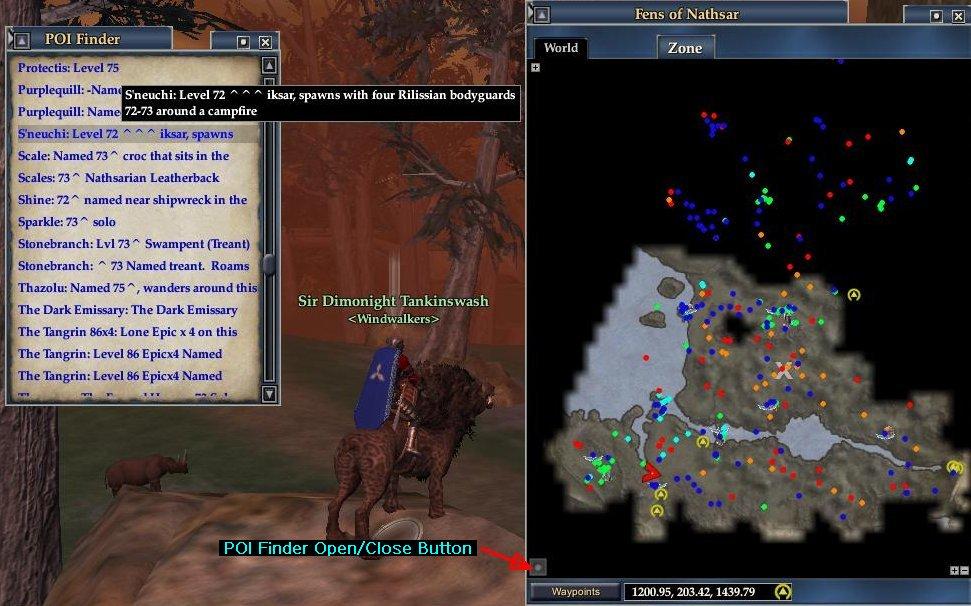
Version 1.50+: New Launch button Location (See picture) ->

Date of EQ2Map auto-updated files used in latest uploaded zip file: 6/30/08 (includes updated README.txt file)

Mod Purpose and History:
This mod is basically a newer version of mother9987's terrific EQ2Map Map Spoiler Project mod. I was prompted to make this version because the spoiler links were never updated often enough to be more then a small subset of those available as EQ2Map POIs (Points of Interest). And the links that did exist often weren't descriptive enough. I also updated the mod name to be "POI Finder" because its not really a spoiler tool (in my eyes at least). All the info it provides is already part of the basic EQ2Map mod - but that info was very difficult and annoying to find especially on the large and heavily POI'd outdoor maps. Using this mod, finding the POI you need for a quest should be considerably easier.

Features:
Basic features are identical to mother9987's version. Clicking on a link will create an X on the EQ2Map at the POI it refers to and activate the tracking path visual if you are close enough to it. Like before the POIs are split into 6 categories (Locations, Monsters, Named Monsters, NPCs, Quests, and Zone Lines) and alphabetized. And unlike before, all POI links now have tooltips that match (minus the UID info) the tooltip you see by holding your mouse pointer over the actual EQ2Map POI icon.

Tips for using:
Keep in mind if you are looking for a particular POI location that they are ordered alphabetically. And that order can be affected if "POI I Want" is entered as "A POI I Want" or "The POI I want" or "Quest Name: POI I Want". Also the difference between Quest POIs and Location POIs can sometimes be up to debate, so check both sections if you don't see it in the first one you look at.

How It Works and How You Can Contribute:
The bulk of the .xml files contained in the zip file are autogenerated using a script I created. It scans every icon_<zone>.xml file that comes with the Main EQ2Map mod and creates links for every single POI included. So if you want to contribute POI information you don't send it to me. Rather you should submit it via the EQ2Map Project section of this website. Although the new POI won't be found by this mod right away it will be there the next time I post an update. I typically post new versions built from the latest EQ2Map Autoupdates once every 2-4 weeks or more often in the weeks after an expansion adds new maps.

Installation:

1) Install EQ2Map:
This mod is an add-on for the ever-popular EQ2Map Mod. So make sure that is installed first. It should work fine with both the Manual and Auto Updating versions.

2) Identify the correct POI Finder install directory:
Inside of your EQ2 installation directory there will be a folder called UI. Two subdirectories deep inside of that will be a folder named eq2map that contains several icon_something.xml files and a bunch of plugin_#.xml files. The tricky part is that the directory that sits 1 deep inside the UI folder and that holds the eq2map folder could be named many different things. And is sometimes also called eq2map.

This middle directory inside of the UI directory is where you need to extract the downloaded zip file for this mod. I will refer to it from here on as the POIFinder Install Directory. So if your directory path looks something like Everquest2\UI\customDir\eq2map, then your POIFinder Install Directory is customDir (doesn't have to be called customDir - could be named anything). Or if it looks like Everquest2\UI\eq2map\eq2map then it is the FIRST (left) eq2map folder.

3) Extracting the Files:
Use a program like Winzip or UltimateZip to unzip the downloaded file. When it asks you about a destination for the extracted files, point it at the POIFinder Install Directory identified in Step 2. If the unzip utility asks if you want to overwrite a pre-existing file make sure you say yes for all. At the very least it should ask about overwriting plugin_7.xml. If it does not, you may want to re-read Step 2 again.

4) First Time Install Steps:
This section only needs to be done when installing this mod for the very first time or if the last time you installed it the version was 1.00-1.20. If neither case applies to you, your install is complete. Otherwise read on...

Old Version Cleanup: If you are upgrading from a 1.00-1.20 version of this mod, look in the POIFinder Install Directory and delete the eq2ui_mainhud_poifinder.xml and eq2ui_mainhud_example.xml files. You may also want to remove eq2ui_mainhud.xml but only do if you are certain it is not being used by any other UI mods. If not sure, you can just edit it by removing the one line that has <include>eq2ui_mainhud_poifinder.xml</include>

eq2ui_custom.xml: Look in the POIFinder Install Directory for a file called eq2ui_custom.xml. If not there, rename the eq2ui_custom_example.xml file that should also be in the POIFinder Install Directory just by removing the _example part so it becomes eq2ui_custom.xml.

If you already have the eq2ui_custom.xml file, but only because you followed my v1.30 instructions to copy it from the Default directory, delete eq2ui_custom.xml and then rename the example file as directed above.

In all other cases where you already have the eq2ui_custom.xml file in the POIFinder Install Directory, don't delete it or rename the example version. While some mods like the Profit Reborn UI mod that also use eq2ui_custom.xml may have already included the necessary line to enable POI Finder, you should check by searching the file with a text editor program for the line <include>eq2ui_custom_poifinder.xml</include>. If you don't see it but do see other <include>somefile.xml</include> lines, add the line you were searching for below all the other includes. Basicly, it should look similar to the eq2ui_custom_example.xml file with the possible addition of extra <include> lines.

eq2ui.xml check: Another potential installation problem can be averted by looking in the POIFinder Install Directory for the eq2ui.xml file. If it is NOT present you should actually be fine and don't have to do anything. But if it is there, it was added by some other UI mod and you need to make sure it already contains the line <include>eq2ui_custom.xml</include>. If not, edit the file and add it below all the other <include> lines.

Don't forget to save any files you edited once you are done changing them.

------------------------------------------

Known Issues:
None

Versions:
1.51 (12/2/07) - Open/Close button has been made slightly larger and moved further from edge to aid seeing and clicking.
1.50 (11/29) - The last "Issue" is now gone! The launch button will now both open AND close the POI Finder window. Also the button has been moved to the lower left corner (see new screen cap above) to keep it away from the POI Filter settings pulldown button. And as if that weren't enough new links wiill automatically load as soon as a new map area or zone is entered. No more mousing-over needed. Major props go to gm9 once again for providing me with the XML for these changes and fixes.
1.36 (11/27) - Functionally the same as 1.35, but I removed some un-needed extra XML from all the finder link files on a tip from Jnils. Download size is a few Kb smaller and mod may load a tad quicker.
1.35 (11/18) - Included eq2ui_custom_example.xml file with download in order to simplify the install process. More help from gm9 fixed the issue with multi-map zones.
1.30 (11/15) - Switched to use new custom.xml file that came with GU40. Much help was provided by gm9 of ProfitUI Reborn fame.
1.20 (5/16) - Added XML that will make Talyns' ShrinkMap Plugin work better by moving the POI Finder button to a less intrusive spot when map is shrunk.
1.15 (4/13) - Using ESC will now only close the POI Finder and not the EQ2 Map window as well.
1.10 (4/3) - POI Finder now does not open automatically with EQ2Map. Launch button must be used. Hitting ESC now closes both POI Finder and Map. XML was streamlined and greatly simplified. Much of the credit for these changes should be given to jnils (aka Gregorin of Runnyeye)
1.00 (3/17) - Autogenerated scrollpage and plugin_7 files; Installation path separated from old Spoiler Project version; Zone titles with parentheses in them display correctly
0.90b (3/14/07) - Initial release.
Archive List (Old Versions)
File Name
Version
Size
Author
Date
1.51 - 5/28/08
838.21 Kb
TreeMos
05-28-2008 08:25 PM
1.51 - 5/2/08
822.34 Kb
TreeMos
05-02-2008 02:52 PM
1.51 - 4/10/08
815.90 Kb
TreeMos
04-10-2008 10:11 AM
File Statistics
User Rating:
5 out of 5 with 43 votes
Downloads: 34706
Views: 89045
Favorites: 379
Uploaded By:
 
Last Modified: N/A

View Pictures. Download Now! Post A Comment
Remove Ads


Post A Reply
Author Comments Comment Options
Old 06-21-2008, 12:12 PM  
Starlina
A Young Mystail Rat

Server: Antonia Bayle
Forum posts: 4
File comments: 5
Uploads: 0
Black Background

I fixed my black background problem! I use Profit's Market Window mod and that also uses the eq2ui_custom.xml. I made the mistake of putting the <include>eq2ui_custom_poifinder.xml</include> after the last Profit include line, but it really had to be placed after the first Profit <include> line. So here is how I configured the file to get the white background:

<?xml version="1.0" encoding="utf-8"?>
<Page IgnoreTab="false" ismodule="true" Name="Custom" PackSize="1,1" PackSizeProp="0002/0003,0002/0003" ScrollExtent="1024,768" Size="1024,768" Visible="false">
<include>_ProfitUI_SubClassDetector.xml</include>
<include>eq2ui_custom_poifinder.xml</include>
</Page>
<Namespace Name="ProfitUI_Styles">
<include>_ProfitUI_Styles.xml</include>
</Namespace>

Last edited by Starlina : 06-22-2008 at 01:46 AM.
Starlina is offline Report comment to moderator   Reply With Quote Reply With Quote
Old 06-06-2008, 10:24 AM  
TreeMos
A Grove Wisp
Interface Author - Click to view interfaces

Server: Kithicor
Forum posts: 27
File comments: 48
Uploads: 1
Re: Black Background.

Quote:
Originally posted by ForKnotu
In the sample pictures the poi finder window has a white background and a blue font. However mine has a black background and a blue font. My eyes are having a terriable time reading it. Could someone tell me which file and where to edit, to change the background to white so i can read it.

Otherwise I love this mod.
If you look back though the comments you'll see the occasional post about the "Black background Problem". Usually it has something to do with the way the eq2ui_custom.xml file is configured. But if nothing jumps out at you, go back and read those installation instructions again slowly and carefully. Doing a full custom mod delete and reinstall if all else fails.

Last edited by TreeMos : 06-06-2008 at 10:24 AM.
TreeMos is offline Report comment to moderator   Reply With Quote Reply With Quote
Old 06-04-2008, 06:29 PM  
ForKnotu
A Coastal Crab

Server: Antonia Bayle
Forum posts: 0
File comments: 1
Uploads: 0
Black Background.

In the sample pictures the poi finder window has a white background and a blue font. However mine has a black background and a blue font. My eyes are having a terriable time reading it. Could someone tell me which file and where to edit, to change the background to white so i can read it.

Otherwise I love this mod.
ForKnotu is offline Report comment to moderator   Reply With Quote Reply With Quote
Old 05-05-2008, 12:10 PM  
jnils
A Griffon
 
jnils's Avatar
Interface Author - Click to view interfaces

Server: Runnyeye
Forum posts: 328
File comments: 55
Uploads: 1
Re: POI Finder and Fetish Nightfall

Quote:
Originally posted by vc50er
I have tried everything under the sun. Cannot get POI Finder to run with Fetish Nightfall UI.

I get the error "Can't find eq2ui_custom_poifinder entry in eq2ui_mainhud.xml file, create one?
Answering Yes: Can't create entry:
Index was out of range. Must be nonnegative and less than the size of the collection. Parameter name: startindex

The eq2ui_mainhud.xml file is now in every folder in my fetish nightfall folder and has the entry in it.
The eq2ui_mainhud.xml is not used anymore, should be in the eq2ui_custom.xml file.
There might be a typo in my error message.
Ill will try to install it on Fetish.
EDIT-------------------------------------------------------
I did a clean install of Fetish and it works whithout any errors.
You can try to do a clean install and see if that helps.
-----------------------------------------------------------
Are you using the latest updater?
You should use my forum thread instead, as Treemos might get angry spaming his Download page

http://www.eq2interface.com/forums/s...ead.php?t=8403

Last edited by jnils : 05-06-2008 at 12:06 AM.
jnils is offline Report comment to moderator   Reply With Quote Reply With Quote
Old 05-04-2008, 10:55 AM  
vc50er
A Brown Bear
 
vc50er's Avatar

Server: Najena
Forum posts: 8
File comments: 1
Uploads: 0
POI Finder and Fetish Nightfall

I have tried everything under the sun. Cannot get POI Finder to run with Fetish Nightfall UI.

I get the error "Can't find eq2ui_custom_poifinder entry in eq2ui_mainhud.xml file, create one?
Answering Yes: Can't create entry:
Index was out of range. Must be nonnegative and less than the size of the collection. Parameter name: startindex

The eq2ui_mainhud.xml file is now in every folder in my fetish nightfall folder and has the entry in it.
vc50er is offline Report comment to moderator   Reply With Quote Reply With Quote
Old 03-19-2008, 06:15 AM  
jnils
A Griffon
 
jnils's Avatar
Interface Author - Click to view interfaces

Server: Runnyeye
Forum posts: 328
File comments: 55
Uploads: 1
Quote:
Originally posted by rbutters
Not sure what the problem is but I fresh installed on top of ProfitUI Reborn (w/ EQ2Map) and the map does not have the POI Finder launch icon.

I tripled checked the xml files that are identified in the POI install instructions and everything seems fine.

If there is any information that would be useful to troubleshoot this let me know. Thanks.
If the button is missing the plugin7.xml file my be in the wrong location.
Make sure all the paths is right
jnils is offline Report comment to moderator   Reply With Quote Reply With Quote
Old 03-19-2008, 06:12 AM  
jnils
A Griffon
 
jnils's Avatar
Interface Author - Click to view interfaces

Server: Runnyeye
Forum posts: 328
File comments: 55
Uploads: 1
Quote:
Originally posted by cdec518
Don't know what I did wrong here. First time install of this mod, pretty sure I did everything in the steps listed. However, when I click the button it brings up a window that is just a black background on which I can barely make out the words in blue. Attempts in changing opacity and frame/titlebar settings have proven fruitless.

What do I need to change?
You need to check your eq2ui_custom.xml file again.
Make sure you did it all right.
jnils is offline Report comment to moderator   Reply With Quote Reply With Quote
Old 03-18-2008, 07:25 PM  
rbutters
A Coastal Crab

Server: Antonia Bayle
Forum posts: 0
File comments: 1
Uploads: 0
Not sure what the problem is but I fresh installed on top of ProfitUI Reborn (w/ EQ2Map) and the map does not have the POI Finder launch icon.

I tripled checked the xml files that are identified in the POI install instructions and everything seems fine.

If there is any information that would be useful to troubleshoot this let me know. Thanks.
rbutters is offline Report comment to moderator   Reply With Quote Reply With Quote
Old 03-18-2008, 11:40 AM  
cdec518
A Coastal Crab

Server: Antonia Bayle
Forum posts: 1
File comments: 8
Uploads: 0
Don't know what I did wrong here. First time install of this mod, pretty sure I did everything in the steps listed. However, when I click the button it brings up a window that is just a black background on which I can barely make out the words in blue. Attempts in changing opacity and frame/titlebar settings have proven fruitless.

What do I need to change?
cdec518 is offline Report comment to moderator   Reply With Quote Reply With Quote
Old 03-05-2008, 11:08 AM  
TreeMos
A Grove Wisp
Interface Author - Click to view interfaces

Server: Kithicor
Forum posts: 27
File comments: 48
Uploads: 1
Re: now nothing works

Quote:
Originally posted by Doktur_Boom
i extracted this file into C:\Program Files\Sony\EverQuest II\UI\thorui

no eq2map dosnt work as well as my thor ui ,, it used the default install eq2 interface,, what amI not doing? i renamed the one example file by removing the _example,,, this is the first time ive tried installing this mod also
Is there an eq2ui.xml file in your thorui directory? If so, take a look at the last paragraph in my install instructions section. Beyond that I couldn't say what else could be wrong. Especially if it is breaking your whole eq2map.
TreeMos is offline Report comment to moderator   Reply With Quote Reply With Quote
Old 03-04-2008, 06:12 PM  
Doktur_Boom
A Young Mystail Rat

Server: Antonia Bayle
Forum posts: 3
File comments: 1
Uploads: 0
now nothing works

i extracted this file into C:\Program Files\Sony\EverQuest II\UI\thorui

no eq2map dosnt work as well as my thor ui ,, it used the default install eq2 interface,, what amI not doing? i renamed the one example file by removing the _example,,, this is the first time ive tried installing this mod also
Doktur_Boom is offline Report comment to moderator   Reply With Quote Reply With Quote
Old 02-29-2008, 08:56 AM  
jnils
A Griffon
 
jnils's Avatar
Interface Author - Click to view interfaces

Server: Runnyeye
Forum posts: 328
File comments: 55
Uploads: 1
Re: Not sure if it's intentional !?

Quote:
Originally posted by Brorim
The max horisontal size is 300 in my custom.poifinder.
Changing this solves my problem but I just find it odd ..
There is no point to make the window wide as Treemos cap his Button strings at 300, thats why i locked it at 300.
You can change the value but you won't see more text.

Last edited by jnils : 02-29-2008 at 08:57 AM.
jnils is offline Report comment to moderator   Reply With Quote Reply With Quote
Old 02-25-2008, 11:21 AM  
Brorim
Zerk Ad'Libitum
 
Brorim's Avatar
Premium Member
Interface Author - Click to view interfaces

Server: Runnyeye
Forum posts: 26
File comments: 58
Uploads: 1
Cool Not sure if it's intentional !?

But

The max horisontal size is 300 in my custom.poifinder.
Changing this solves my problem but I just find it odd ..

Yours
Brorim
Brorim is offline Report comment to moderator   Reply With Quote Reply With Quote
Old 02-23-2008, 10:15 AM  
bryk2001
A Young Mystail Rat

Server: Antonia Bayle
Forum posts: 5
File comments: 2
Uploads: 0
Cool Indispensable = Gotta have this mod!!

EQ2 map: "It's a jungle out there."

We'd be lost without this mod! Thanx a Million.
bryk2001 is offline Report comment to moderator   Reply With Quote Reply With Quote
Old 02-21-2008, 10:22 AM  
TreeMos
A Grove Wisp
Interface Author - Click to view interfaces

Server: Kithicor
Forum posts: 27
File comments: 48
Uploads: 1
Re: Re: Re: An odd thing !!

Jnils might have been talking about the download page for his auto-updater program for this mod.

I've found the best cure for extra-bizarre problems with EQ2Map or the POI Finder is usually to delete (or at least temporarily rename the directory holding) all your custom UI mod files and then start over with a clean slate. Starting with EQ2Map (or whatever EQ2Map-including complete UI you use) and POIFinder. Then test things in EQ2 to make sure that fixed the problem. If it did, go ahead an reinstall the rest of your mods if any. Perhaps retesting after each to see if they re-cause the issue.

I have seen the problem with POI's sometimes not showing when first zoning in until you close and reopen the map myself, though not recently. I also have seen a problem with older maps having POI's for griffin towers or zone spots misaligned but I read in another thread that its a known bug with the map itself if you use a smaller then default size.
TreeMos is offline Report comment to moderator   Reply With Quote Reply With Quote
Post A Reply

 
Category Jump:
Search this Category:
 

All times are GMT -5. The time now is 12:54 AM.


Our Network
EQInterface | EQ2Interface | WoWInterface | VGInterface | LoTROInterface | MMOInterface