EQ2Interface.com
Search Downloads


Go Back   EQ2Interface > Interface Pieces > Miscellaneous

Category: MiscellaneousHimay's OCDed Startbutton click to eat/drink
Interface Information
Download
himay's Portal Bug Reports Feature Requests
How do I install this? (FAQ)
Name: Himay's OCDed Startbutton click to eat/drink   Popular!
Author:
Date: 03-25-2008 09:01 PM
Size: 72.41 Kb
Version: 43.1
Rate Addon: 5 out of 5 with 2 votes  
Patch & Add-on List
File Name
Version
Size
Author
Date
Type
42.1
814 b
02-29-2008 09:38 PM
Patch
2.0
4.33 Kb
06-09-2007 04:13 AM
Addon
34.0
3.84 Kb
04-29-2007 04:15 PM
Patch
35.0
772 b
04-29-2007 03:48 PM
Patch
Pictures
Click to enlarge 

Views: 5261
Size: 15.65 Kb
Dimensions: 202 x 194
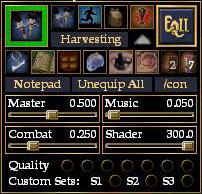
Start Button Expanded
 
Click to enlarge 

Views: 5315
Size: 28.65 Kb
Dimensions: 231 x 400
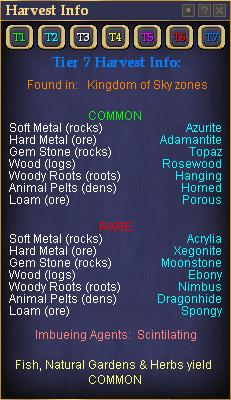
Harvest Window
 
Click to enlarge 

Views: 5197
Size: 63.12 Kb
Dimensions: 529 x 384
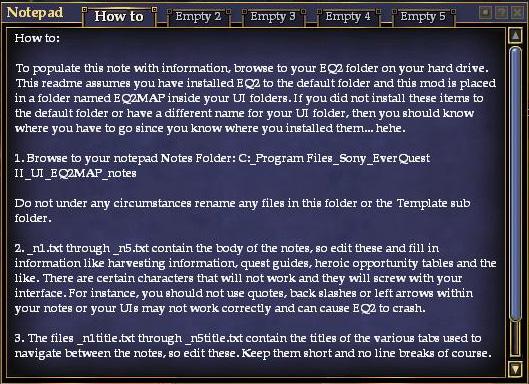
Notepad Window
 
Click to enlarge 

Views: 5105
Size: 4.91 Kb
Dimensions: 205 x 61
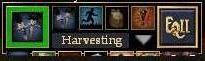
Start Button Collapsed
 
Description
43.1 Somehow my last changes didn't get saved... So now it actually has T8 info instead of T2.

43.0 Updated Harvest Window... finally

42.1 Updated to work with recent changes to ProfitUI

42.0 Added Connection window to mainhud.xml making it display correctly.

39.0 Updated for GU39

V35.0 Updated for GU 35.0

V34.0 Updated Unequip All button and mainhud.xml.

V30.0 Updated for LU30.

V29.0 LU29 Compliant! Fixed issue with achievement page. (You can just upload the patch for a quick fix if you already have it downloaded.)

V27.1 Fixed harvest window information to be up to date.

V25.1 Fixed small button version, added video compiler (I know, finally!), moved full size button version to patch, and added a patch for Fetish. I don't use Fetish, so if you do please tell me if it doesn't work!

V 25.0 Fixed for LU25 and changed journal toggle to zone reuse toggle. Also switched the Harvest button and Unequip All buttton locations. I accidently fixed full size button version first. I will post the small button one eventually. Sorry it took so long, but I'm a self taught UI coder so it takes me a while.

V 24.0 Fixed so zone reuse window works. Thanks xyrqes for posting the problem.

V 23.0b Fixed showhood button, to work for hoods and helms. (This time I actually uploaded it too )

V 23.0 Fixed showhood button, to work for hoods and helms.

V22.1 - Fixed some T1-3 harvesting info and added fullsize button patch

V22.0 - Updated for KoS

*Some old features were made obsolete from various game updates, so many have been changed to buttons I find usefull.

*Updated the Harvest page to include Loams and Tier 7 harvestables.

*Fixed the notebook as well (since it wasn't working on my system I figured it wasn't working on others).

Special thanks to Krull for his "Panic Button" and some great ideas on what to replace broken items with.

Thanks of course to Jaxel for the original mod.

V17.2 **UPDATED - NOT SHOWING PROBLEMS SHOULD BE FIXED**


I configured the mod to show the quick buttons by hovering over the Startbutton. So after installation all you have to do is hover over the EQII button and the other buttons will appear place that window where you want it and the start button will automatically move to your new location (once the arrow is no longer over it). I'm guessing many of you will have to do this everytime you login or change characters. If you want one less thing to hover over: Press - [ALT ~]. This should make the window appear as soon as you login (you still have to hover over quickbuttons to get start button to move to appropriate space). Hope this fixes it for everyone.

-------

This is Jaxel's excellent Startbutton slightly changed. I changed the stop eat/drink button to two click to eat/drink buttons.

The green border around the large button on the right is a manastone timer. To make it work correctly go to options>alarms> and set the session timer to 1 minute and repeat off. It will then go red for one minute and when it is green again it is just a second or two away from being ready. Man Jaxel is brilliant!!

--------------------
v.17.1 - Realized I was missing pieces for this mod in my zip so I added them. It all works now. also I'm including a quote from Jaxel's skin page since he did all the work.

[quote]First of all, the biggest and most easily recognizable feature... MANASTONE SUPPORT! Pushing the green squared button will immediately turn the button red and start a 1 minute timer. One minute later, the button will become green again telling you 1 minute has passed. You must note, that it actually takes 61 seconds to cast the manastone, but you can only set the timer for 60 seconds; if you push the button as soon as it turns green, it will tell you that the manastone is not ready. But, if you wait a second and push the button again, the manastone will cast and the 1 minute timer will restart. I must point out that everytime you push the manastone button, whether it is red or green, it will restart the 1 minute timer. If you install this mod and the timer is not working (its rare, but it happens to some people), do the following:

Options > Alarms > Session Duration:

* Hours: 0
* Minutes: 1
* Repeat: OFF

then click "restart, that will fix it.

The second thing people will notice is the UNEQUIP ALL button. Often, if you are raiding and you know you will die, the leader of the raid will /yell the mob. If this happens, you can click the unequip all button and all your armor will immediately be unequipped! This helps save on repair costs (especially if you are in full fabled). Unfortunately there is no button to automatically re-equip all your armor. Too bad. This feature alone is a reason why everyone should have this startbutton. If mob is not /yelled, then the button will unequip 1 item at a time, each time you press it.

Also included is complex shader support! Much of the visual lag in the game is due to the high graphics setting of characters and surroundings. Lowering the complex shader distance will effect how fast complex graphics will get shadow support. So this bar is a quick method to changing the quality setting of your screen without having to push the video quality settings and having that 5-10 second screen lag. There are also buttons for your the other activatable slot, a Fishbone Earring and two Imbued Ruby Rings. I kept the ranged ammor slot counter in, but now it is smaller. This mod supports all classes, melee or caster alike.
-----

This is my version of Goldi's Start Button. There are harvesting menus, the note pad (with included note builder configured for my OCD skin style), as well as a built in ammo slot into the start menu using a some freaky method that Quib came up with a while ago. Pressing the arrow on the start button will hide and unhide the volume and video controls...

This mod has all the features that Goldi's StartButton mod has:
> Follow Button for quick /follow
> Bags Button for quick /togglebags
> Hood Button for quick /showhood
> Illusion Button for quick /hide_illusions
> Kosmos NightVision Button
> Eating/Drinking Buttons for easy click to eat or drink (change since original)
> Harvesting Information Window
> Notepad with built in Note Assembler
> Kosmos Video Performance Panel with Video Compiler
Archive List (Old Versions)
File Name
Version
Size
Author
Date
43.0
72.34 Kb
himay
03-25-2008 07:49 PM
42.1
72.63 Kb
himay
02-29-2008 09:37 PM
42.0
72.73 Kb
himay
02-07-2008 09:54 AM
39.0
72.72 Kb
himay
10-23-2007 07:55 PM
35.0
72.68 Kb
himay
05-27-2007 09:16 PM
34.0
72.53 Kb
himay
04-29-2007 04:10 PM
30.0
72.47 Kb
himay
12-28-2006 09:51 PM
File Statistics
User Rating:
5 out of 5 with 2 votes
Downloads: 3223
Views: 23465
Favorites: 15
Uploaded By:
 
Last Modified: N/A

View Pictures. Download Now! Post A Comment
Remove Ads


Post A Reply
Author Comments Comment Options
Old 02-17-2008, 06:16 PM  
himay
A Sea Turtle
 
himay's Avatar
Interface Author - Click to view interfaces

Server: Befallen
Forum posts: 30
File comments: 77
Uploads: 28
Quote:
Originally posted by ladygamer5
I just installed this today.. the one recently updated. Mine doesn't look just like the one pictured.. there is no large green button. Also, how do I move it to another location? It doesn't respond to moving like the rest of my UI does
thanks
I should probably replace the picture since the green you see was originally a timer for the manastone (which no one ever has equiped in their charm slot anymore). The easiest way to move it is to expand it then grab somewhere on the lower part. (The curser will change when you are over a part that is movable.) You can't move it using the EQ2 button (it will follow afterwards).
himay is offline Report comment to moderator   Reply With Quote Reply With Quote
Old 02-14-2008, 02:59 PM  
ladygamer5
A Brown Bear

Server: Antonia Bayle
Forum posts: 9
File comments: 5
Uploads: 0
I just installed this today.. the one recently updated. Mine doesn't look just like the one pictured.. there is no large green button. Also, how do I move it to another location? It doesn't respond to moving like the rest of my UI does
thanks
ladygamer5 is offline Report comment to moderator   Reply With Quote Reply With Quote
Old 06-01-2007, 05:49 AM  
Knight Marshal
A Young Mystail Rat

Server: Lucan DLere
Forum posts: 3
File comments: 10
Uploads: 0
Thanks. I had found the three files, but couldn't figure out what to change on them.
Knight Marshal is offline Report comment to moderator   Reply With Quote Reply With Quote
Old 05-31-2007, 09:03 PM  
himay
A Sea Turtle
 
himay's Avatar
Interface Author - Click to view interfaces

Server: Befallen
Forum posts: 30
File comments: 77
Uploads: 28
There is a file in your custom ui folder named "Setting Sound and Shader Sliders.txt" Open this file and it will explain how to change them. There are two options to do it and both might be a little intimidating if you haven't done anything like it before. Don't worry though it isn't all that hard to do and if you goof up you can always just replace the files with the originals you downloaded.


Quote:
I am having a problem with the sound controls. I set the sound sliders where I want them and every time I log back in the only sound I can here is the UI sounds. I have to reset the sliders where I want them again.

Example. I set the Master volumn control to 100% and when I log back in, it is set to 50%.

Is there a way to permantly set the sliders to stay where I want them?
himay is offline Report comment to moderator   Reply With Quote Reply With Quote
Old 05-31-2007, 05:32 PM  
Knight Marshal
A Young Mystail Rat

Server: Lucan DLere
Forum posts: 3
File comments: 10
Uploads: 0
I am having a problem with the sound controls. I set the sound sliders where I want them and every time I log back in the only sound I can here is the UI sounds. I have to reset the sliders where I want them again.

Example. I set the Master volumn control to 100% and when I log back in, it is set to 50%.

Is there a way to permantly set the sliders to stay where I want them?
Knight Marshal is offline Report comment to moderator   Reply With Quote Reply With Quote
Old 04-28-2007, 11:06 AM  
abbelyn
A Rumbleroot Sapling
 
abbelyn's Avatar
Interface Author - Click to view interfaces

Server: Lucan DLere
Forum posts: 68
File comments: 27
Uploads: 3
Hello, just letting you know there are those of us waiting for the GU34 release =) Thanks for all of your hard work.
abbelyn is offline Report comment to moderator   Reply With Quote Reply With Quote
Old 01-23-2007, 05:52 PM  
himay
A Sea Turtle
 
himay's Avatar
Interface Author - Click to view interfaces

Server: Befallen
Forum posts: 30
File comments: 77
Uploads: 28
Quote:
Originally posted by rbforme
doesn't seem to work for me, just keep getting the default start button to show up. i use a mix of pieces a few of which are from fetish and tried both the fetish and regular LU30 patch you have posted and neither seems to work for me.
please try this -

Options -> User Interface -> Game Windows -> (Uncheck) Keep Main HUD Windows Visible then click accept and Press the Alt + ~ to make it show. After you have it loaded up then you can go back and recheck the option to keep your Main HUD windows from being hidable.
himay is offline Report comment to moderator   Reply With Quote Reply With Quote
Old 01-21-2007, 04:18 PM  
rbforme
A Young Mystail Rat

Server: Antonia Bayle
Forum posts: 6
File comments: 7
Uploads: 0
doesn't seem to work for me, just keep getting the default start button to show up. i use a mix of pieces a few of which are from fetish and tried both the fetish and regular LU30 patch you have posted and neither seems to work for me.
rbforme is offline Report comment to moderator   Reply With Quote Reply With Quote
Old 12-19-2006, 08:37 PM  
himay
A Sea Turtle
 
himay's Avatar
Interface Author - Click to view interfaces

Server: Befallen
Forum posts: 30
File comments: 77
Uploads: 28
Re: Movin' startbutton

Quote:
Originally posted by Passatuner
When i use this, the startbuttons changes its placed from time to time when i log in. Anyway to fix this?
Not sure what you mean. The actual startbutton will have a fixed place it starts at and will not appear as part of the modification until you hover over (and possibly off) of the startbar mod. There is no way to change this, it is just one of the little quirks of the programming.

If you mean your actual startbar mod is moving from one place to another, well that is weird and shouldn't be happening.
himay is offline Report comment to moderator   Reply With Quote Reply With Quote
Old 12-19-2006, 04:51 AM  
Passatuner
Just a Skinning Noob
Interface Author - Click to view interfaces

Forum posts: 7
File comments: 8
Uploads: 6
Movin' startbutton

When i use this, the startbuttons changes its placed from time to time when i log in. Anyway to fix this?

Last edited by Passatuner : 12-19-2006 at 04:52 AM.
Passatuner is offline Report comment to moderator   Reply With Quote Reply With Quote
Old 11-27-2006, 02:16 PM  
Sleestak
A Brown Bear
 
Sleestak's Avatar

Server: Najena
Forum posts: 11
File comments: 6
Uploads: 0
Woot

thanks for working so hard on this. we really appriciate it!
My favorite start button mod out there
Sleestak is offline Report comment to moderator   Reply With Quote Reply With Quote
Old 09-11-2006, 08:37 AM  
mr.wolfie
A Young Mystail Rat
Interface Author - Click to view interfaces

Server: Antonia Bayle
Forum posts: 5
File comments: 6
Uploads: 4
Re: works again

Quote:
Originally posted by himay
They patched a fix and it works again! Yay and I didnt have to do anything. Just a quick FYI harvesting window update coming in next day or so.
Yup. Works just fine for me. And:

DOH! I just sent in an add on for a new harvest window
Ah well, a choice is never a bad thing, eh?

Cheerio,
mr.wolfie.
mr.wolfie is offline Report comment to moderator   Reply With Quote Reply With Quote
Old 09-11-2006, 02:33 AM  
himay
A Sea Turtle
 
himay's Avatar
Interface Author - Click to view interfaces

Server: Befallen
Forum posts: 30
File comments: 77
Uploads: 28
works again

They patched a fix and it works again! Yay and I didnt have to do anything. Just a quick FYI harvesting window update coming in next day or so.

Quote:
Originally posted by xyrqes
Unfortunately as of LU27 this is broke - it crashes the client when loading a character

Goldi had the same problem which they have now fixed.

I hope you can find the time to update this very useful mod.

thank you.
himay is offline Report comment to moderator   Reply With Quote Reply With Quote
Old 09-08-2006, 03:11 AM  
Ranot
A Griffon
Interface Author - Click to view interfaces

Server: Antonia Bayle
Forum posts: 113
File comments: 54
Uploads: 2
Until he gets this one working you can steal the eq2ui_mainhud_startbutton.xml out of vert reborn, it's exactly the same as this one since mine started as jaxel's aswell except I have the notepad button directing to Milk's Infocenter.

- Joscelyn (Ranot)
Ranot is offline Report comment to moderator   Reply With Quote Reply With Quote
Old 09-07-2006, 11:42 AM  
modesta
A Grove Wisp

Server: Antonia Bayle
Forum posts: 28
File comments: 9
Uploads: 0
Broken

For those of you looking for alternatives out there till it is fixed, MaddBomber's is also broken.

Quote:
Originally posted by xyrqes
Unfortunately as of LU27 this is broke - it crashes the client when loading a character

Goldi had the same problem which they have now fixed.

I hope you can find the time to update this very useful mod.

thank you.

Last edited by modesta : 09-07-2006 at 11:43 AM.
modesta is offline Report comment to moderator   Reply With Quote Reply With Quote
Post A Reply

 
Category Jump:
Search this Category:
 

All times are GMT -5. The time now is 03:27 PM.


Our Network
EQInterface | EQ2Interface | WoWInterface | VGInterface | LoTROInterface | MMOInterface