EQ2Interface.com
Search Downloads


Go Back   EQ2Interface > Complete Sets

Category: Complete SetsProfitUI
Interface Information
Download
How do I install this? (FAQ)
Name: ProfitUI   Popular!
Author:
Date: 11-16-2005 10:04 AM
Size: 249.78 Kb
Version: 1.8b
Rate Addon: 5 out of 5 with 61 votes  
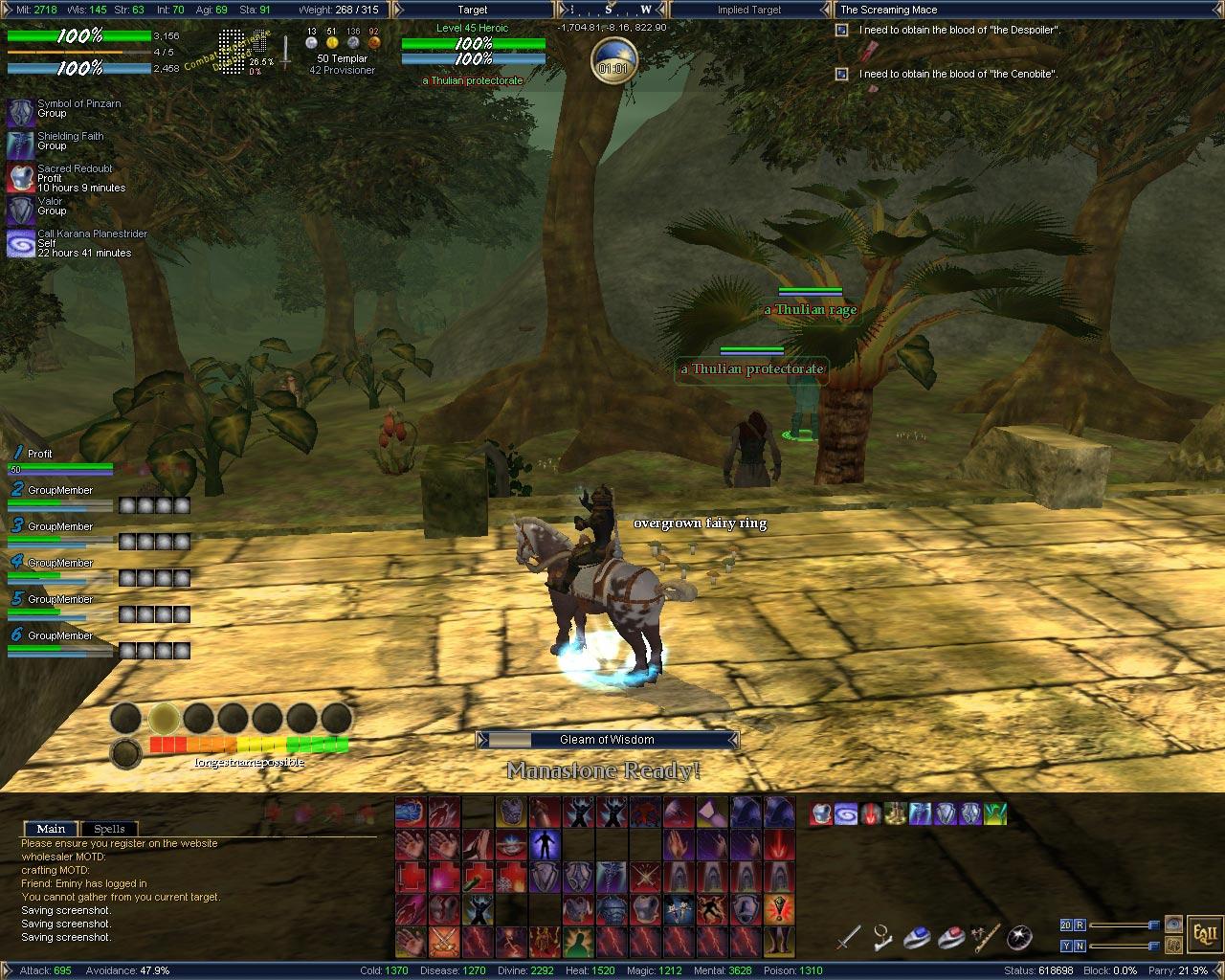
Pictures
Click to enlarge 

Views: 120147
Size: 261.67 Kb
Dimensions: 1280 x 1024
1280x1024
 
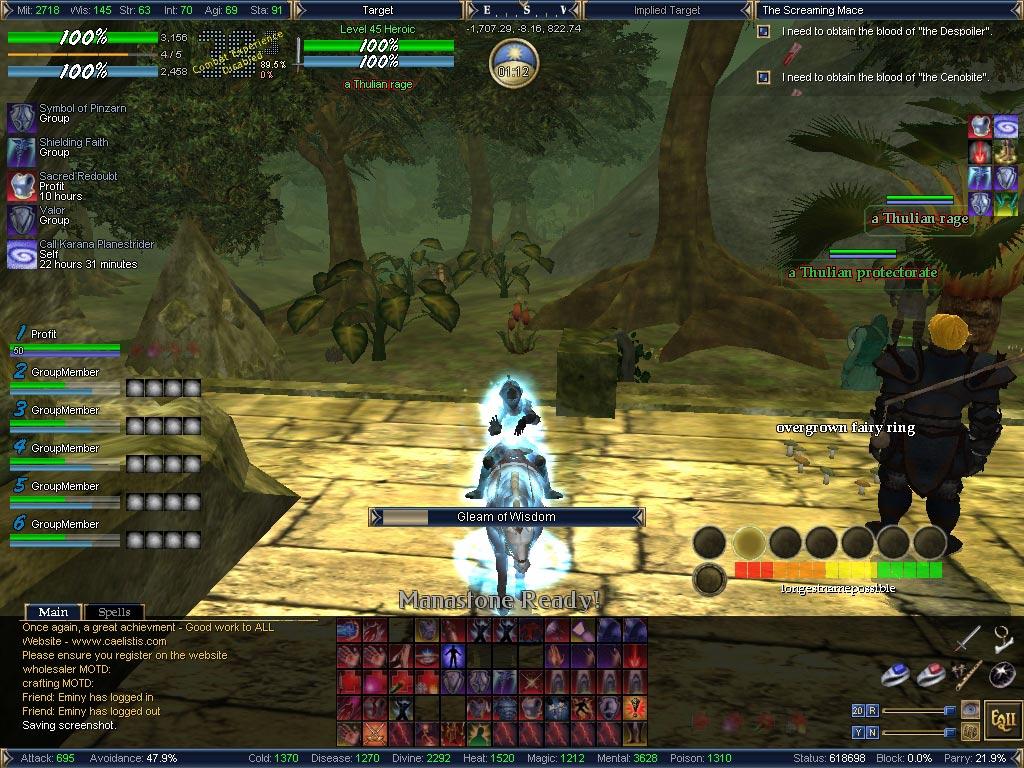
Click to enlarge 

Views: 97790
Size: 176.54 Kb
Dimensions: 1024 x 768
1024x768
 
Description
ProfitUI 1.8c

Please discuss here:
http://www.eq2interface.com/forums/showthread.php?p=35895


Features of ProfitUI

First of all, thank you for using my UI.

I designed this UI for myself, I never intended to release it, but after several months I figured others could benefit from changes, especially when I had the Manastone timer and horse/ring buttons (no longer needed due to update #16).

This UI was only designed for a resolution of 1280x1024 (17/19" LCD), it can be used on other resolutions with a little tinkering.

I also recommend turning off font smoothing and small fonts, it breaks the fancy fonts I use and in my opinion does not looks as sharp/professional.

If you are having problems with the fonts, try installing them to the windows fonts folder. This should not be needed though if they are installed to the default UI/Fonts folder.


I highly recommend you start by using the included uisettings file, especially if you have never used this UI before. simply rename the file to match your server and player name. Please backup your existing file in case you need to return to your previous UI.

The following are the highlights/features of the windows I updated in the UI


Experience Window (ALT+X)
Click the dotty XP numbers to cycle between Adventure, Tradeskill and Guild
The smaller numbers on the Guild xp is number of player on/in your Guild.
Hover over the XP window to show resists
Can also be resized if you have a smaller/larger resolution than it was designed for
Right Click for more options

Group window (ALT+G)
Highlights the selected member
Press the numbers 2-6 to follow that member
Hover over the window to show the leave group button
Turn Frame on to display backgrounds to each member
Turn Titlebar on to show class of each member
There are horizontal and compact versions available in the UI folder, just rename to use

Heroic Opportunities
Different format, taken from another mod
If you don't like this or cannot get used to it, just remove or rename this file: eq2ui_mainhud_heroic.xml

Hotbars
Turn Frame on to show shortcut key
Sizeable

Chat window
Turn on Frame and Titlebar to get full use of the window
Hover in window to show scrollbars and default chat icon

Active Quest window (ALT+J)
Hover over to show scrollbars

Maintained Effects (ALT+M)
Shows duration and target
Use mouse to scroll up and down effects (I hide my permanent spells, so easier to see maintained spells that are due to run out)

Target window (ALT+T)
Shows target's power
Hover over to show the toggle con_version button

Player window (ALT+U)
Turn Frame on to display backgrounds to each target
Turn Titlebar on to show titles

Raid window (ALT+R)
Can be resized to show 1-4 groups
Use the mouse wheel to scroll between groups
Turn off Frame to hide group titles

Start button
Can be resized to hide the graphical buttons/sliders

Memorized window
This is my way of creating the darker area on the bottom of the screen
The opacity can be set to suit your needs

Compass window
Turn on Titlebar to show current co-ordinates

Clock (ALT+C)
Shows Earth/Norathian time

Casting window
This can be resized

Quest Journal
Side by side format
Includes writs/lore and heritage information (taken from another mod)

Market window
Cleaner/easier format

Store window
Includes a Find button which automatically puts the selected items name in the market window
Added a toggle vault button

Bank window
Added a toggle all bank bags button

Bags
Small icons with no titlebar
Hover over bag to show the move/close buttons


If you want to make the upper area easier to read you can turn on the background and change the opacity of the following windows:
Experience, Compass, Active Quest
File Statistics
User Rating:
5 out of 5 with 61 votes
Downloads: 27354
Views: 180244
Favorites: 225
Uploaded By:
 
Last Modified: 12-01-2005 10:20 AM by Profit    

View Pictures. Download Now! Post A Comment
Remove Ads


Post A Reply
Author Comments Comment Options
Old 03-08-2008, 11:24 PM  
FlorenceSopher
Templar and Sage

Server: Lucan DLere
Forum posts: 12
File comments: 2
Uploads: 0
Linking to EQ2 Allakhazam's wiki

You can now connect DIRECTLY to records at AllaK using the wiki URL format.

Just preface the name of the quest or item with:

http://eq2.allakhazam.com/wiki/eq2_quest:name_of_quest

or

http://eq2.allakhazam.com/wiki/eq2_item:name_of_item

not sure if you have a place to link FROM, but spells (ability), zone, faction and object can be linked the same way.

Thought you might wanna alter the link you create for the UI in this way.

----
Bludwyng, EQ2 Allakhazam Wikibase Admin
FlorenceSopher is offline Report comment to moderator   Reply With Quote Reply With Quote
Old 05-30-2007, 04:45 PM  
Taff
A Young Mystail Rat

Server: Antonia Bayle
Forum posts: 4
File comments: 1
Uploads: 0
Re: part not working with new free content

the exp percent number displays the wrong number,the quest journal dont have a share button to share quests.
anyone know whaen these parts will be updated?

I think you might want to direct this toward ProfitReborn.

There is a separate support area, I've noticed. Also the guy who puts this together is on vacation.

Good luck on getting your answers.
Taff is offline Report comment to moderator   Reply With Quote Reply With Quote
Old 05-26-2007, 08:56 AM  
yantis_the_rat
A Young Mystail Rat

Server: Antonia Bayle
Forum posts: 2
File comments: 1
Uploads: 0
part not working with new free content

the exp percent number displays the wrong number,the quest journal dont have a share button to share quests.
anyone know whaen these parts will be updated?
yantis_the_rat is offline Report comment to moderator   Reply With Quote Reply With Quote
Old 11-21-2006, 11:16 PM  
komives
A Young Mystail Rat

Server: Antonia Bayle
Forum posts: 5
File comments: 1
Uploads: 0
having problems with my experience bar, it doesnt always display all the digits of the big number, also fraction part seem to count rather hectic... the number at top status line seems OK, except around 100% (before ding) its shows something like ~00.60% ...


found similar posts on other forum, seems like a SOE side bug.

Last edited by komives : 11-21-2006 at 11:21 PM.
komives is offline Report comment to moderator   Reply With Quote Reply With Quote
Old 11-15-2006, 05:16 AM  
larslars
A Coastal Crab

Server: Antonia Bayle
Forum posts: 0
File comments: 1
Uploads: 0
ui is messed up with the new expansion
larslars is offline Report comment to moderator   Reply With Quote Reply With Quote
Old 08-29-2006, 04:16 AM  
Ciar2001
A Young Mystail Rat
 
Ciar2001's Avatar

Server: Nagafen
Forum posts: 3
File comments: 1
Uploads: 0
Seem to be missing certain aspects of this UI, did a total reinstall of EQII to resolve some other issues i was having with the game, installed this UI it's very nice only thing is i seem to missing the graphics for the health bar, and the bars that run along the top and bottom of the screen, is there something i have missed out?

i have installed the UI over the top of the actual default EQII UI, sorry bit of a UI n00b i am only used to using them in DAoC
Ciar2001 is offline Report comment to moderator   Reply With Quote Reply With Quote
Old 06-23-2006, 02:46 AM  
gm9
Drumstix42 is my hero
 
gm9's Avatar
EQ2Interface Super Mod
Interface Author - Click to view interfaces

Server: Runnyeye
Forum posts: 3083
File comments: 53
Uploads: 15
Btw, in case you didn't notice yet (or are coming here from the link on the front page):

New download location is here:

Last edited by gm9 : 04-27-2007 at 03:55 AM.
gm9 is offline Report comment to moderator   Reply With Quote Reply With Quote
Old 04-29-2006, 02:20 AM  
Rumor
A Coastal Crab

Server: Antonia Bayle
Forum posts: 0
File comments: 1
Uploads: 0
pet window?

i cant seem to find or open a pet window
Rumor is offline Report comment to moderator   Reply With Quote Reply With Quote
Old 04-09-2006, 11:06 AM  
LeiWong
A Coastal Crab

Server: Antonia Bayle
Forum posts: 0
File comments: 1
Uploads: 0
New ProfitUI

Hello, just to let you all know there is a new ProfitUI skin out its pretty nice and some new features. It is now being updated by someone else here is the link.


http://www.eq2interface.com/download...fo.php?id=4215

Last edited by LeiWong : 04-09-2006 at 11:07 AM.
LeiWong is offline Report comment to moderator   Reply With Quote Reply With Quote
Old 02-24-2006, 07:15 PM  
FrellingTralk
A Young Mystail Rat

Server: Antonia Bayle
Forum posts: 2
File comments: 1
Uploads: 0
Agreed - update, please!
FrellingTralk is offline Report comment to moderator   Reply With Quote Reply With Quote
Old 02-21-2006, 11:29 AM  
instant
A Young Mystail Rat

Server: Antonia Bayle
Forum posts: 5
File comments: 3
Uploads: 0
Really wish this ui would be updated.. have looked at all the other Eq2 uis and they look like crap compared to this one.
instant is offline Report comment to moderator   Reply With Quote Reply With Quote
Old 02-12-2006, 09:26 PM  
saltgurl
A Young Mystail Rat

Server: Antonia Bayle
Forum posts: 4
File comments: 6
Uploads: 0
Raid Window

Hello, my boyfriend is using your UI and i LOVEEEEEEEEEEEEE your raid window, but have my own custom UI for everything else. is it possible that you would package your raid window seperate so users can download it? Thanks in advance if this is possible =)
saltgurl is offline Report comment to moderator   Reply With Quote Reply With Quote
Old 02-09-2006, 01:12 PM  
masoninc61
A Coastal Crab

Server: Antonia Bayle
Forum posts: 0
File comments: 1
Uploads: 0
Quote:
Originally posted by Saloma Teale
Having big issues with the UI now. For some reason it comes with 12 chat windows loaded up, and I cant seem to get rid of them. They will not insert into other windows as chat tabs, and there is no option on the windows anywhere to CLOSE them out.

Is it possible to get a Close Chat Window option in here somewhere? This is killing me.
I have the curse of the numerous chat windows also, wha tI had to do is creat a new tab, put it in one of the cursed, then they will all combine.


Also, I just reinstalled profitUI to use Tamer's update (which is great!) but I use to have a modified version of the maintained spell efects that made it smaller (The window on the left, maybe its spell effects?) I cant remember where I got it from, if anyone knows where I'd be much appreciate it, the current one is just to big to fit all my spells
masoninc61 is offline Report comment to moderator   Reply With Quote Reply With Quote
Old 02-04-2006, 06:15 PM  
Saloma Teale
A Coastal Crab

Server: Antonia Bayle
Forum posts: 0
File comments: 3
Uploads: 0
Having big issues with the UI now. For some reason it comes with 12 chat windows loaded up, and I cant seem to get rid of them. They will not insert into other windows as chat tabs, and there is no option on the windows anywhere to CLOSE them out.

Is it possible to get a Close Chat Window option in here somewhere? This is killing me.

Last edited by Saloma Teale : 02-04-2006 at 06:16 PM.
Saloma Teale is offline Report comment to moderator   Reply With Quote Reply With Quote
Old 02-03-2006, 12:04 PM  
Tamer
A Young Mystail Rat

Server: Blackburrow
Forum posts: 5
File comments: 2
Uploads: 0
Profit18e can be found on this thread addressing issues with LU19

http://www.eq2interface.com/forums/s...0363#post40363
Tamer is offline Report comment to moderator   Reply With Quote Reply With Quote
Post A Reply

 
Category Jump:
Search this Category:
 

All times are GMT -5. The time now is 03:32 PM.


Our Network
EQInterface | EQ2Interface | WoWInterface | VGInterface | LoTROInterface | MMOInterface