EQ2Interface.com
Search Downloads


Go Back   EQ2Interface > Compilations

Category: CompilationsDamea's UI Pack *EoF & LU#29 Compatible!!*
Interface Information
Download
How do I install this? (FAQ)
Name: Damea's UI Pack *EoF & LU#29 Compatible!!*   Popular!
Author:
Date: 11-15-2006 06:14 PM
Size: 2.56 MB
Version: 1.29.1
Rate Addon: 4 out of 5 with 8 votes  
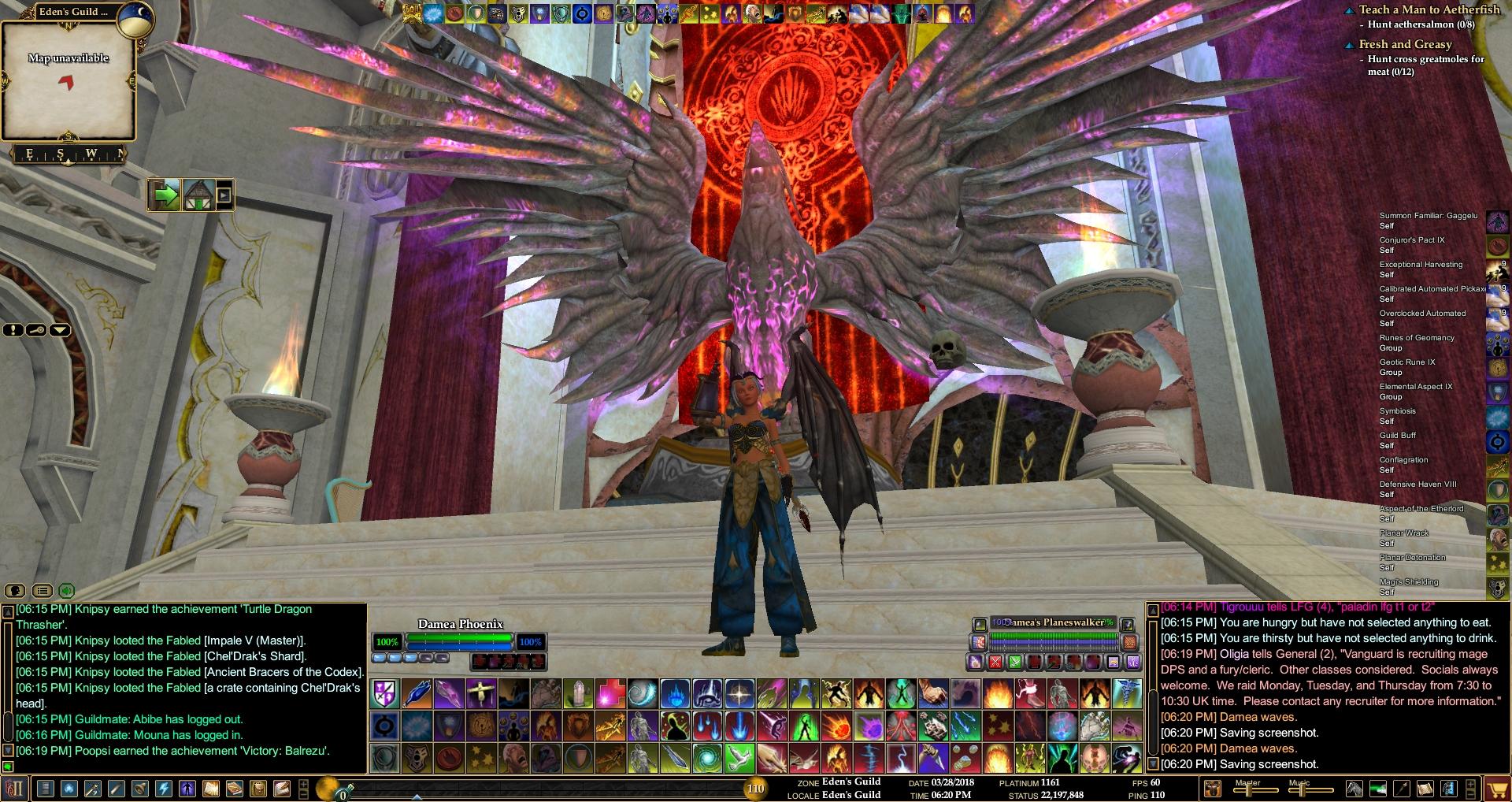
Pictures
Click to enlarge 

Views: 6130
Size: 191.68 Kb
Dimensions: 1280 x 1024
Normal View
 
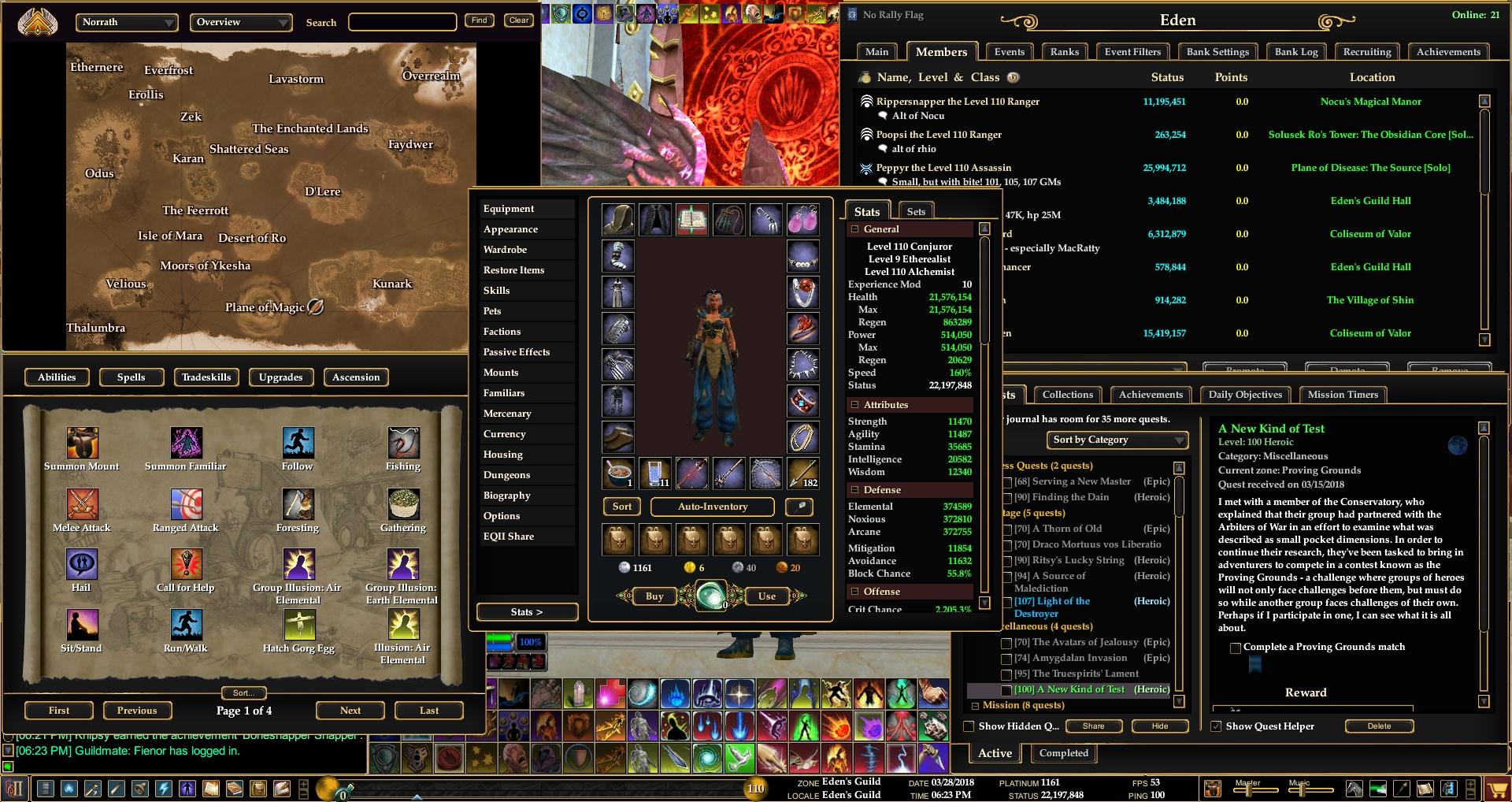
Click to enlarge 

Views: 4760
Size: 204.25 Kb
Dimensions: 1280 x 1024
Normal View Non Opaque
 
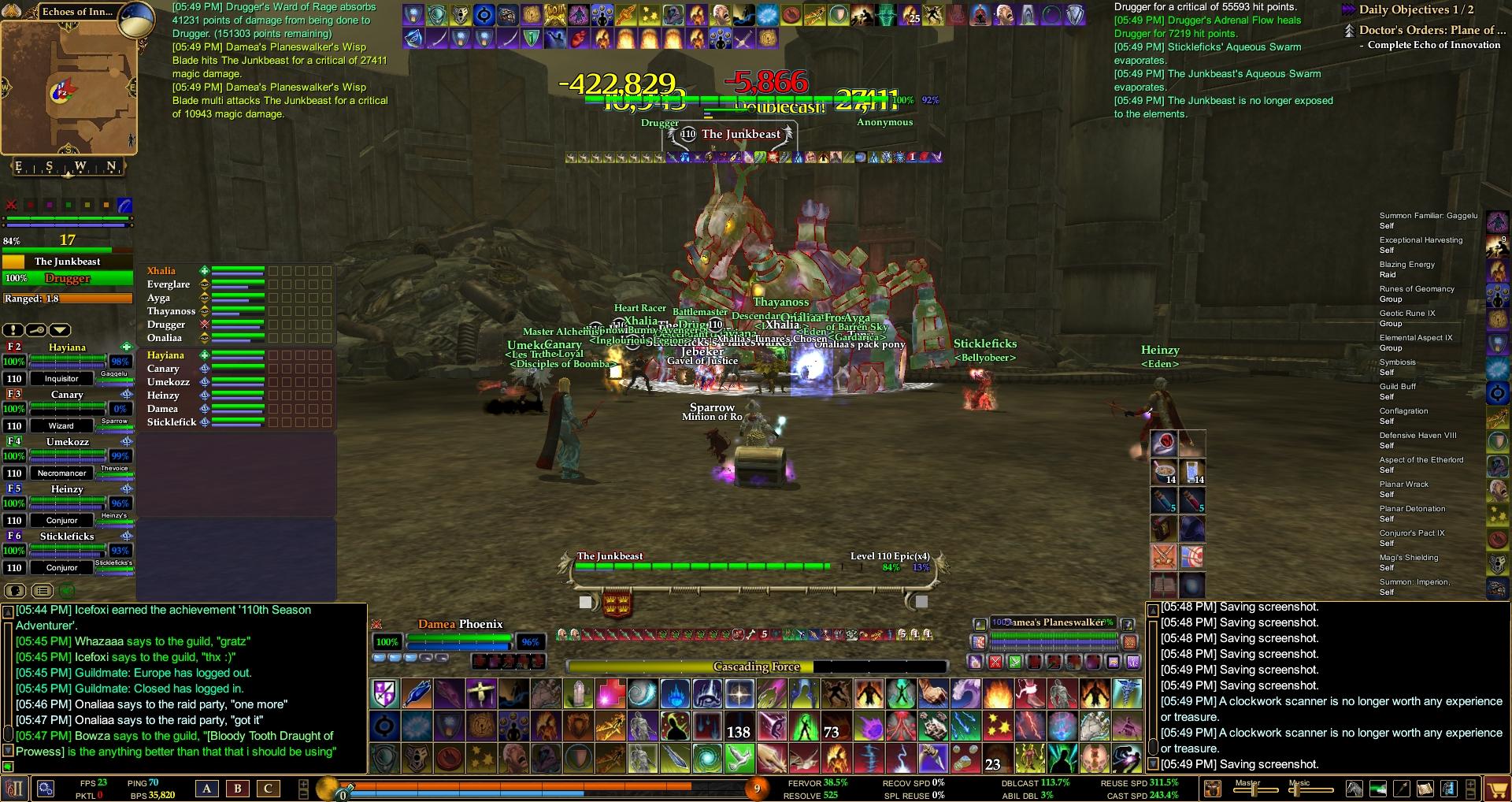
Click to enlarge 

Views: 4336
Size: 194.20 Kb
Dimensions: 1280 x 1024
In Group Midfight
 
Description
*Version 1.29.1*

Hi all!
Complete Overhaul of my UI pack again as EoF and LU#29 busted my hotbars and targets...!! No sweat, altho a little sweat :P
The only workable hotbars and targets I found that were REALLY to my liking
were the ones from ProfitUI Reborn II... Now I hope gm9 wont be mad for this but I used his ProfitUI as my base...
I only use the targets, hotbars and clock/compass tho, rest is still compiled from the other pieces I always liked or got used to!!
I hope u all will like the "newish" look!! =)
Screens of Midfight and Raid will be added soon!!!
*Designed for Resolution 1280x1024*

Bottom left chatwindow is used for /ooc, channels and other spammage.
Bottom middle chatwindow is used for Guild, Group, Raid (The Important ones :P)
Top right chatwindow is for the battlespammage! Shows on action or mouseover.
The 6x2 Hotbars above petwindow show on mouseover, so does the little command startbutton thingie on the right next to the XP bar.
Targets are above main chat window. (Screens of midfight and Raid will be added soon :P)
The top buff effects are the Effects on U and the one on the right close to the spells is for ur Maintained spells.
Rest is pretty clear from the pictures I think.


Mod Used:

ProfitUI Reborn II (Partially): http://www.eq2interface.com/downloads/fileinfo.php?id=4277
Mortis Bank : http://www.eq2interface.com/downloads/fileinfo.php?id=3963
Scrollbarless Chat Window : http://www.eq2interface.com/downloads/fileinfo.php?id=3232
Zombiepup's Experience Bar : http://www.eq2interface.com/downloads/fileinfo.php?id=3942
SageUI Guild Window : http://www.eq2interface.com/downloads/fileinfo.php?id=4273
Smaller HO! : http://www.eq2interface.com/downloads/fileinfo.php?id=3306
DragowulfUI Advanced 6-Way Inventory : http://www.eq2interface.com/downloads/fileinfo.php?id=3927
SageUI Journal : http://www.eq2interface.com/downloads/fileinfo.php?id=4270
Mahonri's Quick Change Shutdown Window : http://www.eq2interface.com/downloads/fileinfo.php?id=4008
depechenode's Advanced Pet Window : http://www.eq2interface.com/downloads/fileinfo.php?id=4029
Incubi - Transparent Raid Window : http://www.eq2interface.com/downloads/fileinfo.php?id=3264


Thanks & Credits go out to :
mortis42, gm9, insomniac, Zombiepup, Jaxel, michsageman242, cesea, dragonwulf, Mahonri, depechenode, ZoLeN, Everyone from the EQ2Map Team,
Everyone supporting my mod pack, The Guild & Guildies from Phoenix Legion on the Runnyeye server and Everyone I forgot!!


Thanks for ur support and hope u enjoy my UI pack!!!


Regards,
Damea...

File Statistics
User Rating:
4 out of 5 with 8 votes
Downloads: 3202
Views: 35984
Favorites: 18
Uploaded By:
 
Last Modified: 11-18-2006 12:09 AM by Damea    

View Pictures. Download Now! Post A Comment
Remove Ads


Post A Reply
Author Comments Comment Options
Old 06-26-2007, 01:27 PM  
snus
A Coastal Crab

Server: Antonia Bayle
Forum posts: 1
File comments: 1
Uploads: 0
How to fix LFG window.

The LFG window is not working.

I found this in another post. copy paste

Bluu
A Young Mystail Rat Join Date: May 2007
Server: Antonia Bayle
Posts: 3


In your custom UI folder find the file named eq2ui_mainhud.xml and open it in windows notepad.

Once you have the file open in notepad scroll down to the bottom where you see the code...
Code:
</Page>
Directly above that line insert two new lines and add this...
Code:
<include>eq2ui_mainhud_guildcreation.xml</include>
<include>eq2ui_mainhud_lfg.xml</include>
Save the file and load up EQ2 and see if you get the new LFG window.


Thx to Bluu

Last edited by snus : 06-26-2007 at 01:42 PM.
snus is offline Report comment to moderator   Reply With Quote Reply With Quote
Old 10-20-2006, 08:22 AM  
Damea
A Young Mystail Rat
Interface Author - Click to view interfaces

Server: Antonia Bayle
Forum posts: 5
File comments: 9
Uploads: 1
Quote:
Originally posted by DraconisNoir
Is there any way to make the targeting window smaller? It stretches over nearly half my screen and takes up quite a bit of room. I really like your UI but appear to be using a smaller screen resolution than you designed for.
Indeed this UI is designed for 1280x1024 resolution.
The only thing u can do really is delete those targets from the Custom Map.
Then u will have default target and implied target windows.
U can also check the site here for targets u like, download em and just copy them into the Custom Map, select yes when it asks to overwrite.

I hope this helped!!


Regards,
Damea...
Damea is offline Report comment to moderator   Reply With Quote Reply With Quote
Old 10-18-2006, 06:19 PM  
DraconisNoir
A Young Mystail Rat
 
DraconisNoir's Avatar

Server: Highkeep
Forum posts: 4
File comments: 2
Uploads: 0
Is there any way to make the targeting window smaller? It stretches over nearly half my screen and takes up quite a bit of room. I really like your UI but appear to be using a smaller screen resolution than you designed for.

Last edited by DraconisNoir : 10-20-2006 at 01:02 AM.
DraconisNoir is offline Report comment to moderator   Reply With Quote Reply With Quote
Old 10-09-2006, 04:35 PM  
Valkiera
A Coastal Crab

Server: Butcherblock
Forum posts: 1
File comments: 1
Uploads: 0
Like the looks

Has anyone else tried the new version?

I unpacked it and got a custom.rar file instead of the .zip or a folder.

I know enough about UI's to be dangerious

Thanks for any assistance.

Val

Last edited by Valkiera : 10-09-2006 at 07:08 PM.
Valkiera is offline Report comment to moderator   Reply With Quote Reply With Quote
Old 07-30-2006, 07:57 PM  
Lethiana
Premium Member
Premium Member

Server: Najena
Forum posts: 10
File comments: 13
Uploads: 0
Anyone have a similar UI since this one is no longer being updated?
Lethiana is offline Report comment to moderator   Reply With Quote Reply With Quote
Old 07-13-2006, 05:56 PM  
Lethiana
Premium Member
Premium Member

Server: Najena
Forum posts: 10
File comments: 13
Uploads: 0
Are you working on the update Damea? The new changes forced me to return to the default and I miss your UI.
Thank you
Lethiana is offline Report comment to moderator   Reply With Quote Reply With Quote
Old 06-29-2006, 06:26 PM  
Lethiana
Premium Member
Premium Member

Server: Najena
Forum posts: 10
File comments: 13
Uploads: 0
All you have to do to use this UI with the new broker system is copy the trader file from your default UI folder and move it over to your Damea folder. Fairly simple fix for it.
Lethiana is offline Report comment to moderator   Reply With Quote Reply With Quote
Old 06-16-2006, 09:08 AM  
Chronix420
A Coastal Crab

Server: Antonia Bayle
Forum posts: 0
File comments: 2
Uploads: 0
wondering if you plan on updating this due to LU24? Had to switch UI's since it won't work with the new broker system.
Chronix420 is offline Report comment to moderator   Reply With Quote Reply With Quote
Old 03-25-2006, 08:05 AM  
Damea
A Young Mystail Rat
Interface Author - Click to view interfaces

Server: Antonia Bayle
Forum posts: 5
File comments: 9
Uploads: 1
U will have to reset the modded targets then.
Just open the custom directory and look for files called something_target and something_impliedtarget or something...

Just delete those 2 files and ur set, u can look for seperate targets in the download section that u like to replace em also.

Hope this helped u further!


Regards,
Damea is offline Report comment to moderator   Reply With Quote Reply With Quote
Old 03-23-2006, 10:18 PM  
heeby
A Coastal Crab

Server: Antonia Bayle
Forum posts: 0
File comments: 1
Uploads: 0
This is the best interface I've found but none of the effects on my target shows up. This is a big deal for a pvp server is there any way to get this in the mod?
heeby is offline Report comment to moderator   Reply With Quote Reply With Quote
Old 03-09-2006, 10:09 AM  
choctaw
A Coastal Crab

Server: Antonia Bayle
Forum posts: 0
File comments: 1
Uploads: 0
I was curious about a quick fix for a vertical group layout as in the picture versus the horizontal one. or even a quick and dirty walkthrough on how to change it.
choctaw is offline Report comment to moderator   Reply With Quote Reply With Quote
Old 03-08-2006, 09:17 PM  
Gondo
OMG its Birdzorz!!~1

Server: Highkeep
Forum posts: 0
File comments: 3
Uploads: 0
Re: Game Settings

Quote:
Originally posted by abellda
Damea,

I have noticed every time I start the game certain settings, such as master volume, keep reverting back to settings other than what I set them to. Any ideas on how to get my changes to stay after I log out?
Got a fix for you Abellda works well.

Ok in your video folder you should see the following 4 files that match up with the sliders...

eq2ui_sound_master.xml
eq2ui_sound_music.xml
eq2ui_sound_combat.xml
eq2ui_sound_shader.xml

Using notepad open each of the files and look for this line at very end of it:

For sound sliders...

UpperLimit="20" Value="number here will vary"

change the value="put in your number here from 0 to 20" to a higher number to increase volume or a lower number to decrease (dont change the upperlimit just referencing that for where to look for the value number to change), whatever the number you put in divide it by 20 and that will give you the number it will show on slider in game, like if you want sound at max 1.000 change it to value="20" or if you want something in between can just throw in whatever number your looking for, like if you want 0.250 as the number on the slider shown in the mod, it would be value="5"

next change this part (it will vary to match slider name):

Combat_music_Volume="0.050"

like in the above example if you set value to 5, using the math 5/20 would equal 0.250 as I noted above, you would change the "0.050" to "0.250" to match

For shader slider...

the settings for the shader works slightly different...

instead of the value="x" being divided by 20 as in the sound files it is instead multiplied by 15

so if you want to set the shader to say 150 instead of 300, you would lower the value (instead of increasing) to value="10"

again make sure not to mess with the upperlimit number or any of the equation numbers

then goto the r_fast_layer_min_distance="300.000" line and change "300.000" to "150.000" to match the new change

hope that helps for setting up your slider values to more preferrable ones for your needs
Gondo is offline Report comment to moderator   Reply With Quote Reply With Quote
Old 03-06-2006, 08:33 AM  
abellda
A Young Mystail Rat

Server: Antonia Bayle
Forum posts: 7
File comments: 2
Uploads: 0
Game Settings

Damea,

I have noticed every time I start the game certain settings, such as master volume, keep reverting back to settings other than what I set them to. Any ideas on how to get my changes to stay after I log out?
abellda is offline Report comment to moderator   Reply With Quote Reply With Quote
Old 03-04-2006, 10:44 AM  
Damea
A Young Mystail Rat
Interface Author - Click to view interfaces

Server: Antonia Bayle
Forum posts: 5
File comments: 9
Uploads: 1
Quote:
Originally posted by Gondo
Hey Damea love the UI think its great. Had a question though. I used to have the ^^^ arrows over the target window and the mobs but now its gone. I reinstalled the game yesterday just to clean up old files then installed your newest UI but dont have the ^^^ anymore...wondering if you took them out or if I did something.
U shud be able to change that somewhere...
Sec imma look it up...

Options > User Interface > Name and Chat Bubble > NPC evaluation...

Set that to Detailed and u shud have ur arrows back!!


Hope this helped!

Have fun, regards,

Damea...
Damea is offline Report comment to moderator   Reply With Quote Reply With Quote
Old 02-28-2006, 07:59 AM  
abellda
A Young Mystail Rat

Server: Antonia Bayle
Forum posts: 7
File comments: 2
Uploads: 0
Very nice UI. Keep up the fine work.
abellda is offline Report comment to moderator   Reply With Quote Reply With Quote
Post A Reply

 
Category Jump:
Search this Category:
 

All times are GMT -5. The time now is 09:16 AM.


Our Network
EQInterface | EQ2Interface | War.MMOUI | WoWInterface | VGInterface | LoTROInterface | MMOInterface