|
| Category: Inventory window[DragowulfUI] Advanced 6-Way Inventory+Dressing Room GU#43 PART I of II |
|
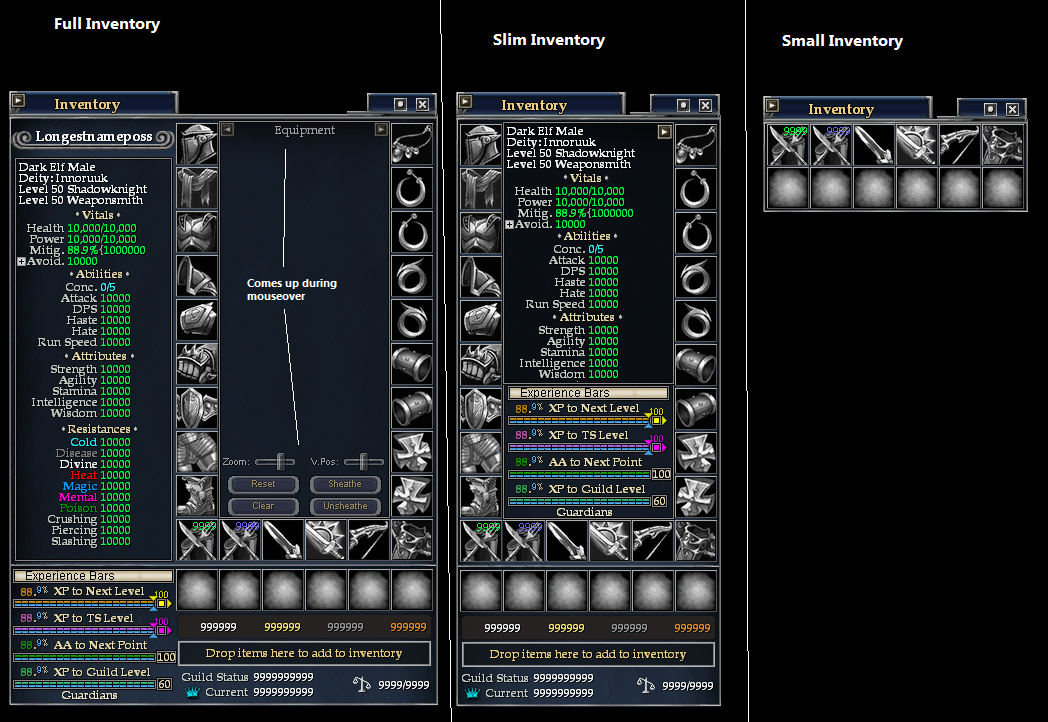
UIBuilderImage- Up-To-Date GU#43 [DragowulfUI] 6-Way Inventory(Full,Slim,Small)
|
| |
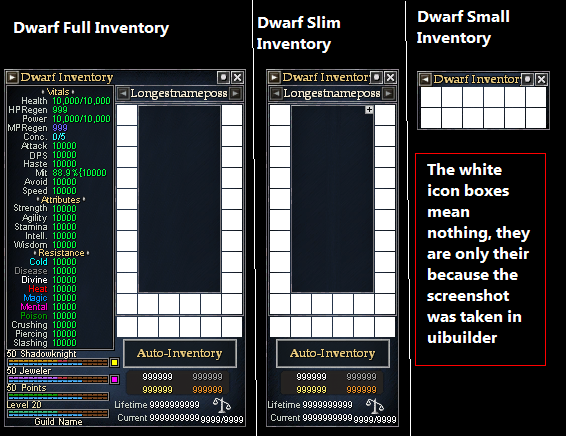
UIBuilderImage- Up-To-Date GU#43 [DragowulfUI] 6-Way Inventory(DwarfFull,DwarfSlim,DwarfSmall)
|
| |
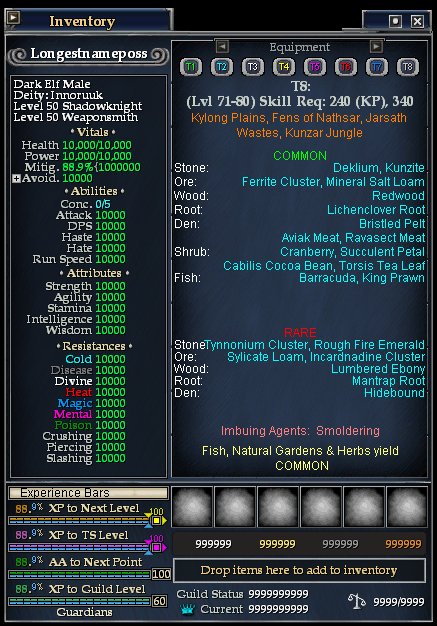
New Harvesting Page T8 info. implemented within the inventory
|
| |
****UPDATED: March 07, 2008: HOTFIX - The Overflow Text bug that caused the Everquest II client to crash should be fixed - HOTFIX
Inventory has been reworked from the ground up and looks better than ever. Performance has also been improved by 200%!!!! ****
PLEASE GIVE FEEDBACK
*Profit UI Compatable*
Features:- All relevant stats can be seen within the UI
- Harvesting page shows all harvesting, rares, common harvests from T1-T8
- Dressing Room (by gm9) is integrated within the UI. When the inventory is up, and you click+shift an item, the Dressing Room is shown within the UI
- Icons (taken from World of Warcraft) are now the Icons I'm using for the equipment
- Persona stats such as the Melee Weapons, Crital Stats, Speed Stats, etc, have been added and are accessible by clicking the little box under the Stats Page
- Experience Bars are Integrated within the UI
- Guild Status, and Status are in the UI
UPDATE NOTES:
Part I: Inventory has been completely reworked from the ground up
Bug Fixes:
- The Overflow Text bug that caused the Everquest II client to crash should be fixed
Changes:- HarvestingPage:
*The bug that made the HarvestingPage conflict with the StatsPage has been resolved
- CheckBoxes:
*Checkboxes for extra stats window and statstrip have been removed until I can make a solid update of these windows
*Checkboxes that were in other pages were removed
*Bag Checkbox was removed
- Paperdoll:
*The arrows/text to switch between Equipment/Appearance/Harvesting pages can now only be seen upon mouseover of the Paperdoll
*Paperdoll is slightly bigger
*The Paperdoll frame has been changed. Many had felt it was too bulky and took up much room
- Stats:
*Stats have been reworked a bit
*StatsPageScroll only comes up when you click the avoidance + (full version)
*StatsPageScroll only comes up upon mouseover of the StatsPages
Misc:
*All those unecessary icons in the StatsPages and Paperdolls have been completely removed. I have concluded that they are no longer needed.
*Player Name now has a cute little eye candy
*PvP and Combat Icons have been removed
Additions:- HarvestingPage:
*Added T8 Info/Button
- Misc:
*Now works with all smooth fonts, etc.
*Other features have been added
Enjoy!!!!
**NOTE** If their is any bugs at all please private message me or leave a comment. If you want anything added, do so also.**
*CREDITS*:
My supporters!
Insom, for giving me the great idea of changing his original inventory piece long ago.
Zonx, 6-way idea
gm9, Advanced Dressing Room
World of Warcraft Icons
----------------------------------------------
INSTALLATION GUIDE:
1). Put all .dds files in the Images folder into your custom UI Images folder
--------------------
2). Put all the .xml/.txt files into your Custom UI directory
--------------------
3). Open up the _DragowulfUI_InventorySettings.txt file, you should see:
<?xml version="1.0" encoding="utf-8"?>
<Page Name="DragowulfUI_InventorySettings">
<Text Name="FullInventory">true</Text>
<Text Name="SlimInventory">false</Text>
<Text Name="SmallInventory">false</Text>
<Text Name="DwarfFullInventory">false</Text>
<Text Name="DwarfSlimInventory">false</Text>
<Text Name="DwarfSmallInventory">false</Text>
</Page>
--------------------
This is the file you use to change which version of the inventory you want to see when you enter the game. By default the FullInventory is set to True, meaning it is the one you will see when you first open inventory when you log in. To see the another version like SmallInventory, change all the other versions to false, and change SmallInventory to True. It should look like (this is an example):
<?xml version="1.0" encoding="utf-8"?>
<Page Name="DragowulfUI_InventorySettings">
<Text Name="FullInventory">false</Text>
<Text Name="SlimInventory">false</Text>
<Text Name="SmallInventory">true</Text>
<Text Name="DwarfFullInventory">false</Text>
<Text Name="DwarfSlimInventory">false</Text>
<Text Name="DwarfSmallInventory">false</Text>
</Page>
--------------------
****NOTE: There are screenshots for referance of which to choose****
--------------------
4). Open up eq2ui_custom.xml with Notepad or any .xml editor and paste the following:
<include>_DragowulfUI.xml</include>
<include>_DragowulfUI_InventorySettings.txt</include>
--------------------
*********DO NOT COPY THE IMAGES*********
*********IF YOU HAVE USED A PREVIOUS VERSION, DELETE THE eq2ui_inventory_mouseovericons and eq2ui_inventory_extrastats files*********
****If you follow these steps carefully than it will work****
drago.
|
| Archive List (Old Versions) |
File Name |
Version |
Size |
Author |
Date |
|
GU#43[V12.1] |
1.52 MB |
dragowulf |
03-06-2008 08:49 AM |
|
GU#43[V12.0] |
1.50 MB |
dragowulf |
03-05-2008 10:11 PM |
|
GU#38[V11.2] |
3.02 MB |
dragowulf |
09-22-2007 08:14 PM |
|
GU#38[V11.1] |
3.16 MB |
dragowulf |
09-22-2007 07:37 PM |
|
GU#38[V11] |
3.18 MB |
dragowulf |
09-15-2007 02:02 AM |
|
GU#36[V10.1] |
2.83 MB |
dragowulf |
07-10-2007 05:54 PM |
|
GU#36[V10.0] |
2.84 MB |
dragowulf |
07-10-2007 05:43 PM |
|
GU#36[V10] |
2.84 MB |
dragowulf |
07-10-2007 03:31 PM |
|
GU#31[V9] |
2.80 MB |
dragowulf |
01-31-2007 10:07 PM |
| File Statistics |
| User Rating: |
|
| Downloads: |
46836 |
| Views: |
145607 |
| Favorites: |
112 |
| Uploaded By: |
|
| Last Modified: |
N/A |
|
|  |
|
 |
|
 05-28-2010, 01:31 PM
|
|
A Young Mystail Rat
Server: Crushbone
Forum posts: 3
File comments: 5
Uploads: 0
|
update
please I am begging can we get an update on this.
|


|


|
|
06-11-2009, 09:50 PM
|
|
A Young Mystail Rat
Server: Antonia Bayle
Forum posts: 6
File comments: 10
Uploads: 0
|
I've always like this mod, any chance of updating it with weapon appearance?
|
|
|
|
|
04-12-2009, 01:10 PM
|
|
A Young Mystail Rat
Server: Antonia Bayle
Forum posts: 3
File comments: 1
Uploads: 0
|
Full Inventory will not show even though I have it as "true" in the UI settings. Only slim will show.
|
|
|
|
|
04-02-2009, 01:19 PM
|
|
A Griffon
Server: Unrest
Forum posts: 647
File comments: 45
Uploads: 3
|
been a long time since we have heard anything about this.
Part 1 of 2?
|
|
|
|
|
12-15-2008, 12:43 PM
|
|
A Coastal Crab
Server: Everfrost
Forum posts: 1
File comments: 3
Uploads: 0
|
Quote:
Originally posted by dragowulf
I probably wont get the update in for tomorrow, but I'm really close to finishing. There was a few last minute things that were added in beta so it will take me a little bit to get that sorted out. I haven't even touched the harvestingpage yet, but that should be a quick fix.
Sorry for the delay, trying to get the next version out and ready to go.
|
Any ETA on the update? |
|
|
|
|
11-30-2008, 06:48 PM
|
|
A man among men
Server: Nagafen
Forum posts: 934
File comments: 247
Uploads: 20
|
Quote:
Originally posted by noahbody
It seems to work in full screen, but if you alt + tab and play in a windowed mode, it moves as in the screenshots.
Anyway to change this so it does not move?
Much Appreciated
|
No. Some windows do that. I'm sure you can get around it by moving it in full screen, camping, and then relog w/ windowed mode |
|
|
|
|
11-30-2008, 09:48 AM
|
|
A Grove Wisp
Server: Oasis
Forum posts: 25
File comments: 10
Uploads: 0
|
It seems to work in full screen, but if you alt + tab and play in a windowed mode, it moves as in the screenshots.
Anyway to change this so it does not move?
Much Appreciated
|
|
|
|
|
11-26-2008, 09:37 PM
|
|
A Grove Wisp
Server: Oasis
Forum posts: 25
File comments: 10
Uploads: 0
|
Quote:
Originally posted by dragowulf
Try to move it when its on full screen instead of alt+tabbed.
|
I thought about that, but my wife (who has the same problem) plays full screen. I play in windowed mode. |
|
|
|
|
11-26-2008, 07:41 PM
|
|
A man among men
Server: Nagafen
Forum posts: 934
File comments: 247
Uploads: 20
|
Try to move it when its on full screen instead of alt+tabbed.
|
|
|
|
|
11-26-2008, 07:01 PM
|
|
A Grove Wisp
Server: Oasis
Forum posts: 25
File comments: 10
Uploads: 0
|
|
|
|
|
|
11-25-2008, 07:22 PM
|
|
A man among men
Server: Nagafen
Forum posts: 934
File comments: 247
Uploads: 20
|
I don't understand your problem. I have tested this and tried to troubleshoot your problem thoroughly and cannot find an answer because this does not happen to me.
|
|
|
|
|
11-25-2008, 05:24 PM
|
|
A Grove Wisp
Server: Oasis
Forum posts: 25
File comments: 10
Uploads: 0
|
Re: Re: Re: Re: Minor annoyance
Quote:
Originally posted by noahbody
Slim
|
And my wife uses Full Inventory |
|
|
|
|
11-24-2008, 05:42 PM
|
|
A Grove Wisp
Server: Oasis
Forum posts: 25
File comments: 10
Uploads: 0
|
Re: Re: Re: Minor annoyance
Quote:
Originally posted by dragowulf
Which Inventory do you use? (Full, Slim, Small, DwarfFull, DwarfSlim, Dwarfsmall)
|
Slim |
|
|
|
|
11-23-2008, 08:54 PM
|
|
A man among men
Server: Nagafen
Forum posts: 934
File comments: 247
Uploads: 20
|
Re: Re: Minor annoyance
Quote:
Originally posted by noahbody
My wife and I both are having this problem. Even if it is "locked", you exit the game and go back in, it is moved just as described above.
Thanks!
|
Which Inventory do you use? (Full, Slim, Small, DwarfFull, DwarfSlim, Dwarfsmall) |
|
|
|
|
11-22-2008, 01:11 PM
|
|
A Grove Wisp
Server: Oasis
Forum posts: 25
File comments: 10
Uploads: 0
|
Re: Minor annoyance
Quote:
Originally posted by Rrys
I love your inventory UI! But  I have one minor issue. When I start up EQ2 (full screen, 1600x1200) the inventory window always appears up from the bottom and in from the right side of the screen (roughly grounded at 1280 by 1024 bottom right would be my guess). I can move it with no problem to where it belongs and it stays there for the duration of that gaming session with the selected character, including switching from full to windowed and back. Once I log/relog the character however, it once again appears in the wrong position. I have one minor issue. When I start up EQ2 (full screen, 1600x1200) the inventory window always appears up from the bottom and in from the right side of the screen (roughly grounded at 1280 by 1024 bottom right would be my guess). I can move it with no problem to where it belongs and it stays there for the duration of that gaming session with the selected character, including switching from full to windowed and back. Once I log/relog the character however, it once again appears in the wrong position.
Any thoughts?
Thanks for producing an absolutely fabulous UI.
Rrys
|
My wife and I both are having this problem. Even if it is "locked", you exit the game and go back in, it is moved just as described above.
Thanks! |
|
|
|
All times are GMT -5. The time now is 12:22 PM.
|
|