Quantcast
EQ2Interface.com
Search Downloads


Go Back   EQ2Interface > Interface Pieces > Tradeskill window

Category: Tradeskill window[DrumsUI] Tradeskills
Interface Information
Download
Drumstix42's Portal Bug Reports Feature Requests
How do I install this? (FAQ)
Name: [DrumsUI] Tradeskills   Popular!
Author:
Date: 12-10-2012 04:10 PM
Size: 8.49 Kb
Version: 2012.12.10
Rate Addon: 5 out of 5 with 6 votes  
Pictures
Click to enlarge 

Views: 0
Size: 132.36 Kb
Dimensions: 381 x 347
Crafting without recipe list enabled
 
Click to enlarge 

Views: 0
Size: 151.15 Kb
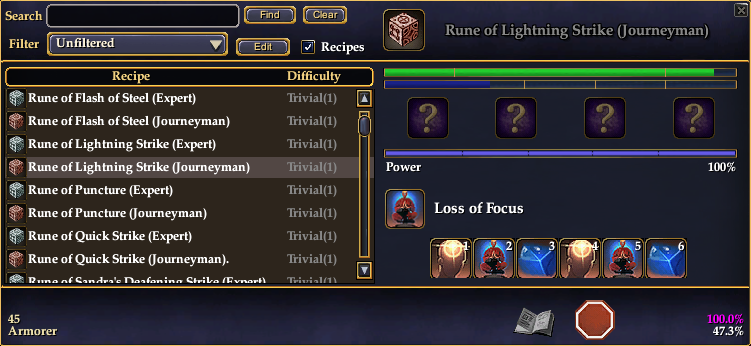
Dimensions: 751 x 346
Latest version
 
Description
Game Update #65 Compatible


Description:
This modification slims down the Tradeskill window and adds several useful features. It is vertically much smaller, with a lot of dead space removed. The recipe list rows are 3/4 the original size, the components page is slightly re-arranged and reduced in size, and the creation page contains one progress bar with the character's power beneath it. The window comes with a slim border and will display Rush Order's time remaining within the window.
  • The ENTER key will active the Create, Repeat, Begin, and Ok buttons on all the important screens.
  • The ESC key will return to the recipe list but WILL NOT stop recipe making. I find this to be too dangerous to do accidentally.
** Tradeskill event buttons now focus properly in dual pane view! Props to Brushfire for the discovery.

Check the Update Log for the latest changes.


Installation Notes:
- How To: Install A Custom UI
- eq2ui_tradeskills.xml goes in your CustomUI folder.


Update Log:
2012.12.10
- Sizing bug fix.


2012.12.03
- Updated for CoE changes.
2011.02.25
- Window updated to reflect changes to default recipe loading (Velious update).
2011.01.25
- window should be fixed to show the Prepare page when not using the Repeat button.
- "Create" button should now properly display when canceling back from the Prepare page.

2010.08.23
- Hitting the "Clear" button will also set your cursor to the input field.
- Window now successfully focuses the reaction buttons for keyboard usage on creation start!
- Small fix for the window's Create button not reappearing after crafting an item.

2010.08.19
- now properly displays 6 buttons (update caused only 5 to show during crafting)
- window will now bypass the "Prepare" page ONLY when hitting the repeat button. This is the cleanest method to allow comissioned crafting to work and allow repeating to be more fluid.

2010.08.18
- by user request, the highlight color on the recipe list has been brightened up
- the Prepare step of crafting is no longer automatically skipped. Until SOE takes another look at the tradeskill window, normal and comissioned crafting have too a high of a chance of bugging users out. Hopefully this change helps stop any more problems.

2010.02.25
- Writ timer default text no longer always visible
- Actual writ timer text is broken until fixed by SOE (won't require an update for this mod when it's fixed, hopefully)

2009.04.25
- Updated with new code.
- "Recipes" checkbox now keeps the window in side-by-side mode
- Clicking the "clear" button with also refresh the recipe list
- Only the one durability/progress bar now exists at the top
- The player's power now displays on the creation page
- The "components" window is now skipped if all items are found (this includes hitting the repeat button)
- When the recipe list is always shown, the "create" button will disappear when crafting so that you can't accidentally bug the window
- Still no known way to set focus to event buttons with recipe list always shown

2008.10.07
- updated for GU#49 (checkbox for supply depot)
2008.09.12
- Now includes toggle for Recipes to remain visible while crafting
2008.07.12
- Re-coded from scratch, updated to the latest GU
2005.03.22
- Initial release
Archive List (Old Versions)
File Name
Version
Size
Author
Date
2012.12.03
8.34 Kb
Drumstix42
12-03-2012 02:52 PM
File Statistics
User Rating:
5 out of 5 with 6 votes
Downloads: 7266
Views: 52160
Favorites: 65
Uploaded By:
 
Last Modified: N/A

View Pictures. Download Now! Post A Comment
Remove Ads


Post A Reply
Author Comments Comment Options
Old 12-10-2012, 04:22 PM  
Drumstix42
A Griffon
 
Drumstix42's Avatar
Featured Artist

Server: Antonia Bayle
Forum posts: 2945
File comments: 525
Uploads: 44
Sizing/resizing weirdness should now be fixed in version I just uploaded. If not, please post screenshots in support thread.

Last edited by Drumstix42 : 12-10-2012 at 04:22 PM.
Drumstix42 is offline Report comment to moderator   Reply With Quote Reply With Quote
Old 12-06-2012, 02:25 AM  
Jojozityjo
A Coastal Crab
 
Jojozityjo's Avatar

Forum posts: 0
File comments: 1
Uploads: 0
I see it says you updated it since fod mentioned that stretching thing, so i downloaded and installed, but im still getting that same issue o.o
Jojozityjo is offline Report comment to moderator   Reply With Quote Reply With Quote
Old 12-04-2012, 01:31 PM  
Drumstix42
A Griffon
 
Drumstix42's Avatar
Featured Artist

Server: Antonia Bayle
Forum posts: 2945
File comments: 525
Uploads: 44
Re: TS window now collapses, but ...

Quote:
Originally posted by Fadani
Hi Drums,

The TS window now collapses when you uncheck "recipes", but when you drag bottom to make the recipe list larger the recipe list stays the same and only the blue area stretches.

-Fadani
Doh. Will try to fix soon. It's a simply type-o in code.
Drumstix42 is offline Report comment to moderator   Reply With Quote Reply With Quote
Old 12-04-2012, 12:27 AM  
Fadani
A Brown Bear

Server: Permafrost
Forum posts: 8
File comments: 23
Uploads: 0
TS window now collapses, but ...

Hi Drums,

The TS window now collapses when you uncheck "recipes", but when you drag bottom to make the recipe list larger the recipe list stays the same and only the blue area stretches.

-Fadani
Fadani is offline Report comment to moderator   Reply With Quote Reply With Quote
Old 12-03-2012, 12:51 AM  
Fadani
A Brown Bear

Server: Permafrost
Forum posts: 8
File comments: 23
Uploads: 0
TS window doesnt collapse...

Heya Drums,

The dual pane window does not collaspe into a single pane when you uncheck recipe list like it did before. I've always preferred to use it without recipe list for its compact size. Hoping this is just a glitch and will be fixed. Love this TS window and thanks for getting it updated so quickly

-Fadani

PS: My tooltips recently quit working. Could you tell me which files I need to update to fix them? I mostly just use your UI, but I dont use your updater so I can preserve a few things that are different.
Fadani is offline Report comment to moderator   Reply With Quote Reply With Quote
Old 11-21-2012, 01:59 AM  
Drumstix42
A Griffon
 
Drumstix42's Avatar
Featured Artist

Server: Antonia Bayle
Forum posts: 2945
File comments: 525
Uploads: 44
Re: TS Window

Quote:
Originally posted by Askelon
This window is still causing the client to crash I DLed and installed this on the 19th. I use your entire UI so its not a conflict with others. I also did a clean install of your UI and added this to the directory after you worked on it so the issue has to be with this window.
That is because this it out of date. You'll simply have to use default TS until I can update this one. (Delete eq2ui_tradeskills.xml from your folder)
Drumstix42 is offline Report comment to moderator   Reply With Quote Reply With Quote
Old 11-20-2012, 01:46 PM  
Askelon
Premium Member
 
Askelon's Avatar
Premium Member
Interface Author - Click to view interfaces

Server: Beta 1
Forum posts: 13
File comments: 13
Uploads: 1
TS Window

This window is still causing the client to crash I DLed and installed this on the 19th. I use your entire UI so its not a conflict with others. I also did a clean install of your UI and added this to the directory after you worked on it so the issue has to be with this window.
Askelon is offline Report comment to moderator   Reply With Quote Reply With Quote
Old 11-18-2012, 06:05 AM  
itpaladin
A Grizzled Badger

Server: Antonia Bayle
Forum posts: 46
File comments: 3
Uploads: 0
Don't forget to "fucus" on your typos!

itpaladin is offline Report comment to moderator   Reply With Quote Reply With Quote
Old 11-15-2012, 07:28 AM  
Juravael
A Coastal Crab

Server: Antonia Bayle
Forum posts: 1
File comments: 27
Uploads: 0
Re: Re: Chains of Eternity

Quote:
Originally posted by Drumstix42
Will be updated in a week or two unfortunately. Away from home and this window is complicated so requires a bit more free time to finish updating

For now will have to use the stock one, sorry!
No worries at all. I look forward to seeing this one done when you have the time. Thanks!
Juravael is offline Report comment to moderator   Reply With Quote Reply With Quote
Old 11-14-2012, 03:32 AM  
Drumstix42
A Griffon
 
Drumstix42's Avatar
Featured Artist

Server: Antonia Bayle
Forum posts: 2945
File comments: 525
Uploads: 44
Re: Chains of Eternity

Quote:
Originally posted by Juravael
Any chance of this UI mod getting updated for Chains of Eternity?
Will be updated in a week or two unfortunately. Away from home and this window is complicated so requires a bit more free time to finish updating

For now will have to use the stock one, sorry!
Drumstix42 is offline Report comment to moderator   Reply With Quote Reply With Quote
Old 11-13-2012, 07:34 PM  
Juravael
A Coastal Crab

Server: Antonia Bayle
Forum posts: 1
File comments: 27
Uploads: 0
Chains of Eternity

Any chance of this UI mod getting updated for Chains of Eternity?
Juravael is offline Report comment to moderator   Reply With Quote Reply With Quote
Old 05-30-2011, 05:36 PM  
ShadowProwler420
A Griffon
 
ShadowProwler420's Avatar

Server: Permafrost
Forum posts: 659
File comments: 10
Uploads: 0
It's not necessarily a 'bug' per se (since it's not effecting the overall operation of of the mod), but I've been noticing an error message every time I use the repeat function saying "You cannot start crafting while already crafting".

Just thought I'd let ya know!
ShadowProwler420 is offline Report comment to moderator   Reply With Quote Reply With Quote
Old 04-18-2011, 02:30 AM  
Gezus
A Brown Bear

Server: Unkown
Forum posts: 14
File comments: 4
Uploads: 0
Quote:
Originally posted by Drumstix42
There's no good way to control tooltips without modifying them globally (if at all). You can try messing with your tooltip settings in the in-game options however.
Yeah figured that.

Okay, I am having another issue. When I am tradeskilling, I use the Enter key to "repeat" but I have to physically click the trade window right after or I can't use the hotkeys.
Gezus is offline Report comment to moderator   Reply With Quote Reply With Quote
Old 04-11-2011, 11:32 AM  
Drumstix42
A Griffon
 
Drumstix42's Avatar
Featured Artist

Server: Antonia Bayle
Forum posts: 2945
File comments: 525
Uploads: 44
Quote:
Originally posted by Gezus
Would be nice to see the tradeskill tooltips for counter abilities pop up "Under" the buttons, I find alot of the time they cover my progress bar.
There's no good way to control tooltips without modifying them globally (if at all). You can try messing with your tooltip settings in the in-game options however.
Drumstix42 is offline Report comment to moderator   Reply With Quote Reply With Quote
Old 04-11-2011, 01:42 AM  
Gezus
A Brown Bear

Server: Unkown
Forum posts: 14
File comments: 4
Uploads: 0
Would be nice to see the tradeskill tooltips for counter abilities pop up "Under" the buttons, I find alot of the time they cover my progress bar.
Gezus is offline Report comment to moderator   Reply With Quote Reply With Quote
Post A Reply

 
Category Jump:
Search this Category:
 

All times are GMT -5. The time now is 05:11 PM.


Our Network
EQInterface | EQ2Interface | War.MMOUI | WoWInterface | VGInterface | LoTROInterface | MMOInterface