 |
 |
 |
|
 |


|
|
|
#1
|
|||
|
|||
 Multiple full UI
K , this is the situation .
Ive downloaded some full UI packets here and now i have the problem = I like the nighelf 2 packet very much for my fay , but if i play it with my assassin , it's sooo ugly , you get it ? the theme has to fit with the rest of the game for me. So my question is , how can i download & = nightelf2 for my fay and Laffs alt Perdition Bottom for my Assassin so that they don't mix up ? I was thinking at 2 eq2.ini files or 2 UI directories ... :s Thx in advantage  
|

|
#2
 12-03-2006, 12:02 PM
|
|||
|
|||
|
ow yeah , and if i install the night elve , i just get the default buttons , and a lot , but a lot of white , it's a problem somwhere , this is what i have done
downloaded & unzipped the .zip , searched for those 2 files = - antonia bayle_jethal_eq2_uisettings.xml - eq2.ini installed them in C:\Program Files\Games\EQ II ( the install directorie for EQ with me ) and placed all the others in C:\Program Files\Games\EQ II\UI\Wood But im messing whole day with the UI's so maybe i deleted something wrong earlier , so this is what i have atm in EQ II\UI This is what my \UI folder looks like now = 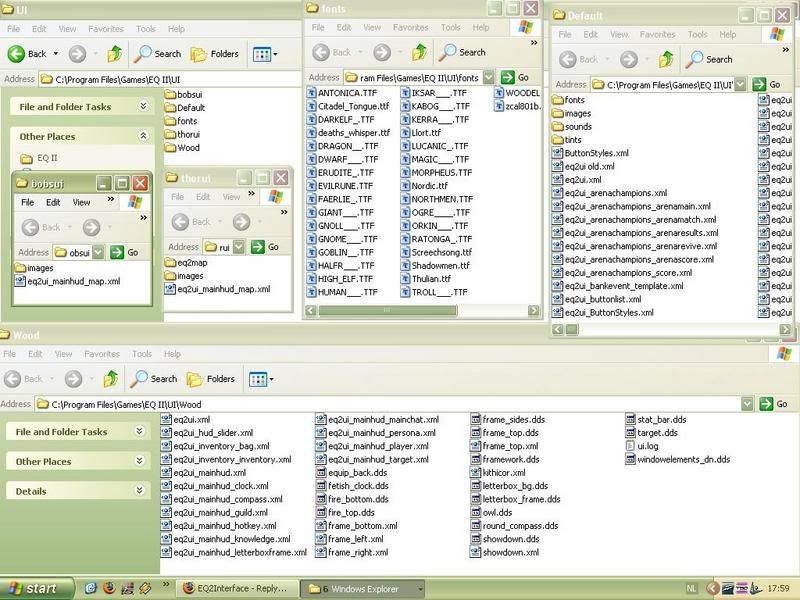 
|
|
#3
12-03-2006, 12:28 PM
|
|||
|
|||
|
Damm , it's really messed up now , i can't get it to the default anymore , white everywhre
The UI folder is empty again , ive started the patcher so he gets the files again... Can any1 make me a step by step noob tutoriaal to install those 2 so i can pick #1 for my assassin & #2 for my fay pls , im going to stop trying stuff
|
|
#4
12-03-2006, 03:03 PM
|
||||
|
||||
|
You'll need to install each set to a separate directory under Everquest II/UI. For example...
Everquest II/UI/NightElf Everquest II/UI/Laffs With that done, you'll need to edit your eq2.ini file to point at whichever you want to load. The skinname should match the desired UI. For example... cl_ui_skinname NightElf You'll have to log out and change this setting each any time you want to swap UIs. There's a UI switcher utility that makes this a bit easier, but you'll have to dig it up yourself  Another alternative is to try the ingame command /loadui NightElf This option is very buggy and often crashes EQ2.
|


|
#5
12-04-2006, 11:57 AM
|
|||
|
|||
|
Tried this but the problem is , it's all white . The spell icons in the hotbar are still visible , but all the things around the 'original functions' are as white as snow. :s
This is happening with both :s probably ive done something wrong with installation but i don't know what. ------------ I don't understand this = Place the "LAFFSV8" folder in C:\Program Files\Sony\EverQuest II\UI 1) you guys say you may not put a folder into the UI folder , and if i open the .zip file , i don't see a folder . With the Laffs.zip , i see one photoshop file , one .Exe , 5 x .ini , 1 x .db , .dds files , some .txt file , a .jpg , a readme , and a lot of .xmls The page on the site says = And rename ONE of these files, "server_character_eq2_uisettings(1600-1200).ini" "server_charname_eq2_uisettings(1280-1024).ini" What is the difference betwwen 1600-1200 & 1280-1024 ? --------- with the Wood_EOFb.zip , i see a lot of .xml's , some .dds , one ui.log , one EQ2.ini and one antonia_bayle_eq2_uisettings.ini The page on the site says Copy the following files to your EverQuestII directory - antonia bayle_jethal_eq2_uisettings.xml - eq2.ini But does that mean i have to delete them out of the EQ2\Ui\Wood directorie ? or leave them there too ? :s you really have to explain something very easy and step by step , cause i have the strange power to always mess it up
|
|
#6
12-04-2006, 12:31 PM
|
||||
|
||||
|
If you're having trouble even with the default UI, I would suggest deleting the default subdirectory/folder in the UI subdirectory/folder (Everquest II/UI/Default) and let the patcher pull a fresh set.
Then to get your custom UIs functioning, simply unzip the contents of the UI packages into newly created folders in your UI directory like Zonx stated. Refer to this thread for step by step instructions on doing this. The difference between the two settings files is resolution settings. You can use any resolution you want, but those two files included will allow you to just 'plug and play' the UI (install it without any need to manually move the windows to desired locations).
|



 Hybrid Mode

 |
© MMOUI
vBulletin® - Copyright ©2000 - 2026, Jelsoft Enterprises Ltd. |
 |
