 |
 |
 |
|
 |


|
|||||||


 |
|
 05-07-2017, 12:59 PM
|
||||
|
A Griffon
Forum posts: 965
File comments: 921
Uploads: 9
|
Quote:
Look in your custom UI folder for eq2ui_popup_add_poi.xml. Delete if it exists. If you are using EQ2MAP, get updates which will replace it. If the window still does not close when you click OK, delete or rename the custom UI folder and reinstall from the utility. . |
|||


|


|

|
05-07-2017, 03:26 PM
|
||||
|
A Forest Scavenger
Server: Crushbone
Forum posts: 15
File comments: 23
Uploads: 0
|
Quote:
|
|||
|
|
|
|
05-07-2017, 04:05 PM
|
|||
|
A Coastal Crab
Server: Unkown
Forum posts: 0
File comments: 17
Uploads: 0
|
Nav bar option to show coins
Hi Darq,
thanks for the new nav and XP bars! Would it be possible to show the coins of the alt like it was with the old bars? 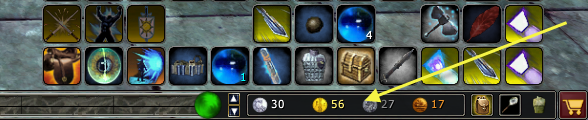 And is there an option to show the stats left of the XP bar and the nav bar on the right side? Best regards, Neverlands Last edited by Neverlands : 05-07-2017 at 04:06 PM. |
||
|
|
|
|
05-07-2017, 04:12 PM
|
||||
|
A Griffon
Forum posts: 965
File comments: 921
Uploads: 9
|
Re: Nav bar option to show coins
Quote:
Coin denominations are among the options for the stat bar portion of the window, and the nav bar/command bar is currently only on the left-hand side. . |
|||
|
|
|
|
05-08-2017, 10:50 AM
|
|||
|
A Berserk Golem
Server: Antonia Bayle
Forum posts: 59
File comments: 50
Uploads: 0
|
Nav Bar
Love the new stuff... thanks a bunch!
Any chance of : Getting a nav bar with nothing but the ping stuff? or be able to resize the size of it to not show the rest? or be able to "compose your own" with a combo of the elements? I know, im picky, but i really never use any of the other stuff and would love to just have the ping there. |
||
|
|
|
|
05-08-2017, 01:53 PM
|
||||
|
A Griffon
Forum posts: 965
File comments: 921
Uploads: 9
|
Re: Nav Bar
Quote:
Ping is one of the stat bar choices, so you can add that on the right-hand side and turn the nav bar off since you're not using any of the other nav controls. I do have a prototype for a dockable/floating nav bar where you can choose widgets, but it's nowhere near ready for prime time. . |
|||
|
|
|
|
05-09-2017, 03:55 AM
|
|||
|
A Coastal Crab
Server: Barren Sky
Forum posts: 0
File comments: 35
Uploads: 0
|
I love all this!
But is possible to return the 'home page' (not 'Help') to the browser button (or give a choice)? And maybe possible to add control of a space between icons in Maintained Spell Monitor, and remove the word 'Target'.  And need more slots (>9)!  Big Thanks!  |
||
|
|
|
|
05-09-2017, 05:29 AM
|
|||
|
A Coastal Crab
Server: Unkown
Forum posts: 0
File comments: 1
Uploads: 0
|
stat bar
i have set the startss i want on my main bar that got levels and the eq2 button but every time i log out and log back in there not saving i got 2 set the stats i wont on my bar every time i log in is there a way i should be doing this lol write back neutra thurgadin
|
||
|
|
|
|
05-09-2017, 06:34 AM
|
||||
|
A Griffon
Forum posts: 965
File comments: 921
Uploads: 9
|
Re: stat bar
Quote:
Each XP bar has its own set of stats, so if you set up the adventure XP bar for example, the stats will only appear when you switch to that bar. If you want to copy the stats to all XP bars, click "Copy these stats to all bars" in the utility. . |
|||
|
|
|
|
05-09-2017, 06:55 AM
|
||||
|
A Griffon
Forum posts: 965
File comments: 921
Uploads: 9
|
Quote:
I like your idea about dropping "Target," it would reduce computations by one. Let me think about it. There is a new command bar choice that will open the browser to your home page. Re-download the Window Manager and the browser button will be at the end of the list. You can already get the extra space between tiles. Near the top of eq2ui_mainhud_betamark.xml change the value to something like <Data Name="IconSize" Value="50,45" />This will only work with stacking tile and stacking icon display modes. . |
|||
|
|
|
|
05-09-2017, 08:41 AM
|
|||||
|
A Coastal Crab
Server: Barren Sky
Forum posts: 0
File comments: 35
Uploads: 0
|
Quote:
Quote:
Аnd please slots more that 9  |
||||
|
|
|
|
05-09-2017, 09:29 AM
|
|||
|
A Young Mystail Rat
Server: Antonia Bayle
Forum posts: 2
File comments: 3
Uploads: 0
|
Menegerie GU
Are we ready for the new GU? I tried to dl updates but nothing updated just yet.
|
||
|
|
|
|
05-09-2017, 10:26 AM
|
||||
|
A Griffon
Forum posts: 965
File comments: 921
Uploads: 9
|
Re: Menegerie GU
Quote:
If you have Character window v3.024 then you are all set. Updates for GU103 have been on the DarqUI updater since earlier this morning. . |
|||
|
|
|
|
05-10-2017, 05:48 PM
|
|||
|
A Young Mystail Rat
Server: Unkown
Forum posts: 5
File comments: 13
Uploads: 0
|
Hi sir. I checked through all your comments and apparently im the only guy with this issue, which is kinda strange but ill go ahead and post anyway. Its not the most informative post, because I have no idea how to obtain crash logs etc. So if u need that let me know.
I have got some FPS/Crashing issue using ur UI. It happens when I played for a while, so far its been between 48 minutes upto 1hr 24 minutes. The game just locks up. It only happens with your UI, using the default I can keep playing for hours upon hours. I just happen to be recording some stuff one time it happen where you can see my FPS starting to drop well below 100fps and then finally below 30 until the game just freezes and I have to shut it down. Also a lot of microstutter. I apologize for the water mark, I was in a hurry when I created it. Ill upload it if u want to see it once youtube processing decides to be over with. Anything I can do to supply some debug logs or anything else? I use the newest version. Windows 10 x64 i7 4930k @ 4.2ghz 16 gig ram 980gtx ti Everything is updated. Also want to add, it has nothing to do with me changing graphic settings, it happens randomly through out the game when using the UI. |
||
|
|
|
|


All times are GMT -5. The time now is 05:43 PM.
 |
© MMOUI
vBulletin® - Copyright ©2000 - 2026, Jelsoft Enterprises Ltd. |
 |
