EQ2Interface.com
Search Downloads


Go Back   EQ2Interface > Interface Pieces > Group window

Category: Group window[DrumsUI] Group
Interface Information
Download
Drumstix42's Portal Bug Reports Feature Requests
How do I install this? (FAQ)
Name: [DrumsUI] Group   Updated less than 3 days ago!
Author:
Date: 03-15-2010 06:11 PM
Size: 22.81 Kb
Version: 2010.03.15
Rate Addon: 4 out of 5 with 2 votes  
Pictures
Click to enlarge 

Views: 0
Size: 47.61 Kb
Dimensions: 130 x 268
In-game
 
Click to enlarge 

Views: 0
Size: 3.21 Kb
Dimensions: 131 x 267
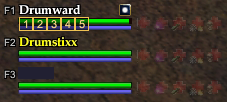
UIBuilder: effects and checkbox shown
 
Description
Game Update #55 Compatible


* Alternate version: see my Tiny Group window: here


Description:
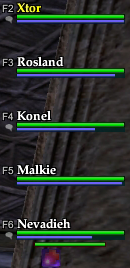
This mod is similar to the default window, but has been slimmed down a bit and has removed a few of the extra graphics. F2-F6 text is included, as well as speaking icons for voice. Effect icons have "click-to-cure" for quick curing of party members.

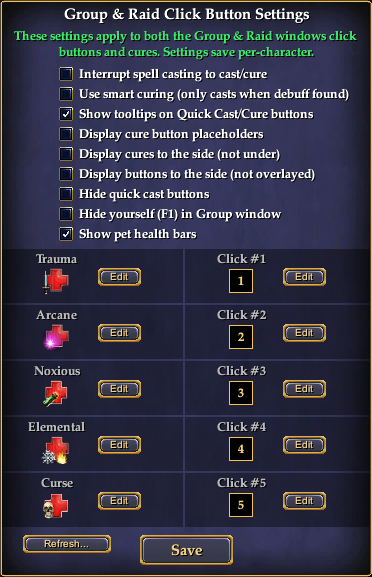
A hover-shown button display on the top-right of the window. This brings up the options window to define all your Quick Cast/Quick Cure buttons. These abilities save by character name and are unique to each. After you set your abilities once, it's recommended to fully restart EQ2 if you plan to switch characters and then switch back. This is a code limitation. Once you fully re-log after setting abilities, they will save indefinitely.

Cures use a "smart" check and only cast when a debuff counter is shown.


See this topic for detailed information:
http://www.eq2interface.com/forums/s...ad.php?t=13801


Installation Notes:
- How To: Install A Custom UI
- DrumsUI/*.* goes in your CustomUI/DrumsUI/*.* folder.
- POI/*.* goes in your CustomUI/POI/*.* folder.
- eq2map_ignorelist.xml goes in your CustomUI folder.
- eq2ui_custom.xml goes in your CustomUI folder.
- eq2ui_mainhud_groupmembers.xml goes in your CustomUI folder.
- eq2ui_popup_add_poi.xml goes in your CustomUI folder.

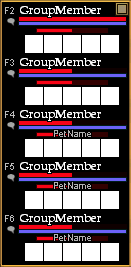
See the /Alternative/ folder for a pet-version of the window.

If you already have a eq2ui_custom.xml you need to add these includes:

Code:
<include>DrumsUI/Settings/DrumsUI_PartyClickWindow.xml</include>
<include>DrumsUI/Settings/DrumsUI_ClickButtonSettings.xml</include>
<include>DrumsUI/Settings/DrumsUI_TextSettings.xml</include>

Update Log:
2010.03.15
- Zip updated with correct files and initialization
- Pet version included in Alternative folder


2010.02.25
- Updated for Sentinel's Fate
- Now includes same functionality as DrumsUI Full Release raid
- Pet version included in zip

2009.11.20
- Initial release
Archive List (Old Versions)
File Name
Version
Size
Author
Date
2010.02.25
38.59 Kb
Drumstix42
02-25-2010 05:24 PM
File Statistics
User Rating:
4 out of 5 with 2 votes
Downloads: 579
Views: 4469
Favorites: 4
Uploaded By:
 
Last Modified: N/A

View Pictures. Download Now! Post A Comment
Remove Ads


Post A Reply
Author Comments Comment Options
Old Today, 10:17 PM  
Drumstix42
A Griffon
 
Drumstix42's Avatar
Interface Author - Click to view interfaces

Server: Blackburrow
Forum posts: 1858
File comments: 256
Uploads: 41
Another fix coming for this and the raid window all. keep your eyes peeled.
Drumstix42 is offline Report comment to moderator   Reply With Quote Reply With Quote
Old Today, 03:52 PM  
Gylen
A Coastal Crab

Server: Antonia Bayle
Forum posts: 0
File comments: 1
Uploads: 0
Hi;

I have your group and raid ui's installed.

I can edit and save the buttons. however when I relog into everquest. the setting are all gone.

Also the Click1PartySpell disappears when I log back in.

These are the settings:
<Icon Name="Click1PartySpell" PathFindLocation="0.00 20000.00 0.00" PoiDescription="useabilityonplayer SELECTED gravitas&#xA;gsay Gravitas at SELECTED&#xA;raid Gravitas at SELECTED" PoiResource="site" PoiShowAlways="true" PoiType="LOCATION" Tooltip="Click1PartySpell" />
<Icon Name="Click2PartySpell" PathFindLocation="0.00 20000.00 0.00" PoiDescription="useabilityonplayer SELECTED 1033316620&#xA;gsay Ressurecting SELECTED&#xA;raid Ressurecting SELECTED" PoiResource="site" PoiShowAlways="true" PoiType="LOCATION" Tooltip="Click2PartySpell" />
<Icon Name="Click3PartySpell" PathFindLocation="0.00 20000.00 0.00" PoiDescription="useabilityonplayer SELECTED elegy of awakening&#xA;gsay Ressurecting SELECTED group&#xA;raid Ressurecting SELECTED group" PoiResource="site" PoiShowAlways="true" PoiType="LOCATION" Tooltip="Click3PartySpell" />
<Icon Name="Click4PartySpell" PathFindLocation="0.00 20000.00 0.00" PoiDescription="useabilityonplayer SELECTED confront fear&#xA;gsay Confront your fears SELECTED&#xA;raid Confront your fears SELECTED" PoiResource="site" PoiShowAlways="true" PoiType="LOCATION" Tooltip="Click4PartySpell" />
<Icon Name="Click5PartySpell" PathFindLocation="0.00 20000.00 0.00" PoiDescription="useabilityonplayer SELECTED sonic barrier&#xA;gsay Sonic Barrier at SELECTED&#xA;raid Sonic Barrier at SELECTED" PoiResource="site" PoiShowAlways="true" PoiType="LOCATION" Tooltip="Click5PartySpell" />
Gylen is offline Report comment to moderator   Reply With Quote Reply With Quote
Old Today, 01:20 PM  
Drumstix42
A Griffon
 
Drumstix42's Avatar
Interface Author - Click to view interfaces

Server: Blackburrow
Forum posts: 1858
File comments: 256
Uploads: 41
Quote:
Originally posted by Burdy
Hi
I tried your new group window and it completely messes my UI. Buttons don't work, the map window has no icons or overlay, etc.
Is it a problem that I don't have the map tool?
Sounds like an issue with another mod. What other mods are you using? This mod only changes the Add POI window, and does not alter any maps or icons.
Drumstix42 is offline Report comment to moderator   Reply With Quote Reply With Quote
Old Today, 11:25 AM  
Burdy
A Young Mystail Rat

Server: Antonia Bayle
Forum posts: 4
File comments: 14
Uploads: 0
Hi
I tried your new group window and it completely messes my UI. Buttons don't work, the map window has no icons or overlay, etc.
Is it a problem that I don't have the map tool?
Burdy is offline Report comment to moderator   Reply With Quote Reply With Quote
Old 03-15-2010, 07:31 PM  
Drumstix42
A Griffon
 
Drumstix42's Avatar
Interface Author - Click to view interfaces

Server: Blackburrow
Forum posts: 1858
File comments: 256
Uploads: 41
Zip updated!

Everything should be working as intended now.

Last edited by Drumstix42 : 03-15-2010 at 07:32 PM.
Drumstix42 is offline Report comment to moderator   Reply With Quote Reply With Quote
Old 03-15-2010, 05:56 PM  
SkyBeeX
A Crazed Gnoll

Server: Antonia Bayle
Forum posts: 24
File comments: 18
Uploads: 0
Awesome. Thanks again.
SkyBeeX is offline Report comment to moderator   Reply With Quote Reply With Quote
Old 03-15-2010, 05:49 PM  
Drumstix42
A Griffon
 
Drumstix42's Avatar
Interface Author - Click to view interfaces

Server: Blackburrow
Forum posts: 1858
File comments: 256
Uploads: 41
Quote:
Originally posted by SkyBeeX
UI Addon not loading/saving properly and settings are not maintained uniquely between characters.

... snip ...

I hope this helps ya to fix the load/save function.
The problem is the missing file you really also needed is: eq2ui_popup_addpoi.xml
This file is what properly does the saving, AND the initialization code was incorrect in these stand-alone click-button windows!

I'm updating this zip PLUS the Full UI release momentarily. There have been no issues with save/load from the Full UI, just these pieces as the code needed some updating.

So I encourage you to try it out once the update is validated by a moderator!

Cheers
Drumstix42 is offline Report comment to moderator   Reply With Quote Reply With Quote
Old 03-15-2010, 01:42 PM  
SkyBeeX
A Crazed Gnoll

Server: Antonia Bayle
Forum posts: 24
File comments: 18
Uploads: 0
UI Addon not loading/saving properly and settings are not maintained uniquely between characters.


I managed to download the DrumUI auto updater and only downloaded the files from this updater program that were listed in the instructions above plus another "eq2map ignore" file. Once downloaded from the autoupdater, i moved the files in the location indicated in above instructions and modified the eq2_custom.ini file as inidicated in the instructions above.

Everything works EXCEPT the UI is not saving properly. When I restart the game, all the settings are erased and replaced with the default settings.

Game loads up. I go to edit the quick cast buttons and save. Look into my file directoy to view the customUI folder/POI/drumsui_textsettings.xml ... My settings are shown to be saved in this file. I /camp to desktop to shut the game down. Then, I come to start the game and login my character and the text file still keeps my settings. BUT ... i go to click the appropriate quick cast button in my group window, nothing happens.

Then, I open the "group & raid click button settings" window. My customUI folder/POI/drumsui_textsettings.xml contains my settings. THEN, I click the edit button for "click #5" and my customUI folder/POI/drumsui_textsettings.xml file has been overwritten with the default settings.

My conclusion is ... UI mod seems to save to the xml file properly. BUT, the UI mod is not properly loading the customUI folder/POI/drumsui_textsettings.xml file.

I switch to a character and my previous textsettings file were carried over from a different character.

I just have to redo the quick cast setting buttons everytime I restart the game or want to use quick cast on a different character. Once I do this, everything works fine. So, at the moment, it is just a nuisance but usable.

I am not familiar at all with any of this programming stuff, just got my testing knowledge.

I hope this helps ya to fix the load/save function.

Last edited by SkyBeeX : 03-15-2010 at 01:44 PM.
SkyBeeX is offline Report comment to moderator   Reply With Quote Reply With Quote
Old 03-05-2010, 04:15 PM  
SkyBeeX
A Crazed Gnoll

Server: Antonia Bayle
Forum posts: 24
File comments: 18
Uploads: 0
Quote:
Originally posted by Drumstix42
This standalone mod needs an update since it's recent release. Hold tight while I get a working one ported over from the full UI.

Sorry for the inconvenience. Busy week!
Woohoo!!!

You are awesome. Excellent mod. Appreciate all the hard work. Can't wait to download it. Good guy.
SkyBeeX is offline Report comment to moderator   Reply With Quote Reply With Quote
Old 03-05-2010, 04:08 PM  
Drumstix42
A Griffon
 
Drumstix42's Avatar
Interface Author - Click to view interfaces

Server: Blackburrow
Forum posts: 1858
File comments: 256
Uploads: 41
Quote:
Originally posted by SkyBeeX
Trying to use your group mod to replace ProfitUIs group window mod. In the window where ya change the settings to the quick cast / quick cure buttons, a "Point of Interest" window opens when I click the edit button in the "Group & Raid Click Button Settings" window.

Looks like it is asking me to create a PoI instead of changing the quick cast / quick cure button ... I am so confused !!!

EDIT : Ok. I have played with it for a while, it does NOT work. From the screenshots i see above, awesome mod for the group window. Just doesn't work. Need a little help here.
This standalone mod needs an update since it's recent release. Hold tight while I get a working one ported over from the full UI.

Sorry for the inconvenience. Busy week!
Drumstix42 is offline Report comment to moderator   Reply With Quote Reply With Quote
Old 03-05-2010, 03:37 PM  
SkyBeeX
A Crazed Gnoll

Server: Antonia Bayle
Forum posts: 24
File comments: 18
Uploads: 0
Trying to use your group mod to replace ProfitUIs group window mod. In the window where ya change the settings to the quick cast / quick cure buttons, a "Point of Interest" window opens when I click the edit button in the "Group & Raid Click Button Settings" window.

Looks like it is asking me to create a PoI instead of changing the quick cast / quick cure button ... I am so confused !!!

EDIT : Ok. I have played with it for a while, it does NOT work. From the screenshots i see above, awesome mod for the group window. Just doesn't work. Need a little help here.

Last edited by SkyBeeX : 03-05-2010 at 04:04 PM.
SkyBeeX is offline Report comment to moderator   Reply With Quote Reply With Quote
Old 03-05-2010, 03:24 PM  
SkyBeeX
A Crazed Gnoll

Server: Antonia Bayle
Forum posts: 24
File comments: 18
Uploads: 0
For the "Group & Raid Click Button Setting" window, opens to edit the quick cast / quick cure buttons, I have to toggle the 'Frame and Titlebar' value in the "Frame and Title" drop down box to clock the window. Otherwise, the window opens up with no 'X' button in the top-right corner to close the window.

Is there a possible fix for this?
SkyBeeX is offline Report comment to moderator   Reply With Quote Reply With Quote
Old 12-22-2009, 09:49 PM  
Drumstix42
A Griffon
 
Drumstix42's Avatar
Interface Author - Click to view interfaces

Server: Blackburrow
Forum posts: 1858
File comments: 256
Uploads: 41
Quote:
Originally posted by cdec518
Any chance we can get a version to show group member %'s ?
More than likely I will include this as an alternative layout with the group window in my Full Release for DrumsUI. I will try to keep my individual pieces updated as well.
Drumstix42 is offline Report comment to moderator   Reply With Quote Reply With Quote
Old 12-22-2009, 03:29 PM  
cdec518
A Young Mystail Rat
 
cdec518's Avatar

Server: Antonia Bayle
Forum posts: 6
File comments: 21
Uploads: 0
Any chance we can get a version to show group member %'s ?
cdec518 is offline Report comment to moderator   Reply With Quote Reply With Quote
Old 12-16-2009, 03:26 PM  
Drumstix42
A Griffon
 
Drumstix42's Avatar
Interface Author - Click to view interfaces

Server: Blackburrow
Forum posts: 1858
File comments: 256
Uploads: 41
Quote:
Originally posted by Qupe
Is there any way to stop the "This spell or ability is no longer available" text that appears when using the click cures?
Currently there's no easy way other than directly editing the XML file.
I may create an options file so you can enable/disable spells in the future, or maybe make an in-game options window like my player window.
Drumstix42 is offline Report comment to moderator   Reply With Quote Reply With Quote
Post A Reply

 
Category Jump:
Search this Category:
 

All times are GMT -5. The time now is 11:24 PM.


Our Network
EQInterface | EQ2Interface | War.MMOUI | WoWInterface | VGInterface | LoTROInterface | MMOInterface