 |
 |
 |
|
 |


|
|||||||


|  |
| ||||||||||||||||||||||||||||||||||||||||||||||||||||||||||||||||||||||||||||||||||||||||||||||||||||||||||||||||||||||||||||||||||||||||||||||||||||||||||||||||||||||||||||||||||||||||||||||||||||||||||||||||||




 |
|
 11-17-2013, 05:09 AM
|
|||
|
A Forest Scavenger
Server: Antonia Bayle
Forum posts: 16
File comments: 2
Uploads: 0
|
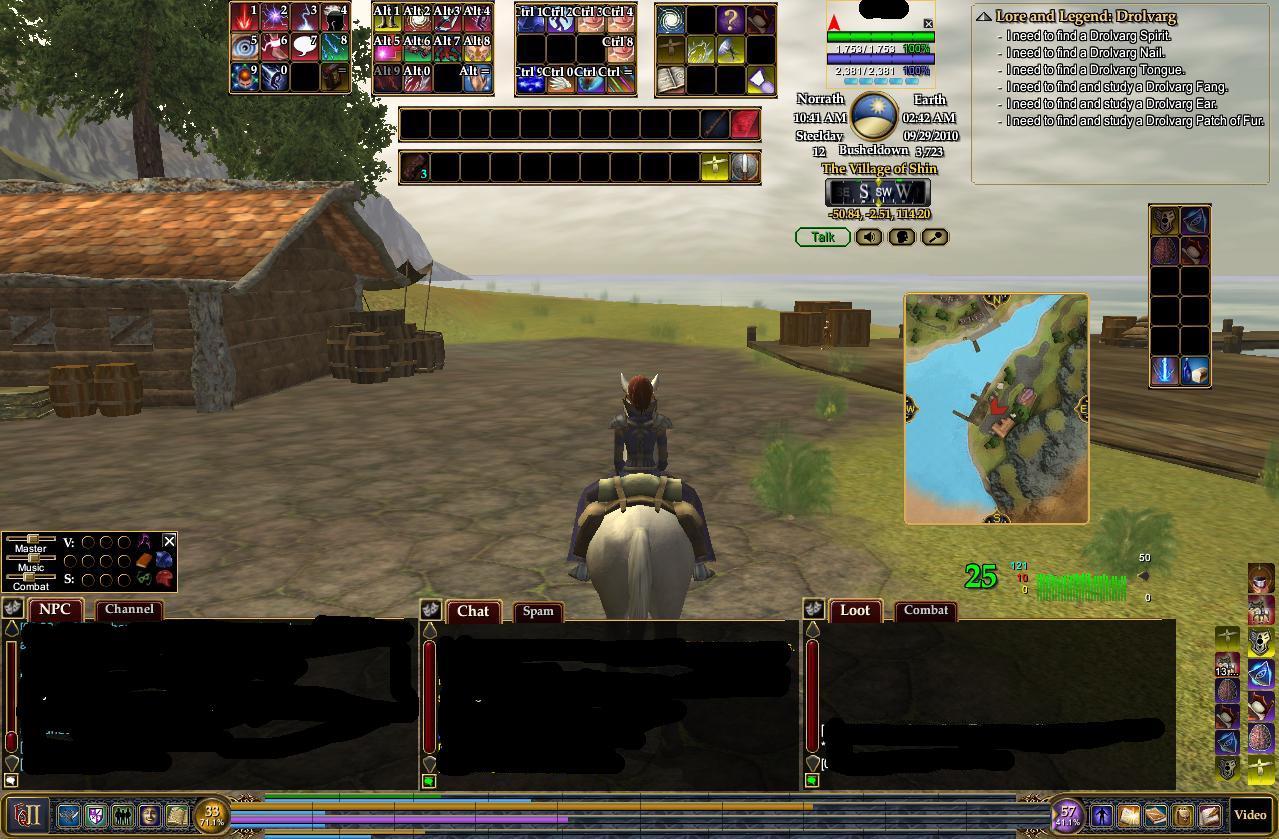
The persona window is broken with the latest expansion release Tears of Veeshan. There may be more broken things, but this is the one that I noticed.
Last edited by thepriz : 11-17-2013 at 05:10 AM. |
||


|


|
|
12-13-2012, 10:02 PM
|
||||
|
A Grassland Beetle
Server: Crushbone
Forum posts: 63
File comments: 50
Uploads: 15
|
Quote:
 |
|||
|
|
|

|
12-13-2012, 06:59 PM
|
|||
|
A Young Mystail Rat
Server: Antonia Bayle
Forum posts: 4
File comments: 4
Uploads: 0
|
Your update was most wonderful. As you probably know, they changed tooltips again earlier today and it is broken in the UI again. HELP!
 |
||
|
|
|
|
11-30-2012, 08:08 AM
|
||||
|
A Grassland Beetle
Server: Crushbone
Forum posts: 63
File comments: 50
Uploads: 15
|
Re: Latest game updates
I am still working on it, but I haven't been able to fully test the tradeskill window yet. I was hoping to get it tested and release a full update all at once, but my game time's been far less than I'd like for the past two months.
I think I know what's up with the tooltips. Will try to get that edited and tested later today. Alternately, watch Drum's for an update - the problem is in the examine window, and I'm using his (with his permission). Once I get that fixed, I'll go ahead and post a full UI update, with the caveat that the tradeskill window may need tweaking for experimentation. As long as I'm posting update info, I'll say now the group window will not be updated for SOEmote for a while - I have neither a webcam nor a computer with enough power to put one more strain on it while running EQ2. I expect those to change by new year's, but even after that the slim versions of the group window won't have it. It sort of defeats the purpose of a slim window to have bulky graphics options attached. Quote:
|
|||
|
|
|
|
11-29-2012, 06:56 PM
|
|||
|
A Young Mystail Rat
Server: Antonia Bayle
Forum posts: 4
File comments: 4
Uploads: 0
|
Latest game updates
With recent weekly updates and the release of CoE, parts of the UI have stopped working and I have been replacing them a piece at a time (i.e. crafting was the last piece I replaced). Todays hotfix made tooltips non-functional and I don't see a way to replace that feature without changing UIs. Is this UI still being maintained?
|
||
|
|
|
|
06-07-2011, 10:54 PM
|
|||
|
A Grassland Beetle
Server: Crushbone
Forum posts: 63
File comments: 50
Uploads: 15
|
No new comp, but a repair install and some other tweaks seem to have helped immensely. Only one bluescreen since FanFaire!
[s]Okay folks, sorta bad news. Thor's going on hiatus for a bit. I'm bluescreening in EQ2. It's not every time, but it's often enough that it worries me and interferes with testing UI pieces. So cutting game time to a minimum, and what time I do get on will probably not be spent on updates. I do have plans to buy a new computer this year, but it won't be until after FanFaire at the earliest. Hopefully it'll be very soon after FanFaire, and before the next GU. I'm sorry I didn't get the UI changes for GU 60 complete. Of course, anyone else who feels like making updates, feel free to do so and post them as patches/add-ons! Thanks for your patience and loyalty, and hope to be back soon![/s] Last edited by Lodrelhai : 08-23-2011 at 05:55 AM. |
||
|
|
|
|
06-01-2011, 06:52 AM
|
||||
|
A Grassland Beetle
Server: Crushbone
Forum posts: 63
File comments: 50
Uploads: 15
|
Re: Updates
Quote:
 . I'm going to post a functional persona window and Zenubi's latest graphics options as a patch, since those are ready. My apologies to anyone who uses this UI and plays pvp, the xp bar is my next priority! And if I don't have the other options I've been working on useable by this weekend, I'll post the full UI and leave the optional stuff to next GU. . I'm going to post a functional persona window and Zenubi's latest graphics options as a patch, since those are ready. My apologies to anyone who uses this UI and plays pvp, the xp bar is my next priority! And if I don't have the other options I've been working on useable by this weekend, I'll post the full UI and leave the optional stuff to next GU. |
|||
|
|
|
|
06-01-2011, 06:37 AM
|
||||
|
A Young Mystail Rat
Server: Antonia Bayle
Forum posts: 4
File comments: 4
Uploads: 0
|
Updates
Quote:
|
|||
|
|
|
|
04-29-2011, 12:45 AM
|
|||
|
A Grassland Beetle
Server: Crushbone
Forum posts: 63
File comments: 50
Uploads: 15
|
Just want to let everyone know, I'm out of town until Sunday, and my laptop does not run EQ2. So I can't make or update any needed UI changes until I get back. Expect any needed updates after May 1st (hopefully very soon after).
Sorry for the inconvenience. I honestly didn't expect the housing changes to be pushed to live until the next GU! |
||
|
|
|
|
03-30-2011, 06:01 PM
|
||||
|
A Grassland Beetle
Server: Crushbone
Forum posts: 63
File comments: 50
Uploads: 15
|
Re: I love your clock
Quote:
Several people reported a while ago that the graphic wasn't working, which turned out to be a change of reference I hadn't caught. If the problem is the graphic not showing, check if the other UI you use has a custom graphic file in the images folder called specialelements.dds. It could be that the other UI uses a different graphics reference for clocks, in which case you'd need to find its clock graphics and change the references in the ui file. If the clock looks right, but the timer is what's not working, there's a few things that could be going on. For the timer to display, you need the following files: eq2ui_custom_timer.xml eq2ui_custom_timersettings.xml thorui_timer.dds (this should be in the images folder of the custom UI) You also need to make sure the eq2ui_custom.xml file contains these two lines: Code:
<include>eq2ui_custom_timer.xml</include>
<include>eq2ui_custom_timersettings.xml</include>
If none of this fixes it, let me know. |
|||
|
|
|
|
03-22-2011, 09:50 AM
|
|||
|
A Fallen Diplomat
Server: Antonia Bayle
Forum posts: 54
File comments: 11
Uploads: 0
|
I love your clock
I have always loved the the thor ui clock, but awhile ago it quit working with my other ui i use. Which files and image file do i need now to get it to work again?
|
||
|
|
|
|
03-12-2011, 07:22 PM
|
||||
|
A Grassland Beetle
Server: Crushbone
Forum posts: 63
File comments: 50
Uploads: 15
|
Quote:
|
|||
|
|
|
|
03-12-2011, 12:21 PM
|
|||
|
A Young Mystail Rat
Server: Antonia Bayle
Forum posts: 4
File comments: 1
Uploads: 0
|
just wondering if there is a way to disable the timer graphic for harvesting/casting whatever. I like the plain jane progress bar but can't figure out how to get it back.
|
||
|
|
|
|
01-04-2011, 12:09 AM
|
|||
|
A Grassland Beetle
Server: Crushbone
Forum posts: 63
File comments: 50
Uploads: 15
|
No included auto-attack bar, sorry. I use samejima's personally, but there's others in the downloads/miscellaneous section of EQ2Interface.
|
||
|
|
|
|


All times are GMT -5. The time now is 01:22 PM.
 |
© MMOUI
vBulletin® - Copyright ©2000 - 2026, Jelsoft Enterprises Ltd. |
 |
