EQ2Interface.com
Search Downloads


Go Back   EQ2Interface > Interface Pieces > Pet window

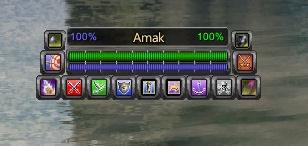
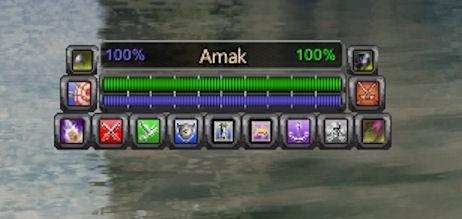
Category: Pet windowAseekias extrem Conjurer Pet window .... Himay style
Interface Information
Download
How do I install this? (FAQ)
Name: Aseekias extrem Conjurer Pet window .... Himay style
Author:
Date: 05-17-2008 07:34 AM
Size: 275.68 Kb
Version: v2.0
Rate Addon: 5 out of 5 with 1 votes  
Pictures
Click to enlarge 

Views: 0
Size: 10.34 Kb
Dimensions: 308 x 146
 
Click to enlarge 

Views: 0
Size: 17.31 Kb
Dimensions: 462 x 219
 
Description
Thanks goes to Himay for the org window

Just for fun i have createt a pet window... for Conjurer

This ist one of my first projects about UI windows in Everquest2 ..
its very funny to create ui windows..
i'am in a learning curve, but i think i make some nice works.

V2.0as popular wish i compressed this mod in zip conjurer only version is v1.0

V1.1
Ad Necromancer Heal Spells for player's who have Necro and Conjurer

V1.0 You find the normal pet control
Ad Attack&Protect button
Ad Shrink Pet button
Ad Meele button
Ad Range button
Ad Call pet button
Ad Heal pet button
Ad Heal & Power percent

Install.:

Extract the file. then copy the file eq2ui_mainhud_pet.xml and the folder images, in your UI folder for ex. "........\EverQuest II\ui\myUI"


Mfg Aseekia


How to Do Guide.:

for players using the standart UI and don't know ho to install modded ui files from this site.


First go to your install folder of everquest2 ..............\EverQuest II\ui
Than create a folder like MyUI ( because if you copied the xml file in your default folder .. eq2 overwrite this file if you log in again.
After creating the folder MyUI for example.
Copy the eq2ui_mainhud_pet.xml from this rar file in your folder MyUI.
Than copy the folder images from this rar file in your folder MyUI.

After this move to your install folder ..............\EverQuest II\ and make sure you see all files in thin folder.
Search the file eq2.ini in this folder and open it with a text editor like the windows editor.

cl_ui_subdir UI/
cl_ui_skinname MyUI

Type this lines in your open eq2.ini file and save it...
Than you can restart eq2 and you can play with the new window..


Mfg Aseekia
Archive List (Old Versions)
File Name
Version
Size
Author
Date
v1.1
272.24 Kb
Aseekia
05-14-2008 05:35 AM
v1.0
272.18 Kb
Aseekia
04-30-2008 10:57 PM
File Statistics
User Rating:
5 out of 5 with 1 votes
Downloads: 158
Views: 1369
Favorites: 1
Uploaded By:
 
Last Modified: N/A

View Pictures. Download Now! Post A Comment
Remove Ads


Post A Reply
Author Comments Comment Options
Old 05-03-2008, 05:09 AM  
Firetiny
A Coastal Crab
 
Firetiny's Avatar

Server: Befallen
Forum posts: 1
File comments: 6
Uploads: 0
Luvs the Window...but...

Heya, level 80 Conjy and your pet window is the awesome, but having one slight problem. Once the Call button is used, the window seems to lose target, not too big a deal, but may cause issues in a raid or hardcore instance. Just a little feedback. Great Mod. Thanksya for the time and effort. ~Xant~
Firetiny is offline Report comment to moderator   Reply With Quote Reply With Quote
Old 04-30-2008, 11:33 PM  
dragowulf
A Griffon
 
dragowulf's Avatar
Interface Author - Click to view interfaces

Server: Antonia Bayle
Forum posts: 521
File comments: 162
Uploads: 17
I do have to say that your recent mods have been really awesome. Keep up the good work mate!
dragowulf is offline Report comment to moderator   Reply With Quote Reply With Quote
Post A Reply

 
Category Jump:
Search this Category:
 

All times are GMT -5. The time now is 12:54 AM.


Our Network
EQInterface | EQ2Interface | WoWInterface | VGInterface | LoTROInterface | MMOInterface