EQ2Interface.com
Search Downloads


Go Back   EQ2Interface > Compilations

Category: CompilationsAskelon's UI Compliation
Interface Information
Download
How do I install this? (FAQ)
Name: Askelon's UI Compliation   Popular!
Author:
Date: 12-24-2008 03:02 PM
Size: 27.20 MB
Version: 1.26a
Rate Addon: 5 out of 5 with 4 votes  
Pictures
Click to enlarge 

Views: 0
Size: 214.59 Kb
Dimensions: 1440 x 900
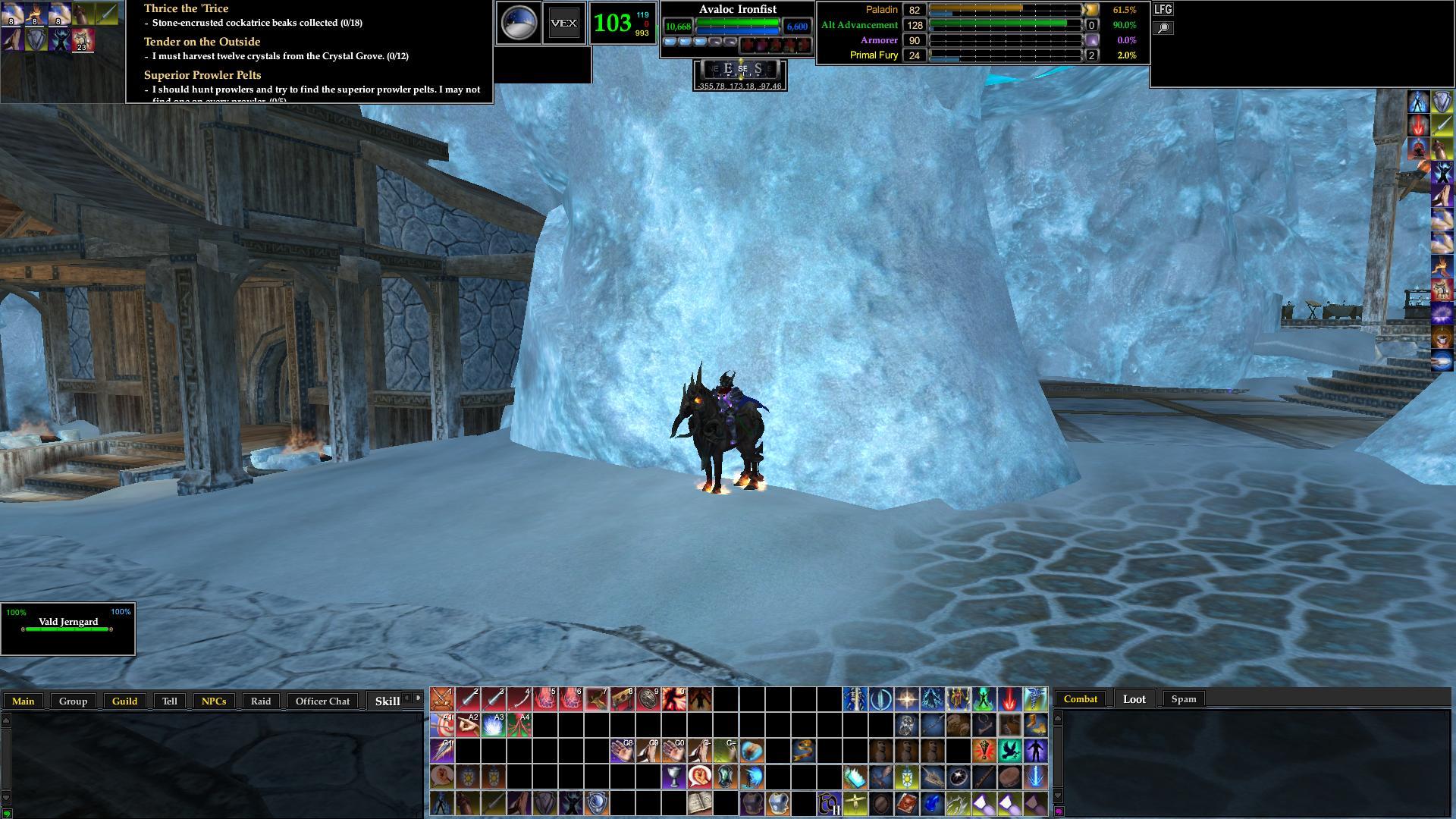
Askelon's UI Compliation
 
Description
1.26a Updated RickF7666 Personna Window and Drumstix42 Horizontal Journal, Have a Merry Christmas!

1.25 Updated with the newest Version of Enhanced T.King Undead Gothic Skin

1.24 Updated with the newest RickF7666 Pet Window, Enjoy.

1.23 Updated With the New Drumstix42 Horizontal Quest Journal

1.22 Updated with the New Personna Window from RickF7666.


1.21 Updated to be compatable with TOS, New EQ2Maps with POIs, New Inventory Window from Drum, New Broker Window from Profit UI. ENJOY!

(P.S. my Mother Died and I will Not be in town or able to update this for a couple of weeks As I am incharge of her will and such)


This is a Compliation of files I and a few others use that leaves most of the screen open for viewing. I had no hand in writing any of the mods used in this Compliation, I only put them together in the form you see. I use a 1440 x 900 Resolution but it should work on any resolution with some minor tweaking.

The Mods used in this Compliation are as follows and full credit is hereby given to these authors for thier hard work and knowledge.

Author Mod

Drumstix42 Chat Window Mod
ProfitUI Market Window
GM9 Advanced Dressing Room Window
Drumstix42 Inventory
Drumstix42 Horizontal Journal
Dragowulf Enhanced T.King Undead Gothic Skin
Dragowulf Advanced Hotkeys
Quib & Tremos EQ2Map - Manual Version
GM9 InfoCenter for Tier 8
RickF7666 Casting & Breath Windows
RickF7666 Pet Window
RickF7666 Player Window
RickF7666 Experiance Bars
RickF7666 Persona Window
Zyther Zy's Celtic Target Ring
Othesus Maintained Spells Window (26 point)
Uberfuzzy Simple Target/Implied Target With Percentages
Heidrickla Just Press Enter
Himay My UI Compass
Himay Group Window w/ Click to Follow
Himay Bags - 6 slot 3/4 default
Corren Silverfur T.King Celtic Knowledge Book
Mother9987 Flexible Raid Window
Jaxel {OCD-Adv} Tracking
Humduce Smaller Gold Heroic Op Window.
Archive List (Old Versions)
File Name
Version
Size
Author
Date
1.26
27.20 MB
Askelon
12-11-2008 03:40 PM
File Statistics
User Rating:
5 out of 5 with 4 votes
Downloads: 823
Views: 15082
Favorites: 14
Uploaded By:
 
Last Modified: N/A

View Pictures. Download Now! Post A Comment
Remove Ads


Post A Reply
Author Comments Comment Options
Old 10-10-2008, 04:49 PM  
Askelon
A Brown Bear
 
Askelon's Avatar
Interface Author - Click to view interfaces

Server: Beta 1
Forum posts: 12
File comments: 9
Uploads: 1
Quote:
Originally posted by Shaoden
How do you use the apperence item slotS?
open your Inventory (I) then at the top of that window theres 2 tabs 1 in Equipment the other is appearance just double click the item in your bags to equip it to the approriate appearance slot when the appearance tab is selected or drag it over to the slot your choise.
Askelon is offline Report comment to moderator   Reply With Quote Reply With Quote
Old 10-09-2008, 09:00 PM  
Shaoden
A Coastal Crab

Server: Antonia Bayle
Forum posts: 0
File comments: 1
Uploads: 0
How do you use the apperence item slotS?
Shaoden is offline Report comment to moderator   Reply With Quote Reply With Quote
Old 10-09-2008, 04:30 PM  
Askelon
A Brown Bear
 
Askelon's Avatar
Interface Author - Click to view interfaces

Server: Beta 1
Forum posts: 12
File comments: 9
Uploads: 1
Re: Re: First tryout and learning.

Quote:
Originally posted by NWTracker
Answering my own questions;

Most of what I want to do is available in one of two menus, either hot-bar settings or window settings. Go figure. I imagine that if I read enough of the forums I'll find simple things like if all hot-bars are deleted how do I make the first one appear.

I think I show Nube the most when I have software overload ambiance set to ON.

hehehe
Askelon is offline Report comment to moderator   Reply With Quote Reply With Quote
Old 10-08-2008, 07:41 AM  
NWTracker
A Coastal Crab

Server: Antonia Bayle
Forum posts: 0
File comments: 2
Uploads: 0
Re: First tryout and learning.

Quote:
Originally posted by NWTracker


The first thing is that I was able to unlock the journal helper in the upper left corner to re-size the length, but I cannot get the height to adjust even though I get a cross-hair.

Second thing is that I don't need that many spaces for spells/skills or devices. So I can access menus for the hot-bars, but am unable to delete them once they're clear.

I suppose these are somewhere in a basic window management tutorial?

Thanks for any help.
Answering my own questions;

Most of what I want to do is available in one of two menus, either hot-bar settings or window settings. Go figure. I imagine that if I read enough of the forums I'll find simple things like if all hot-bars are deleted how do I make the first one appear.

I think I show Nube the most when I have software overload ambiance set to ON.
NWTracker is offline Report comment to moderator   Reply With Quote Reply With Quote
Old 10-07-2008, 03:03 PM  
NWTracker
A Coastal Crab

Server: Antonia Bayle
Forum posts: 0
File comments: 2
Uploads: 0
First tryout and learning.

Ok at level 45 I outgrew the default UI thus I'm trying out collection and am very happy with it. I'm going through a learning curve with managing the windows.

The first thing is that I was able to unlock the journal helper in the upper left corner to re-size the length, but I cannot get the height to adjust even though I get a cross-hair.

Second thing is that I don't need that many spaces for spells/skills or devices. So I can access menus for the hot-bars, but am unable to delete them once they're clear.

I suppose these are somewhere in a basic window management tutorial?

Thanks for any help.
NWTracker is offline Report comment to moderator   Reply With Quote Reply With Quote
Old 08-05-2008, 03:29 PM  
Askelon
A Brown Bear
 
Askelon's Avatar
Interface Author - Click to view interfaces

Server: Beta 1
Forum posts: 12
File comments: 9
Uploads: 1
Greetings

Greetings and Thankyou,

The Fix that Raluen should work if not unlock the Hot Bar and drag it to the right untill it is all the way open, also tell it to show borders (in window settings window) this should help you move it where ya need it.


Quote:
Originally posted by Raluen
Don't know if this will work on this UI or not, but it's what I had to do when I had a similar problem with a different UI. Right click on the hotbar, then click on hotbar settings (I think that's the right one anyway - I'm at work so I can't check). There should be an option that says show spinner, or something like that. Select that so that you can see the spinner on that hotbar. You should be able to move the hotbar now (the crosshairs show up when your mouse pointer is over the spinner).
Askelon is offline Report comment to moderator   Reply With Quote Reply With Quote
Old 07-23-2008, 10:44 AM  
Raluen
A Coastal Crab

Server: Antonia Bayle
Forum posts: 0
File comments: 1
Uploads: 0
Quote:
Originally posted by Bonzo
Nice UI! However, somehow one of my hotbars got messed up on the screen. Its now in a different spot than where I had it, but I cant for the life of me figure out how to move it back. I dont get any crosshairs to move it or anything, the window settings is set on unlocked.

Don't know if this will work on this UI or not, but it's what I had to do when I had a similar problem with a different UI. Right click on the hotbar, then click on hotbar settings (I think that's the right one anyway - I'm at work so I can't check). There should be an option that says show spinner, or something like that. Select that so that you can see the spinner on that hotbar. You should be able to move the hotbar now (the crosshairs show up when your mouse pointer is over the spinner).
Raluen is offline Report comment to moderator   Reply With Quote Reply With Quote
Old 07-16-2008, 12:39 AM  
Bonzo
A Coastal Crab

Server: Befallen
Forum posts: 0
File comments: 1
Uploads: 0
Nice UI! However, somehow one of my hotbars got messed up on the screen. Its now in a different spot than where I had it, but I cant for the life of me figure out how to move it back. I dont get any crosshairs to move it or anything, the window settings is set on unlocked.
Bonzo is offline Report comment to moderator   Reply With Quote Reply With Quote
Old 06-11-2008, 01:28 AM  
Scuz
A Coastal Crab

Server: Antonia Bayle
Forum posts: 0
File comments: 3
Uploads: 0
i could open the guild bank but not the personal bank.

I just downloaded a new bankwindow and overwrote what was in it
Scuz is offline Report comment to moderator   Reply With Quote Reply With Quote
Old 06-10-2008, 04:46 PM  
Askelon
A Brown Bear
 
Askelon's Avatar
Interface Author - Click to view interfaces

Server: Beta 1
Forum posts: 12
File comments: 9
Uploads: 1
ok Bank fixed

but there is still the Bioxes not saving locations and sizes problem ...damned SOE
Askelon is offline Report comment to moderator   Reply With Quote Reply With Quote
Old 06-10-2008, 04:43 PM  
Askelon
A Brown Bear
 
Askelon's Avatar
Interface Author - Click to view interfaces

Server: Beta 1
Forum posts: 12
File comments: 9
Uploads: 1
Re: The Bank

you are correct there is a problem with the bank window...probably the fix to correct the boxes that were not saving thir locations and sizes working on it now.


Quote:
Originally posted by strydr36
This is a great compilation. Thanks for taking your time and putting it all together. My only issue, and maybe its just me overthinking it, but the bank doesn't work for me. When I try to start a bank transaction, I get the message that its not compatible. Am I doing something wrong or overlooking something? Oh and its just my personal bank not my guild bank. Like I said, thats my only issue, everrthing else is amazing and geat to use.
Askelon is offline Report comment to moderator   Reply With Quote Reply With Quote
Old 06-10-2008, 07:23 AM  
strydr36
A Coastal Crab

Server: Antonia Bayle
Forum posts: 0
File comments: 1
Uploads: 0
The Bank

This is a great compilation. Thanks for taking your time and putting it all together. My only issue, and maybe its just me overthinking it, but the bank doesn't work for me. When I try to start a bank transaction, I get the message that its not compatible. Am I doing something wrong or overlooking something? Oh and its just my personal bank not my guild bank. Like I said, thats my only issue, everrthing else is amazing and geat to use.
strydr36 is offline Report comment to moderator   Reply With Quote Reply With Quote
Old 06-09-2008, 03:00 AM  
Scuz
A Coastal Crab

Server: Antonia Bayle
Forum posts: 0
File comments: 3
Uploads: 0
Re: I was gonna

Quote:
Originally posted by Askelon
I was gonna thankyou But I do not know your Email, If ya lived close by (Vanc Wa ) I would take ya out for a beer or 3 I really do thankyou for all you did and I salute your honesty and Integrity

Southern cali.

I emailed the link in your profile here, also sent a PM via the board (check your PM) and notified the eq2interface webmaster as well as your guild heh.
Scuz is offline Report comment to moderator   Reply With Quote Reply With Quote
Old 06-07-2008, 10:26 PM  
Askelon
A Brown Bear
 
Askelon's Avatar
Interface Author - Click to view interfaces

Server: Beta 1
Forum posts: 12
File comments: 9
Uploads: 1
I was gonna

I was gonna thankyou But I do not know your Email, If ya lived close by (Vanc Wa ) I would take ya out for a beer or 3 I really do thankyou for all you did and I salute your honesty and Integrity


Quote:
Originally posted by Scuz
I see you had time to get your UI back up. Thats good.

Would of been nice to get a thank you after spending a few hours of my life making sure your security break didn't screw you over.
Askelon is offline Report comment to moderator   Reply With Quote Reply With Quote
Old 06-07-2008, 01:27 PM  
Scuz
A Coastal Crab

Server: Antonia Bayle
Forum posts: 0
File comments: 3
Uploads: 0
I see you had time to get your UI back up. Thats good.

Would of been nice to get a thank you after spending a few hours of my life making sure your security break didn't screw you over.
Scuz is offline Report comment to moderator   Reply With Quote Reply With Quote
Post A Reply

 
Category Jump:
Search this Category:
 

All times are GMT -5. The time now is 09:25 PM.


Our Network
EQInterface | EQ2Interface | War.MMOUI | WoWInterface | VGInterface | LoTROInterface | MMOInterface