EQ2Interface.com
Search Downloads


Go Back   EQ2Interface > Interface Pieces > Group window

Category: Group windowMother's Health Windows
Interface Information
Download
mother9987's Portal Bug Reports Feature Requests
How do I install this? (FAQ)
Name: Mother's Health Windows   Popular!
Author:
Date: 04-13-2008 11:08 PM
Size: 26.72 Kb
Version: 1.0.3
Rate Addon: 5 out of 5 with 13 votes  
Patch & Add-on List
File Name
Version
Size
Author
Date
Type
1.0.3
4.92 Kb
04-16-2008 11:15 AM
Addon
Pictures
Click to enlarge 

Views: 0
Size: 11.32 Kb
Dimensions: 144 x 164
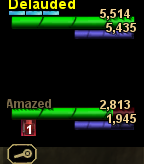
Player and Group windows
 
Click to enlarge 

Views: 0
Size: 35.26 Kb
Dimensions: 615 x 165
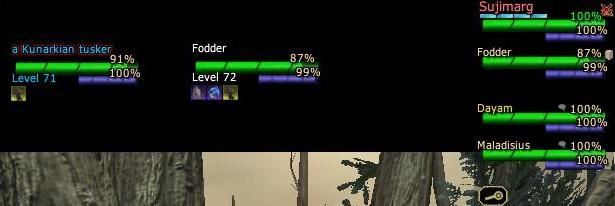
Player, group, target and implied target (frames) windows
 
Description
I finally got my portal page up here.

List bugs at this link. Request features here.

Drop comments, suggestions, observations, etc here.


GU 44 Update

Description:
This started out mostly as me just messing around. But I actually liked it when I loaded it up to look.

The theme is loosely inspired by the FFXI group window. So, if you played that game, it should look somewhat familiar.

Features:
  • Click-To-Cure - I finally made a healer alt, so click-to-cure seemed like a good idea.
  • Tank-finder[tm] - make a macro that when triggered auto-targets a single member of your group or your pet
  • Tank-assist[tm] - make a macro that when triggered auto-assists a single member of your group.

Changes from Mother's Group Windows:
  • Combined the files for Group, Player, Pet, Target, Implied Target
  • Made graphical changes to the health and power bars that I think look sharper, and could improve performance slightly (<1 fps, but enough of those changes can add up)
  • Mouse over group window when not in combat will display level and class of group members
  • Changed the macros for tank finder and tank assist so they should work more consistently
  • Added support for curse indicator and click to cure curse
  • Changed click-to-cures to use /useabilityonplayer

Version history:
1.0.3
Level/class display in group window now do not show up when you are in combat

Level/class display in group window now do not show up for any member with a status ailment.

Level/class display in group window now moved so it's more clear who's level/class it is.

1.0.2
Fixed target and implied target power not updating in frames version.

Fixed a minor bug with background of group members health bars not changing color with the foreground.

1.0.1
Fixed the target and implied target windows claiming they were an old version. Fixed target and implied target power bar not working.

Fixed incorrect pet window being packaged with the mod.

Fixed display of group debuffs.

I think that's it. Thanks to Fae for helping me test repeatedly!

1.0.0
Initial Release

To Install:
If you already have an EQ2UI_Custom.xml file in your custom ui folder, do not overwrite it. Just add the line:

Code:
<include>_Mothers_Styles.xml</include>
before the </Page> line.

With the rest of the files, just unzip into your custom ui folder overwriting any file with the same name already there.

Instructions to use:
TankFinder[tm]. There is a radio button just to the right of each group-member's HP display. If you click there, you mark that player as the tank and a little white box will appear to indicate tank status.

To target the tank, make a macro:
Code:
/target_none
/show_window MainHUD.GroupMembers.Target
TankAssist[tm] Technology. Just like TankFinder[tm], but does a /assist instead of a /target. Hey, it was a request.

To assist the tank, make a macro:
Code:
/target_none
/show_window MainHUD.GroupMembers.Assist
Archive List (Old Versions)
File Name
Version
Size
Author
Date
1.0.2
26.56 Kb
mother9987
04-09-2008 08:43 PM
File Statistics
User Rating:
5 out of 5 with 13 votes
Downloads: 22716
Views: 50859
Favorites: 69
Uploaded By:
 
Last Modified: N/A

View Pictures. Download Now! Post A Comment
Remove Ads


Post A Reply
Author Comments Comment Options
Old 08-23-2008, 05:38 PM  
Tumna
A Coastal Crab

Server: Antonia Bayle
Forum posts: 0
File comments: 1
Uploads: 0
Quote:
Originally posted by Sabane
Hi, DLed this today and I love it. But, as a healer I cannot cure anything but curse. Other buttons tell me spell or ability no longer available. GU 45 changed this. Any ETA on an update to fix or maybe someone knows what I need to edit in order to fix?


Thanks in advance

I don't think there has been an update to make the "Cure" spell for priests "click to cure." I am patiently waiting on an update, since this is by far my favorite UI and I can't find another interface that I like as much as Mother's set. Hopefully Mother is still around and willing to give us an update. I really miss being able to click and cure my party.

Last edited by Tumna : 08-23-2008 at 05:39 PM.
Tumna is offline Report comment to moderator   Reply With Quote Reply With Quote
Old 07-03-2008, 04:37 AM  
PancakeAbuse
A Young Mystail Rat

Server: Antonia Bayle
Forum posts: 3
File comments: 2
Uploads: 0
I really like the mod, but I have a request. Is there any way to change the health percentage of group members to Current/Max HP (Mana can stay percentage)?

That would make the mod "perfect" for me. I'm more used to that than using %'s to figure out I should heal.
PancakeAbuse is offline Report comment to moderator   Reply With Quote Reply With Quote
Old 05-18-2008, 04:12 PM  
Sabane
A Coastal Crab

Server: Antonia Bayle
Forum posts: 1
File comments: 1
Uploads: 0
Hi, DLed this today and I love it. But, as a healer I cannot cure anything but curse. Other buttons tell me spell or ability no longer available. GU 45 changed this. Any ETA on an update to fix or maybe someone knows what I need to edit in order to fix?


Thanks in advance
Sabane is offline Report comment to moderator   Reply With Quote Reply With Quote
Old 05-03-2008, 12:51 PM  
strange
A Coastal Crab

Server: Antonia Bayle
Forum posts: 1
File comments: 2
Uploads: 0
Additional pet button

Call me daft, but what does the brown 'megaphone' button do in the pet button window with your mod?

issit.
strange is offline Report comment to moderator   Reply With Quote Reply With Quote
Old 04-18-2008, 04:58 PM  
mother9987
An atom heart
 
mother9987's Avatar
Interface Author - Click to view interfaces

Server: Everfrost
Forum posts: 184
File comments: 67
Uploads: 17
Quote:
Originally posted by cdec518
I like the look of this mod but I have 2 beefs...

C2C icons are tiny. The group window's classes popping up is a nice touch, btu it blocks you from hitting that tiny cure icon.

Biggest prob is that this mod somehow conflicts with my broker window mod (I use Profit's broker window). I have tried reinstalling both on top of each other, and when i install your mod over the broker window i cant see some text in the broker window; When i install the broker window over yours, my health and power bars are darkened out. I dont know much about creating or editing mods, but any help you can offer on this subject would be much appreciated.
Are you still having problems with the C2C's getting blocked in version 1.03? I changed a lot of the code so that the class/level display should never pop if a player has something that needs curing and the class/level display is now at the back, the C2Cs should always be on top if somehow you get both to display.

The new bars are causing me lots of headache. I'll look at profit's broker window and see if I come up with any suggestions for you. Or maybe I just need to rewrite something myself - I'm undecided yet.

I'm rather unhappy with having to shrink the size of the icons, but SOE had to add another one, and I couldn't find anywhere else to put it than to shrink the others and put it in the same space. Hopefully they reduce the number back to 4 or something or maybe I'll have some genius idea on how to fit all 5 icons.

Mother
mother9987 is offline Report comment to moderator   Reply With Quote Reply With Quote
Old 04-17-2008, 11:40 PM  
cdec518
A Coastal Crab
 
cdec518's Avatar

Server: Antonia Bayle
Forum posts: 1
File comments: 10
Uploads: 0
I like the look of this mod but I have 2 beefs...

C2C icons are tiny. The group window's classes popping up is a nice touch, btu it blocks you from hitting that tiny cure icon.

Biggest prob is that this mod somehow conflicts with my broker window mod (I use Profit's broker window). I have tried reinstalling both on top of each other, and when i install your mod over the broker window i cant see some text in the broker window; When i install the broker window over yours, my health and power bars are darkened out. I dont know much about creating or editing mods, but any help you can offer on this subject would be much appreciated.
cdec518 is offline Report comment to moderator   Reply With Quote Reply With Quote
Old 04-14-2008, 01:52 PM  
Chillispike
A Coastal Crab

Server: Antonia Bayle
Forum posts: 0
File comments: 1
Uploads: 1
Re: Re: Personal Health window

Quote:
Originally posted by mother9987
There will be a % and a naked. I'll release them as patches for the absolute version here as soon as I'm happy with the way absolute is working. It's just easier to debug one version than 3.
Just added the % my self wuhuu hehe
Line 15 old:
Code:
<Page BackgroundColor="#00FF00" Location="5,16" Name="MemberInfoPage" PackLocation="left,top" ScrollExtent="135,39" Size="135,39">
line 15 and new added line 16 and 17:
Code:
<Page BackgroundColor="#00FF00" Location="5,16" Name="MemberInfoPage" PackLocation="left,top" ScrollExtent="180,39" Size="180,39">
 <Text AbsorbsInput="false" actiontype="Target" Color="#8A8AFF" DynamicData="/GameData.Self.Power" Font="/TextStyles.Normal.NormalStyle" Location="130,13" MaximumSize="124,15" MaxLines="1" Name="PowerPercent" ScrollExtent="35,15" ShadowStyle="/ShadowStyles.Outline1" Size="35,15" TextAlignment="Right" TextAlignmentVertical="Center" TruncateElipsis="false">100%</Text>
 <Text AbsorbsInput="false" actiontype="Target" Color="#8A8AFF" DynamicData="/GameData.Self.Health" Font="/TextStyles.Normal.NormalStyle" Location="130,-1" MaximumSize="124,15" MaxLines="1" Name="HealthPercent" ScrollExtent="35,15" ShadowStyle="/ShadowStyles.Outline1" Size="35,15" TextAlignment="Right" TextAlignmentVertical="Center" TruncateElipsis="false">100%</Text>

With that add i see % hp and power next to the number.
Only edit in the memberinfo line is that the size is 180 now instead of 135 so just a little bigger.

Chilli
Chillispike is offline Report comment to moderator   Reply With Quote Reply With Quote
Old 04-13-2008, 10:24 PM  
mother9987
An atom heart
 
mother9987's Avatar
Interface Author - Click to view interfaces

Server: Everfrost
Forum posts: 184
File comments: 67
Uploads: 17
Re: Personal Health window

Quote:
Originally posted by Druesius
I really like your UI pieces however when I had to update, I updated all the pieces and now my personal health and power show totals and no longer show as a percentage. Do you have another version that shows percentages? As an illusionist, I must run at 30% power or less for an AA line I use and it's now more difficult to see where my power stands as a percentage value.
There will be a % and a naked. I'll release them as patches for the absolute version here as soon as I'm happy with the way absolute is working. It's just easier to debug one version than 3.
mother9987 is offline Report comment to moderator   Reply With Quote Reply With Quote
Old 04-13-2008, 06:41 PM  
Druesius
A Coastal Crab

Server: Lucan DLere
Forum posts: 0
File comments: 1
Uploads: 0
Personal Health window

I really like your UI pieces however when I had to update, I updated all the pieces and now my personal health and power show totals and no longer show as a percentage. Do you have another version that shows percentages? As an illusionist, I must run at 30% power or less for an AA line I use and it's now more difficult to see where my power stands as a percentage value.
Druesius is offline Report comment to moderator   Reply With Quote Reply With Quote
Old 04-13-2008, 02:57 PM  
revsmitty
A Young Mystail Rat

Server: Antonia Bayle
Forum posts: 3
File comments: 11
Uploads: 0
Is there anyone to turn off the extra rollover of class and level for all group members? When I go in to use the click the cure feature this pops right over the ailment and in the way.

Last edited by revsmitty : 04-13-2008 at 05:05 PM.
revsmitty is offline Report comment to moderator   Reply With Quote Reply With Quote
Old 04-12-2008, 12:34 AM  
c24h78ill
A Coastal Crab

Server: Antonia Bayle
Forum posts: 0
File comments: 2
Uploads: 0
Yeah that's what it was... My main eq2ui.xml did have an include customs xml. We ust added the line and it works fine now.. thanx
c24h78ill is offline Report comment to moderator   Reply With Quote Reply With Quote
Old 04-11-2008, 09:27 PM  
machbane
A Forest Scavenger
 
machbane's Avatar

Server: Antonia Bayle
Forum posts: 18
File comments: 3
Uploads: 0
Re: Re: Re: Re: grp window

Quote:
Originally posted by mother9987
Ah - that'd make sense for both of you, then. I'm trying to move away from modifying the eq2ui.xml or whatever the parent file is and into modifying the eq2ui_custom.xml as I guess that's now perferred - for exactly this reason.

So, please - previous poster, also check if you have an eq2ui.xml file in your ui mod directory and if so, does it have the eq2ui_custom.xml include?
Just tested and it fixed my problem. I do have something else i need help with if i can pm you.ty.
machbane is offline Report comment to moderator   Reply With Quote Reply With Quote
Old 04-11-2008, 08:25 PM  
mother9987
An atom heart
 
mother9987's Avatar
Interface Author - Click to view interfaces

Server: Everfrost
Forum posts: 184
File comments: 67
Uploads: 17
Re: Re: Re: grp window

Quote:
Originally posted by machbane
Actually i was comng here to post that i am having the same problem, all the files are in the right spots. Just cant get the health and power bars to show.


Just thought of something but can't test it atm. I have a eq2ui.xml file in my ui directiry. It is missing <include>eq2ui_custom.xml</include> which is in the default file. I added it to the one in my ui directory and will test in a bit.
Ah - that'd make sense for both of you, then. I'm trying to move away from modifying the eq2ui.xml or whatever the parent file is and into modifying the eq2ui_custom.xml as I guess that's now perferred - for exactly this reason.

So, please - previous poster, also check if you have an eq2ui.xml file in your ui mod directory and if so, does it have the eq2ui_custom.xml include?
mother9987 is offline Report comment to moderator   Reply With Quote Reply With Quote
Old 04-11-2008, 07:42 PM  
machbane
A Forest Scavenger
 
machbane's Avatar

Server: Antonia Bayle
Forum posts: 18
File comments: 3
Uploads: 0
Re: Re: grp window

Actually i was comng here to post that i am having the same problem, all the files are in the right spots. Just cant get the health and power bars to show.


Just thought of something but can't test it atm. I have a eq2ui.xml file in my ui directiry. It is missing <include>eq2ui_custom.xml</include> which is in the default file. I added it to the one in my ui directory and will test in a bit.

Last edited by machbane : 04-11-2008 at 07:47 PM.
machbane is offline Report comment to moderator   Reply With Quote Reply With Quote
Old 04-11-2008, 12:35 PM  
mother9987
An atom heart
 
mother9987's Avatar
Interface Author - Click to view interfaces

Server: Everfrost
Forum posts: 184
File comments: 67
Uploads: 17
Re: grp window

Quote:
Originally posted by c24h78ill
I downloaded and installed everything as advertised. I have abit of exp. with working ui's ect... Me and my wife.. on 2 seperate computers have all working except we have no power or health bars. we get % and numbers correctly.. that's it....
Sounds like any of:
  • You didn't put the eq2ui_custom.xml in your UI directory (or edit your existing one to add the _Mothers_Styles.xml line
  • You don't have _Mothers_Styles.xml or _Mothers_Styles_1.xml in your UI directory.
  • You don't have progress01.dds in the images subdirectory of your UI directory.

The bars are in progress01.dds which is referenced by _mothers_styles_1.xml which is referenced by _mothers_styles.xml which is referenced by eq2ui_custom.xml.

So, something in that chain is broken... If you check all that and still have problems, PM me and I'll work with you to figure out what's up.
mother9987 is offline Report comment to moderator   Reply With Quote Reply With Quote
Post A Reply

 
Category Jump:
Search this Category:
 

All times are GMT -5. The time now is 08:36 PM.


Our Network
EQInterface | EQ2Interface | War.MMOUI | WoWInterface | VGInterface | LoTROInterface | MMOInterface