EQ2Interface.com
Search Downloads


Go Back   EQ2Interface > Interface Pieces > Hotbar

Category: Hotbar[DrumsUI] Hotbar
Interface Information
Download
Drumstix42's Portal Bug Reports Feature Requests
How do I install this? (FAQ)
Name: [DrumsUI] Hotbar   Popular!
Author:
Date: 04-26-2009 07:07 PM
Size: 3.22 Kb
Version: 2009.04.26
Rate Addon: 5 out of 5 with 10 votes  
Pictures
Click to enlarge 

Views: 0
Size: 6.87 Kb
Dimensions: 418 x 34
In-Game, spinner shown
 
Click to enlarge 

Views: 0
Size: 27.32 Kb
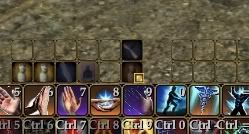
Dimensions: 408 x 170
In-Game, spinners off, borders off, icon padding 0, icon size 32
 
Click to enlarge 

Views: 0
Size: 153.27 Kb
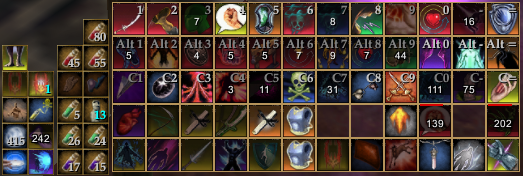
Dimensions: 523 x 176
Re-use timers displayed
 
Description
Game Update #54+ Compatible


Description:
This is a simple modification to the default hotbar. All extra space has been removed. The Frame is exactly 1 pixel outside the hotkeys, all the hotkeys are directly next to each other (when padding is set to 0), and the spinner is able to size down fairly small. Frame will scale down to minimum size as well.

Overlay re-use timers are now displayed with the Frame turned on in Window Settings. Enabling the Titlebar in Window Settings will enable reuse bars.

* Unlock each hotbar, or turn spinners on, to easily move them around.


Installation Notes:
- How To: Install A Custom UI
- eq2ui_mainhud_hotkey.xml goes in your CustomUI folder.
- DrumsUI/images/hotkey.dds goes in your CustomUI/DrumsUI/images/ folder.


Update Log:
2009.04.26
- Now includes overlay re-use timers in text and bar form (controllable via Window Settings)


2008.06.16
- Recoded from scratch, now minimal space hotbars
2005.12.13
- Updated to latest GU to include hotbar options window
2005.10.23
- Minor fix to tertiary hotbar
File Statistics
User Rating:
5 out of 5 with 10 votes
Downloads: 5850
Views: 46151
Favorites: 68
Uploaded By:
 
Last Modified: 02-25-2010 06:23 PM by Drumstix42    

View Pictures. Download Now! Post A Comment
Remove Ads


Post A Reply
Author Comments Comment Options
Old 03-14-2010, 12:40 AM  
shadowdrummer46
A Young Mystail Rat

Server: Unkown
Forum posts: 2
File comments: 1
Uploads: 0
Hey Joined to say "Great Mod"...lol makes the game sooo much better. Keep it up you got our support.

Last edited by shadowdrummer46 : 03-14-2010 at 12:44 AM.
shadowdrummer46 is offline Report comment to moderator   Reply With Quote Reply With Quote
Old 02-03-2010, 09:12 AM  
Drumstix42
A Griffon
 
Drumstix42's Avatar
Interface Author - Click to view interfaces

Server: Blackburrow
Forum posts: 1858
File comments: 254
Uploads: 41
Quote:
Originally posted by Kuja_Leonhart
Can you make transparent background then button is pressed?
Don't think there's a way to that, but not sure
Drumstix42 is offline Report comment to moderator   Reply With Quote Reply With Quote
Old 02-03-2010, 09:08 AM  
Kuja_Leonhart
A Coastal Crab

Server: Barren Sky
Forum posts: 1
File comments: 7
Uploads: 0
Can you make transparent background then button is pressed?
Kuja_Leonhart is offline Report comment to moderator   Reply With Quote Reply With Quote
Old 10-21-2009, 04:36 PM  
Drumstix42
A Griffon
 
Drumstix42's Avatar
Interface Author - Click to view interfaces

Server: Blackburrow
Forum posts: 1858
File comments: 254
Uploads: 41
Re: Not getting many numbers

Quote:
Originally posted by Vertox
for some reason i get countdown numbers when i hit escape (on troub) but not on other casts - any ideas? (... as in - only one hot bar cell is showing numbers)
Edit the hotbar's window properties. Make sure frames are turned on. Try toggling them off and on.
Drumstix42 is offline Report comment to moderator   Reply With Quote Reply With Quote
Old 10-20-2009, 08:48 PM  
Vertox
A Young Mystail Rat

Server: Antonia Bayle
Forum posts: 3
File comments: 4
Uploads: 0
Not getting many numbers

for some reason i get countdown numbers when i hit escape (on troub) but not on other casts - any ideas? (... as in - only one hot bar cell is showing numbers)

Last edited by Vertox : 10-20-2009 at 08:50 PM.
Vertox is offline Report comment to moderator   Reply With Quote Reply With Quote
Old 06-02-2009, 02:17 PM  
Drumstix42
A Griffon
 
Drumstix42's Avatar
Interface Author - Click to view interfaces

Server: Blackburrow
Forum posts: 1858
File comments: 254
Uploads: 41
It's based on a font property, so you cannot directly put in a size, but...
You could try taking Line #140:
Code:
    <IconBank BackgroundOpacity="1.000" Dragable="true" font="/TextStyles.Normal.NormalStyle" framecolor="#B5935A" iconframepadding="0" iconpadding="0" iconstyle="/IconStyles.button" Location="11,0" Name="Icons" PackSize="a,a" renderframe="true" renderoutlines="true" ScrollExtent="384,32" Size="384,32" textcolor="#C3C3C3" textmargin="2,-1,2,-2" treatasbutton="true" />
And changing it to this:
Code:
    <IconBank BackgroundOpacity="1.000" Dragable="true" font="/TextStyles.Large.LargelStyle" framecolor="#B5935A" iconframepadding="0" iconpadding="0" iconstyle="/IconStyles.button" Location="11,0" Name="Icons" PackSize="a,a" renderframe="true" renderoutlines="true" ScrollExtent="384,32" Size="384,32" textcolor="#C3C3C3" textmargin="2,-1,2,-2" treatasbutton="true" />
Quote:
Originally posted by Anotherbrick
Thanks for mod.
Is it possible to increase size of numbers, that show re-use timers, in eq2ui_mainhud_hotkey.xml by myself?

Last edited by Drumstix42 : 06-02-2009 at 02:18 PM.
Drumstix42 is offline Report comment to moderator   Reply With Quote Reply With Quote
Old 06-02-2009, 09:30 AM  
Anotherbrick
A Coastal Crab

Server: Unkown
Forum posts: 0
File comments: 1
Uploads: 0
Thanks for mod.
Is it possible to increase size of numbers, that show re-use timers, in eq2ui_mainhud_hotkey.xml by myself?
Anotherbrick is offline Report comment to moderator   Reply With Quote Reply With Quote
Old 04-30-2009, 10:09 PM  
Kattmando
A Young Mystail Rat

Server: Antonia Bayle
Forum posts: 6
File comments: 10
Uploads: 0
That would be perfect.
Kattmando is offline Report comment to moderator   Reply With Quote Reply With Quote
Old 04-29-2009, 11:35 PM  
Drumstix42
A Griffon
 
Drumstix42's Avatar
Interface Author - Click to view interfaces

Server: Blackburrow
Forum posts: 1858
File comments: 254
Uploads: 41
Quote:
Originally posted by Kattmando
I do have some that are off screen since I don't need the complete hotbar on the left side.

Thanks for the quick response. =)
Maybe a little grab handle on the right side that only shows on mouse-over when the frame is enabled, yeah? That would probably be easier than having multiple setups.
Drumstix42 is offline Report comment to moderator   Reply With Quote Reply With Quote
Old 04-29-2009, 07:31 PM  
Kattmando
A Young Mystail Rat

Server: Antonia Bayle
Forum posts: 6
File comments: 10
Uploads: 0
I do have some that are off screen since I don't need the complete hotbar on the left side.

Thanks for the quick response. =)

Last edited by Kattmando : 04-29-2009 at 08:29 PM.
Kattmando is offline Report comment to moderator   Reply With Quote Reply With Quote
Old 04-29-2009, 01:33 AM  
Drumstix42
A Griffon
 
Drumstix42's Avatar
Interface Author - Click to view interfaces

Server: Blackburrow
Forum posts: 1858
File comments: 254
Uploads: 41
Quote:
Originally posted by Kattmando
Nicely done.

Any chance you could get revers spinners to work? With just the normal spinners the hotbars are not movable unless the left side of the hotbar is visible when the spinners are enabled. If the revers spinners were enabled then the hotbars could be moved from either side no matter which edge of the screen they are up against.

Thanks.
If spinners are disabled, and the hotbar is against the left side of the screen, and then the spinner is enabled, it will push the buttons to the right to make space. So, I'm not sure exactly what you're looking for. Unless the hotbar is actually off the screen?
Drumstix42 is offline Report comment to moderator   Reply With Quote Reply With Quote
Old 04-28-2009, 11:57 PM  
Kattmando
A Young Mystail Rat

Server: Antonia Bayle
Forum posts: 6
File comments: 10
Uploads: 0
Nicely done.

Any chance you could get revers spinners to work? With just the normal spinners the hotbars are not movable unless the left side of the hotbar is visible when the spinners are enabled. If the revers spinners were enabled then the hotbars could be moved from either side no matter which edge of the screen they are up against.

Thanks.
Kattmando is offline Report comment to moderator   Reply With Quote Reply With Quote
Old 08-18-2008, 06:00 PM  
Drumstix42
A Griffon
 
Drumstix42's Avatar
Interface Author - Click to view interfaces

Server: Blackburrow
Forum posts: 1858
File comments: 254
Uploads: 41
Quote:
Originally posted by PrincessAriel
Would be great if you would introduce it in silver/white
I'll see what I can do
Drumstix42 is offline Report comment to moderator   Reply With Quote Reply With Quote
Old 08-16-2008, 11:00 AM  
PrincessAriel
A Forest Scavenger

Server: Antonia Bayle
Forum posts: 19
File comments: 4
Uploads: 0
Would be great if you would introduce it in silver/white
PrincessAriel is offline Report comment to moderator   Reply With Quote Reply With Quote
Old 06-17-2008, 06:24 AM  
rberry88
Premium Member
 
rberry88's Avatar
Premium Member

Server: Antonia Bayle
Forum posts: 5
File comments: 3
Uploads: 0
This is simply awesome, thanks for the hard work you put into it.

I've been using the DrumUI mods lately and all of them have made my game experience even better and more fluid.

One small request: Is there a way to shorten the key text using the Numpad from <Numpad #> to NP#?

Last edited by rberry88 : 06-17-2008 at 06:52 AM.
rberry88 is offline Report comment to moderator   Reply With Quote Reply With Quote
Post A Reply

 
Category Jump:
Search this Category:
 

All times are GMT -5. The time now is 05:07 PM.


Our Network
EQInterface | EQ2Interface | War.MMOUI | WoWInterface | VGInterface | LoTROInterface | MMOInterface