 |
 |
 |
|
 |


|
|||||||


|  |
| |||||||||||||||||||||||||||||||||||||||||||||||||||||||||||||||||||




 |
|
 07-13-2013, 03:18 AM
|
||||
|
A Coastal Crab
Server: Unkown
Forum posts: 0
File comments: 1
Uploads: 0
|
Re: EQ2/SC button
Quote:
|
|||


|


|
|
04-15-2013, 12:58 PM
|
|||
|
A Coastal Crab
Server: Antonia Bayle
Forum posts: 0
File comments: 1
Uploads: 0
|
EQ2/SC button
I really love this xp bar, but I lose the EQ2/SC and all of the other option buttons. Is there another .xml that I can install to have access to these buttons?
|
||
|
|
|
|
11-18-2012, 03:59 AM
|
||||
|
A Griffon
Server: Antonia Bayle
Forum posts: 3287
File comments: 591
Uploads: 44
|
Re: prestige bar
Quote:
|
|||
|
|
|

|
11-18-2012, 03:35 AM
|
|||
|
A Brown Bear
Server: Antonia Bayle
Forum posts: 11
File comments: 26
Uploads: 0
|
prestige bar
Hi bro.
Is it possible to add prestige bar ? I am not sure if this bar is in default UI (if not just ignore me  cuz going to persona window everytime i wanna check my prestige progress makes me sick. cuz going to persona window everytime i wanna check my prestige progress makes me sick. |
||
|
|
|
|
11-05-2011, 01:04 PM
|
||||
|
A Griffon
Server: Antonia Bayle
Forum posts: 3287
File comments: 591
Uploads: 44
|
Quote:
|
|||
|
|
|
|
11-05-2011, 11:33 AM
|
|||
|
A Young Mystail Rat
Server: Antonia Bayle
Forum posts: 5
File comments: 2
Uploads: 0
|
There's a bug with this addon. It existed when I played over a year ago and it still exists today. Whenever you install this addon, all POI's on the map will stop showing. You can fix this by deleting the eq2map_ignorelist and eq2ui_popup_add_poi files as well as the POI folder from this addon, however, in doing so you probably break the click-to-cure feature.
|
||
|
|
|
|
04-03-2009, 03:58 AM
|
|||
|
A Griffon
Server: Antonia Bayle
Forum posts: 3287
File comments: 591
Uploads: 44
|
Everything up-to-date here: GU#51 no changes.
|
||
|
|
|
|
11-20-2008, 12:07 AM
|
||||
|
A Griffon
Server: Antonia Bayle
Forum posts: 3287
File comments: 591
Uploads: 44
|
Quote:
Been busy busy busy here... |
|||
|
|
|
|
11-19-2008, 03:54 PM
|
|||
|
Super Custom Member
Server: Befallen
Forum posts: 19
File comments: 9
Uploads: 0
|
Since the update, everything that I use of yours seems to be working but I am not sure what all has changed, you may need to update the XP bar to reflect the changes.
|
||
|
|
|
|
10-16-2008, 02:34 PM
|
||||
|
A Griffon
Server: Antonia Bayle
Forum posts: 3287
File comments: 591
Uploads: 44
|
Quote:
You are the only one so far to report any inconsistencies with the zip files. Last edited by Drumstix42 : 10-16-2008 at 02:34 PM. |
|||
|
|
|
|
10-16-2008, 02:15 PM
|
|||
|
A Grove Wisp
Server: Antonia Bayle
Forum posts: 29
File comments: 21
Uploads: 0
|
Getting the "invalid or corrupted" error on this one too. All only on your mods, I'm afraid. Are you using anything unusual to zip them up?
|
||
|
|
|
|
09-28-2008, 11:06 AM
|
||||
|
A Griffon
Server: Antonia Bayle
Forum posts: 3287
File comments: 591
Uploads: 44
|
Re: Small cosmetic issue
Quote:
Last edited by Drumstix42 : 09-28-2008 at 11:06 AM. |
|||
|
|
|
|
09-28-2008, 10:53 AM
|
|||
|
A Young Mystail Rat
Server: Antonia Bayle
Forum posts: 4
File comments: 13
Uploads: 0
|
Small cosmetic issue
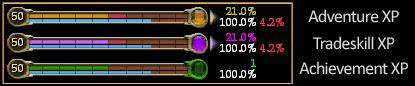
Excellent mod, I was looking for something to show at least Adventure and AA
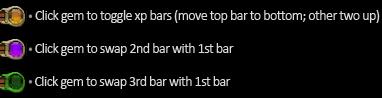
at the same time. Just a small note on this mod however, when you click the gem on the second bar (doesn't matter which bar is in that position) to swap it with the first, you get a message in your chat saying: "You are not following anyone" Again, not a big deal. Just thought you'd like to know. |
||
|
|
|
|


All times are GMT -5. The time now is 03:42 AM.
 |
© MMOUI
vBulletin® - Copyright ©2000 - 2026, Jelsoft Enterprises Ltd. |
 |
