This Program is dedicated in loving memory of Scott A. Torroll, who was known and loved by many as Humudce in the Everquest community.
This program was originally written by Nathan Lockett (Taco-Man)
Read the updates section down at the bottom for the list of updated features.
THERE IS NOT A VIRUS/TROJAN IN THIS FILE. If your antivirus detects one please report it to them so they can fix thier software. It is a false positive. see this thread for more info.
This is split up into different sections and the main subsetions of each are underlined and in bold. each section is split up by a series of dashes "-". Hopefully this will make it easier to find what you are looking for.
--------------------
What this program does:
This Keeps your EQ2MAP mod up to date, when ever new zones or points of interest are submitted on the
EQ2MAP Website, this will update them for you automaticly. A previous installation of
EQ2MAP is not necessary however using this program in a directory that has
EQ2MAP already installed
should work as well.
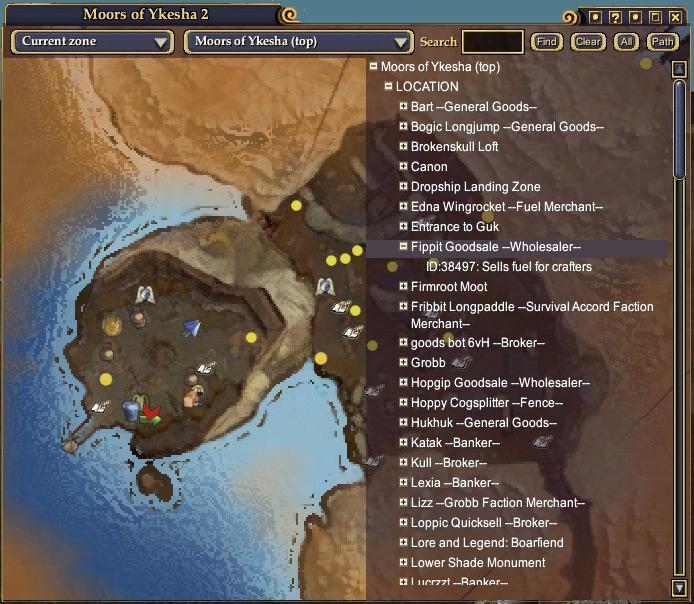
You can see all the maps and points that this mod currently has at the
EQ2MAP Website
--------------------
Before Installing:
You must have The Microsoft .Net Framework 4.0 or greater for this program to run.(The installer should download and install it for you if its missing)
The Microsoft .Net Framework 4.0 can be downloaded either from this
direct download link or if you prefer you can get it from
windows update. When you try and run the program and you get "The application failed to initialize properly (0xc0000135). Click on OK to terminate the application." or something similar it is because you either dont have the .net framework, or you have the .net framework but it not 4.0 or greater.
Microsoft .NET Framework 4.0 is required if you are running x64 edition of Windows XP (you need the x64 version)
Installing:
If you don't have an eq2.ini file you
DO NOT need to make one, it will create one for you.
Run the EQ2MAP_Updater_Setup.exe file to install the program. Run the program.
--------------------
If you are having installation problems please re-read the instructions including the before installing instructions. If you are experiencing problems, or need installation help please post on the
Troubleshooting forum for EQ2MAP.
If you have a suggestions, comments or a feature request for the updater post it on the Official
EQ2MAP Updater Thread, chances are if you have an idea you think may be usefull there are probably many other people who would find it usefull as well, if your idea is possible i will do my best to add it in.
--------------------
Options Window:
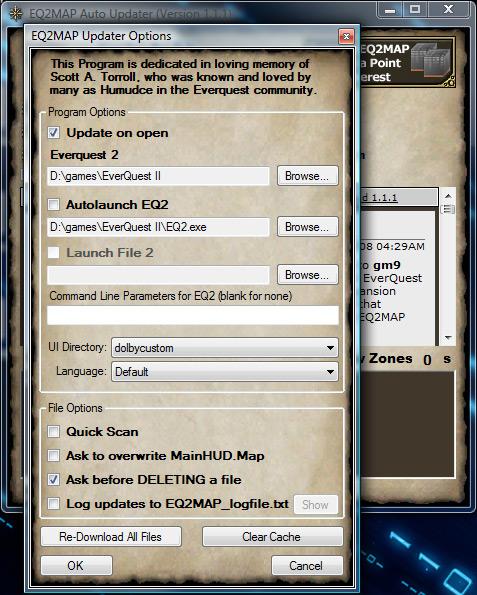
Update on open: If checked, the updater will start scanning for updates as soon as it is opened.
Everquest 2 Directory: The Everquest 2 directory is used so the updater knows where to download the files to. To change it click the Browse Button to the right of the path.
Autolaunch EQ2: If checked, the updater will launch this file once it is done downloading all the updates(if it is unchecked, it will be launched when the open eq button is clicked). To change this file click the Browse Button to the right of the path/filename.
Launch File 2: If checked, the updater will also launch this file when it autolaunches or when the open eq button is clicked. To change this file click the Browse Button to the right of the path/filename. You must set this file before you can check the box to enable it
UI Directory: You can use this drop down menu to select the ui directory to download updates to. When changed it will also modify your eq2.ini file to use this directory as well(so that it will be the one used when eq2 is opened).
Language: You can use this drop down menu to select What language folder to download updates to (only default will show unless you have language folders in your eq2 directory)
Quick scan: If checked it will skip the file scan if no new database is available.This is only done if you use Auto Update. It will scan if you press Update button.
Ask to overwrite "mainhud_map2.xml" If checked it will ask for confirmation to overwrite eq2ui_mainhud_map2.xml. (you should only need this is very rare circumstances)
Log Updates to EQ2MAP_logfile.txt:when this set it keeps a record of what files were updated and new files that were downloaded, it includes a time stamp and keeps adding to the file "EQ2MAP_logfile.txt" which is located in the directory you installed the updater (usually C:\Program Files\EQ2MAP Updater) You can use the
Show button to open the log file in your default text viewer.
Re-Download ALL Files:When this button is pushed the updater will redownload ALL of the files and will NOT ask for confirmation about overwriting any.
ONLY USE THIS when the eq2map mod is working improperly. YOU WILL LOSE all custom skinns and icons when you use this!!!
Clear Cache:You can use this button to clear the cache file and force it to download a new one.(Only needed in rare cases)
--------------------
How To Use:
Once the program is open it should start scanning files to check for updates and then download any updates that are available. Once it is finished updating if there were no errors it will have update complete written and it should open everquest in 5 seconds if "AutoLaunch EQ2" is checked. If its not you may open eq2 by pressing the "open eq" button which is located below the "update" button.
How to check your version:
The title of the window should have the version in it. Example: "EQ2MAP Auto Updater (Version 1.1.0 )" <----
Command Line Argument Options:
While Most all of these functions can now be performed much easier by the updater through the options menu, some have been left for anyone who still wants to use them.
/testserver: this makes the updater update and auto launch from the test server by setting the language to TestServer and then autolaunching the correct eq2 test server file. However a shortcut with this should already be in the eq2map folder of the start menu it is name "EQ2MAP Updater - Update Test Server"
/setupdatefolder:
ONLY USE THIS if you dont have eq2 installed on the computer you are updating from, if eq2 is installed on the computer you are updating from use /seteq2dir. The /setupdatefolder lets you choose any folder to update to if you dont have eq2 installed on the computer you are running the updater from.
What the heck is a command line argument and how do i "set/use" them?
You can specify various command line arguments for the eq2map updater to load when it is started by entering the option as a Command Line Argument in a Windows Shortcut. Here's how:
- After creating a Windows Shortcut to the updater, right-click on the Shortcut's Icon and click 'Properties' in the resulting popup menu.
- Click the 'Shortcut' Tab on the Properties Window that appears.
- In the 'Target' field of the Properties Window, type the command(s) you want to use after the updater's program path and file name (in quotation marks), as shown below:

- Click 'OK' on the Properties Window. Now when you start the updater using this particular Shortcut, whatever options you added will be used.
--------------------
Known Issues:
- If your eq2.ini file isn't set up properly, the updater will try and correct it, but in some cases it may not work. If you just delete the eq2.ini file and run the updater it will create a new one for you that is set up properly.
---------------------
Version 1.3.2 UPDATES: 7/10/24
-Changed file update handling to get the latest files faster.
-Moved to .NET 4.8
Version 1.3.1 UPDATES: 11/29/21
-Fixed an error if EQ2MAP was installed for the first time.
Version 1.3.0 UPDATES: 11/27/21
-Updater will now delete all old POI files as they are replaced with new fewer ones.
-Fixed a few bugs in Installation selector.
-Fixed a few bugs in Version window.
-Added a button for Version in Options window.
-Default for ask before delete is now off.
-Window is now reziseable.
-Moved to .NET 4.5
-Delete file handling is enhanced.
-Fixed a bug where the updater could get out of sync and download the wrong file.
-Fixed Uninstall from Windows Settings Apps.
-Added icon, image and .NET 4.5 check to installer.
Version 1.2.10 UPDATES: 04/05/12
-Found a major bugg in Versioncheck code that prevented the information window from showing properly.
-Have changed some compiler settings to try to fix a Windows 7 issue.
Version 1.2.9 UPDATES: 03/30/12
-If the window is moved of screen it will center on screen next time it starts.
This is to prevent invisible windows.
Version 1.2.8 UPDATES: 03/01/12
-Changed Testserver working directory, was set to wrong path.
-Options now displays Testserver as a Language , was an error in code that prevented that.
-If you set a Launch File 2 , the checkbox was not enabled until you re-open Options window.
-If you enable Launch File 2 it stays enabled now.
Version 1.2.7 UPDATES: 02/28/12
-Added more search paths for installations.
-Fixed an error with TestServer installations , LaunchPad should now work.
Version 1.2.6 UPDATES: 02/17/12
-Redone the installaton selector again, it only suports Launchpad.exe now.
You can still set your own program but Launchpad.exe is default.
-Fixed some typos.
Version 1.2.5 UPDATES: 03/29/11
-BETA RELEASE ONLY
-Made a new installation selector to make it easyer to find a EQ2 installation.
-Rebuild the way the program saves it settings, should no longer need access to program folder.
This required a major rewrite of the Options window, there could be some buggs.
-Removed many commandline arguments.
-Minor UI fixes.
Version 1.2.4 UPDATES: 05/29/09
-Added support for a IgnoreList.
Now UI Modders can specify what files the Updater should not update.
See info below how to create the IgnoreFile.
A missing file will still be downloaded even if its on the IgnoreList.
-Minor chages to code to clean it up.
-Some text changed to clarify.
Version 1.2.3 UPDATES: 01/14/09
-Fixed a bug that could break the updater if the computer had the wrong date set.
-Added tooltip to Version window.
-The installer now clears the cache to prevent errors with new versions.
Version 1.2.2 UPDATES: 01/13/09
-Found a bug that downloaded the database twice.
-VersionHistory was loaded even if it don't show.
Version 1.2.1 UPDATES: 01/12/09
-Changed code to display Version check message properly.
-Added a Message that informs the user if the old map system is in use.
Version 1.2.0 UPDATES: 12/26/08
-Added support for compressed files.
-Added a version reminder that informs and forces users to update if neccesary.
-Some minor changes related to this.
Version 1.1.3 UPDATES: 12/22/08
-Added a Start Delay selector in Options, some users has trouble if it opens a network connection to early.
Version 1.1.2 UPDATES: 11/28/08
-Fixed an alignment bug on the main window
-Fixed some code that slipped by the TSO upgrade
-Changed the downloader , hope some error reports now are fixed.
Version 1.1.1 UPDATES: 11/12/08
-Added delete support.
-Changed code to support the new file structure of the New map system.
Version 1.0.18 UPDATES: 08/04/08
-Cleaned up the MD5 code.
-Added some support files for Vista, should make it easier to install.
Version 1.0.17 UPDATES: 04/27/08
-Added a Quick Scan option, if there is no new database there is no need to scan the files.
This option is only active when using auto Update not manual Update.
-Cleaned up the log file for easier view.
-Fixed an error that repeated map downloads caused by localization.
Version 1.0.16 UPDATES: 12/28/07 12:43pm PST
- Added a retry to DB download.
- Fixed a bug that reported an error even if it did work when retrying to download a file.
- Added XP style buttons.
- Added Tooltip to buttons.
- Changed the Options window
-- Added Cancel button.
-- Added Show log button.
-- Added a Clear Cache button.
-- Added a warning message to Download All button.
-Did some minor UI tweaks.
-The Error message window now has a version string added.
Version 1.0.15 UPDATES: 11/30/07 11:10am PST
- Found and fixed the "Object reference not set to an instance of an object" error. (Thanx for the debug help "Ripper-Joe")
- Fixed a error that prevented you from launching Testserver from commandline option /testserver. Now the Shortcut TestServer icon works again

- Added some more status info.
- Minor fixes.
Version 1.0.14 UPDATES: 11/22/07 12:14pm PST
- Added more config file error handling to try to track down some reported errors.
- Fixed a download bug that did lockup the program in some cases.
Version 1.0.13 UPDATES: 11/17/07 8:30pm PST
- Added config file error handling to try to track down some reported errors.
- Fixed some more bugs i found.
Version 1.0.12 UPDATES: 11/15/07 8:30pm PST
- Inproved error handling while downloading.
- Changed the delay until a file timesout to 15 sec.
- The window will now change its size if you are runing non-standard dpi.
- Added a .config file to prevent some errors.
- Some minor tweaks to improve stability.
Version 1.0.11 UPDATES: 11/11/07 7:00apm PST
- You can now press stop during database scan.
- Some minor UI fixes.
Version 1.0.10 UPDATES: 10/26/07 7:00am PST
- INTERNAL RELEASE ONLY
- It will now skip a file if it's read only. This way you can prevent the updater from updating custom files.
- Added som more info.
Version 1.0.9 UPDATES: 10/26/07 7:00am PST
- INTERNAL RELEASE ONLY
- The updater now retrys if a file fails to download.
- Fixed some minor issues.
Version 1.0.8 UPDATES: 9/9/07 7:00am PST
- INTERNAL RELEASE ONLY
- Added a status window for more information.
- Fixed some more bugs.
Version 1.0.7 UPDATES: 9/4/07 7:00am PST
- INTERNAL RELEASE ONLY
- Converted the source to VB 2005.
- Added a cache for the database to reduce server load.
If no new database exist it uses the cached one.
- Separated download errors from program errors.
- Cleaned up some code.
- Fixed some bugs.
Version 1.0.6 UPDATES: 8/13/05 1:26am PST
-Mainly Bugfixes (i dont even remember all them because its been so long

)
-Fixed bug that could cause improperly set up eq2.ini if there was already info in it but not the ui directory info
-Added an option to send command line parameters to eq2 (or whatever your main autolaunch file is). This existed before however the only way to do it previously was by manually adding an new entry in the updaters config file. It is now a text box in the options window.
-Fixed a bug that on very rare occasions caused the updater to not close when it should.
Version 1.0 UPDATES: 6/3/05 6:00pm PST
-Made a seperate window for all the options
-Added ability to auto-launch a second program as well as EQ2 (usefull for those who use combat stats)
-Window is resizeable for people running at non-standard DPI
-Added Overall progress bar w/ %
-Added # of files left to download
-Added Amount Downloaded/Total Status in KB/MB
-Added text to show the path to the everquest directory, as well as the exe files that it autolaunches
-Added browse buttons for changing all the paths to files/directory
-Added suport for the language folders
I think its working well, but if there are any bugs please let me know, i couldnt really test it that well.
-Added Drop down boxes for switching between diffent UI folders (it will update the eq2.ini as well) and also for switching between languages.
-Fixed the testserver option so it actually launches TestEQ2.exe
-Added an option for File overwrite notification (currently only for mainhud.map but it can be added for files as needed)
-Made it show the UI directory being and language patched
-Error handling for unknown exceptions to help track down unusual bugs.
-Wont let the custom directory be se to default, fonts, sounds, or images
-added a way to stop downloading
-probably some other stuff i cant remember
-made the file scanning progress show up in the progress bar
Version 0.97 UPDATES: 3/14/05 6:40pm PST
- Updater should add a shortcut in its startmenu folder for more easily switching between the regular and test server. If you previously set your eq directory to the test folder directory change it to the main eq2 directory and then use this shortcut.
- 2 new command line arguments added: /testserver and /setupdatefolder read thier description in the command line arguments section
- I have attempted to fix the crashing bug a few people were having since since version 0.95e. Anyone who was having this problem please let me know if this update fixes it or not. Just put a post in the official updater thread. Verba has confirmed that it has fixed the issue for him, so hopefully it will be fixed for the others experiencing this problem
Version 0.96 UPDATES: 3/14/05 3:50pm PST
- Updater now detects your eq2 directory the first time it is run and ask you to verify that it is correct and gives you the option to change it if it is not.
- Updater will read your eq2.ini file and update in the appropriate folder. If no eq2.ini exists one will be created for you and it will use "EQ2MAP" as the folder for the custom interface directory.
- Choosing the file to autolaunch is much easier than before, see entry for /setautolaunch in the command line arguments section.
- Now that the updater stores your everquest directory an option was added to change it at a later time if necessary
- Updater now has an installer, you can run it from wherever you want.
Version 0.95a UPDATES: 3/11/05 3:35pm PST
-IMPORTANT BUGFIX! Window would not show up until after the update was done if auto-updating was enable(which it is by default).This fixes a problem introduced in 0.9f. I appologize for this and am sorry for any inconvenience it may have caused. I did not realize how stupid the vb .net can be sometimes.
although this is still beta and this kind of thing is possible to happen i appologize again.
Version 0.9f UPDATES: 3/10/05 8:25pm PST
- Window with the "updater news" in it made ever so slightly taller (program window size remains the same)
- Program now starts checking for updates automatically when it is opened. If for some reason you don't want it to do this simply use the /noautoscan command line argument.
Version 0.9e UPDATES: 3/09/05 7:25pm PST
- Small Modification made to the way it writes logs. It should now seperate each "section" by a blank line and should not write to the log file if there was nothing downloaded.
- From now on the version number will be included in the program's "title bar"
UPDATES: 3/09/05 5:10pm PST
OK if you re download it the following this have been changed/added:
- Black boxes around buttons should not show up now, even on the systems that were showing them before.
- Autolaunch EQ2 should not wrap to the next line on the computers that it was previously
- You cant click update while the updater is downloading files
- only lets 1 instance of itself to run
- it accepts the following command line arguments /logupdates, /autolaunch filename.exe
Explanation for both arguments(see above in the Command Line Argument Options section)
IgnoreList
To create a IgnoreList make a file named "eq2map_ignorelist.xml" in your UI folder as the following XML example:
Code:
<?xml version="1.0" encoding="utf-8"?>
<IgnoreList>
	<File Name="_skinnable_POI_icons.xml" />
	<File Name="_Skinnable_Styles.xml" />
</IgnoreList>
You can add as may "File" lines as you need.




 01-07-2022, 05:21 PM


