|
| Category: Target / Implied window[DrumsUI] Target & Implied Windows |
| Patch & Add-on List |
File Name |
Version |
Size |
Author |
Date |
Type |
|
1 |
4.11 Kb |
|
08-21-2009 06:45 PM |
Patch |
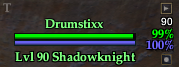
In-game, mouse over buttons shown
|
| |
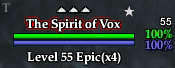
In-game, AA indicator displayed
|
| |
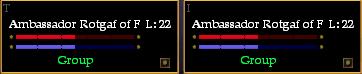
UIBuilder view
|
| |
older, fullscreen display
|
| |
Game Update #53 Compatible
Description:
This mod includes both the Target and Implied windows. They're equipped with HP and Power percentages and support both Con Systems (v0 and v1). The v1 system does not include the extra, heroic and epic images. Both systems are visually the same in the target window and only the text above NPC's heads is different.
Click functions: - "T": toggle the con_version (upper-left gray text character)
- Target's name: inspect the targeted player.
- Top-right button (mouse-over): search for the current target at eq2.wikia.com
- Bottom-right button (mouse-over): hide/show effects for each window.
Now supports Both con systems, Detailed (Arrows) and Simple (Frames)
Installation Notes:
- How To: Install A Custom UI
- eq2ui_mainhud_target.xml goes in your CustomUI folder.
- eq2ui_mainhud_impliedtarget.xml goes in your CustomUI folder.
Update Log:
2009.08.24
- added AA indicator to both windows (star means that your target will reward you with AA experience
2008.10.27
- windows no longer resizable (game bug with effects)
- effects now display correctly in /con_version 1 as per the fix above
2008.10.05
v2 - quick fix for the effects re-sizing the window
- Target and Implied windows are now both resizable horizontally
- Added a button above level text to search for Target's name on eq2.wikia.com
2008.06.04
- Removed inspect button. Now click target name to inspect
- New button to hide/show effects for each window
- clicking the "T" in the target window now switches con mode
- extra window space removed from the bottom of both windows
March 9, 2008
- Updated to support both Con Systems.
Nov 9, 2007
- Added inspect button to target window. Easily inspect your target without having to find them, and right-click them.
Nov 1, 2007
- Level (L: xx) is once again included in default zip. Shows level of RP/Anon players without having to inspect.
Dec 14, 2005
- Now includes spell effect icons in Target and Implied windows (toggleable from Options -> User Interface -> Targeting Windows)
Oct 23, 2005
- Updated to latest Live Update.
|
| File Statistics |
| User Rating: |
|
| Downloads: |
12367 |
| Views: |
84268 |
| Favorites: |
113 |
| Uploaded By: |
|
| Last Modified: |
09-23-2009 10:59 AM by Drumstix42 |
|
|  |
|
 |
|
09-12-2009, 06:56 AM
|
|
A Young Mystail Rat
Server: Antonia Bayle
Forum posts: 4
File comments: 13
Uploads: 0
|
Tried it with effects on and off. Old con mode looks fine, new con as on the screenshot.
|
|
|
09-11-2009, 10:51 PM
|
|
A Griffon
Server: Blackburrow
Forum posts: 1748
File comments: 231
Uploads: 40
|
Quote:
Originally posted by Burdy
This is how npcs look for me:
|
This is quite strange. I tried re-producing this, but I cannot seem to. I tried switching con modes several times, with and without target effects on.
Do you have target effects set to show in your options? could you try toggling them and see what happens?
Thanks.
|
|
|
09-11-2009, 11:53 AM
|
|
A Young Mystail Rat
Server: Antonia Bayle
Forum posts: 4
File comments: 13
Uploads: 0
|
This is how npcs look for me:

|
|
|
09-11-2009, 11:47 AM
|
|
A Young Mystail Rat
Server: Antonia Bayle
Forum posts: 4
File comments: 13
Uploads: 0
|
Quote:
Originally posted by Drumstix42
I can see how the fancy borders would help for what you have currently targeted, but i don't see how it would help in multi-mob encounters. Unless you are switching targets very quickly and just watching your target window?
I usually just look at the text.
[/b]
|
Best example would be the trash in WoE. 4 heroic, 1 epic + targetlock. The text says epic for all. With the target window without the images I can't tell if my target is the epic mob or one of the heroics.
|
|
|
09-10-2009, 08:24 PM
|
|
A Griffon
Server: Blackburrow
Forum posts: 1748
File comments: 231
Uploads: 40
|
Quote:
Originally posted by Burdy
Hi, thanks for the update with the AA star. But I have problem with the window. In the con mode with the fancy brackets (v1?) all NPCs have a 1/3 third visible power bar. When I switch to the old con mode the power bar disappers. Any idea what causes this?
Could you also maybe release a version that includes the heroic and epic images? This makes spotting the epic targets in a mixed epic/heroic encoutner a lot easier. I had a window with those brackets that had the power/hp percentage and level under the name, but it is no longer updated.
|
I'll have to test the power bar things when switching. I've never experienced this before, nor has anyone reported this bug previously.
I can see how the fancy borders would help for what you have currently targeted, but i don't see how it would help in multi-mob encounters. Unless you are switching targets very quickly and just watching your target window?
I usually just look at the text.
I may make this an add-on, but it's not high on my "list". It just gets tedious keeping separate versions up-to-date.
Cheers!
|
|
|
09-09-2009, 08:24 AM
|
|
A Brown Bear
Server: Antonia Bayle
Forum posts: 14
File comments: 12
Uploads: 0
|
for the same reason i still use the old window from uberfuzzy, it has the "brackets" where you can see in encounters (ie. book/duos in WoE) which are the heroic ones and which are the epics. thats the only reason i dont switch yet.
|
|
|
09-02-2009, 08:03 AM
|
|
A Young Mystail Rat
Server: Antonia Bayle
Forum posts: 4
File comments: 13
Uploads: 0
|
Hi, thanks for the update with the AA star. But I have problem with the window. In the con mode with the fancy brackets (v1?) all NPCs have a 1/3 third visible power bar. When I switch to the old con mode the power bar disappers. Any idea what causes this?
Could you also maybe release a version that includes the heroic and epic images? This makes spotting the epic targets in a mixed epic/heroic encoutner a lot easier. I had a window with those brackets that had the power/hp percentage and level under the name, but it is no longer updated.
|
|
|
08-24-2009, 03:13 PM
|
|
A Young Mystail Rat
Server: Crushbone
Forum posts: 7
File comments: 10
Uploads: 2
|
Quote:
Originally posted by Drumstix42
Glad you got it working. Sorry that it's taken this long to be able to work on it, but nice you got a patch out for it. I"m sure other are thankful. I'll have an official patch on this soon.
|
Lol np at all. I understand real life can take over so much you cant even get to a computer. It just got me off my lazy behind to work out what to do.
|
|
|
08-24-2009, 02:35 AM
|
|
A Griffon
Server: Blackburrow
Forum posts: 1748
File comments: 231
Uploads: 40
|
Quote:
Originally posted by Wyntakata
I tried to insert the code for the AA star and it only seemed to work for the Implied target. I am guessing I need work on the location part of it? Any help or an update on the way yet? Please please help me get this working I absolutley do not want to change my target windows cuz yours are the best.
Its ok its ok I worked it out. Dumbass here never scrolled down far enough on the compare screen to see that I was missing the second entry for the second con version. Its all workin good now
Forgot to say I added to the patches add-ons section.
|
Glad you got it working. Sorry that it's taken this long to be able to work on it, but nice you got a patch out for it. I"m sure other are thankful. I'll have an official patch on this soon.
|
|
|
08-21-2009, 04:58 PM
|
|
A Young Mystail Rat
Server: Crushbone
Forum posts: 7
File comments: 10
Uploads: 2
|
I tried to insert the code for the AA star and it only seemed to work for the Implied target. I am guessing I need work on the location part of it? Any help or an update on the way yet? Please please help me get this working I absolutley do not want to change my target windows cuz yours are the best.
Its ok its ok I worked it out. Dumbass here never scrolled down far enough on the compare screen to see that I was missing the second entry for the second con version. Its all workin good now
Forgot to say I added to the patches add-ons section.
Last edited by Wyntakata : 08-21-2009 at 08:35 PM.
|
|
|
07-31-2009, 11:48 PM
|
|
A Griffon
Server: Blackburrow
Forum posts: 1748
File comments: 231
Uploads: 40
|
I'll try to fix this soon. Sorry for the lack of speedy updates.
|
|
|
07-30-2009, 01:13 AM
|
|
A Young Mystail Rat
Server: Antonia Bayle
Forum posts: 6
File comments: 20
Uploads: 0
|
Any help on how to fix this window so the new Named AA indicator works?
|
|
|
04-06-2009, 12:00 AM
|
|
A Griffon
Server: Blackburrow
Forum posts: 1748
File comments: 231
Uploads: 40
|
Quote:
Originally posted by Eowaubeth
Have always used this target window over the one included in Profit just because I had fallen in love with features. Just now noticed you haven't added in threat system on target/implied yet and wanted to know if you were planning to update this. Also being able to click the implied target to switch it to current target is still desired.
|
Thanks for the reminder. I forgot this data went in. I've personally just been using the Threat Meter, but I'll be adding this feature in as well.
When UI changes go in to save custom data to the XML, I'll probably make an options window to let everyone choose what they want to see. Clicking the implied target to switch to target will be implemented as well.
Cheers.
|
|
|
04-05-2009, 10:39 PM
|
|
A Griffon
Server: Najena
Forum posts: 214
File comments: 46
Uploads: 0
|
Have always used this target window over the one included in Profit just because I had fallen in love with features. Just now noticed you haven't added in threat system on target/implied yet and wanted to know if you were planning to update this. Also being able to click the implied target to switch it to current target is still desired.
|
|
|
10-28-2008, 05:30 PM
|
|
A Griffon
Server: Blackburrow
Forum posts: 1748
File comments: 231
Uploads: 40
|
Quote:
Originally posted by Neyai
I've never had effects off. However, I just downloaded it again, stuck it in, and typed the thing you said and it works fine. Yay!
Thank you
|
Glad things are working. It was probably just a bug from the previous version that was floating in the UI config file.
Cheers 
|
|
|
All times are GMT -5. The time now is 03:09 PM.
|
 |