Adjustments to Moab's Target window.
After reading a thread on the fourms here; I decided to try this out and see how yall like the idea.
I have toyed with the idea of putting an option button on my target bar to turn off the player health and power bars, also player name and %. Untill todday I could not find a simple way to do this, therefore It was not included.
By adding the line listed below to the [eq2ui_mainhud_target.xml] (v2.2) file you are adding a little button in the top left side of the window and when you click it the player side of the window goes away, click it again it comes back.
------------------------------------------------
<Button LocalTooltip="Window Options" Location="8,18" Name="OptionsButton" OnPress="Parent.PlayerOptions.visible=(!Parent.PlayerOptions.visible) Parent.PlayerHealth.visible=(!Parent.PlayerHealth.visible)" PackLocation="right,top" PackLocationProp="-353/0001,0018/0001" ScrollExtent="8,8" Size="8,8" Style="/ButtonStyles.options_button" Tooltip="Window Options" UserMovable="true" />
--------------------------------------------------
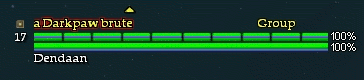
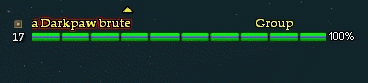
Here are 2 screen shots of the window before and after:
So, what I want to know is, is it worth adding this to my mod or not? Any comments are welcome.