I have spent the last week getting up to speed on mapping. Despite all the wonderful tools and turorials, one topic continued to confuse me: Zonerect.
What ZoneRect Represents
Zonerect represents the in-game /loc of the edges of the displayed map image. Not the edge of the map's internal lines, but the actual edges of the bitmap*. The implications of this are that, except in extreme cases, you will not actually be able to move your character to these /loc extents. Also, you don't actually want your map to touch the edges of the bitmap - that's ugly.
How can I calculate it if I can't get there?
MATHS, my son, MATHS!
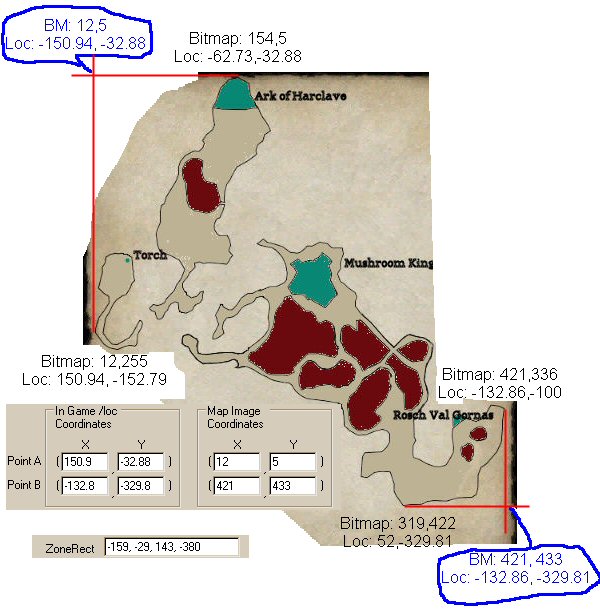
We DO know the in-game /loc of some points of the map (hopfully all of them). We also can find out the coordinates of the same location in your generated bitmap. Because we know how the game calculates your cursor's position, we can work it backwards to determine the extents of the map and thus the Zonerect.
You can see from the illustration below, we can determine the upper left and lower right coordinates by taking the cooridnates of other known points on the map. Then just punch them into Taco's 'leet tool and you're good to go.
 Sanity Check:
Remember that the ZoneRect describes the /loc extremes of the bitmap.
-159, -29, 143, -380
x min = -159
The leftmost point shows as -150 and is pretty close to the edge, so that's good.
y max = -29
The topmost point is at -32 and is REALLY close to the edge, so that's good.
x Max 143
The rightmost point is at 132 and is kinda close to the edge, so that's good.
y min = -380
The bottommost point, -329, is a fair ways from the edge, so that looks good.
Of course, these numbers are pretty close, but probably not perfect. You'll probably have to tweak them a bit by one or two points.
* NOTE: When I say Bitmap, I'm refering to the .JPG or .DDS file that is displayed on the map screen.