EQ2Interface

EQ2Interface (https://www.eq2interface.com/forums/index.php)
-   Interface Changes (https://www.eq2interface.com/forums/forumdisplay.php?f=32)
-   -   [Test] 4.16.07 (patch) - Interface Changes (https://www.eq2interface.com/forums/showthread.php?t=8219)

Dolby 04-18-2007 03:10 AM

[Test] 4.16.07 (patch) - Interface Changes
 
UI Notes:
  • Bags should no longer resize when you log in, from their previous size.
  • Fixed a number of cases where spells would give out unnecessary error messages.
  • Changing a container's label is now done from the Bag Options window.
  • You can now select the primary spell for a macro that contains multiple spell steps. The icon tinting, reuse timer and tooltip are displayed for the primary spell.
Test - 4.16.07 (patch)

Changed:
eq2ui_hud.xml (Double include bugged)
eq2ui_hud_choice.xml
eq2ui_hud_selection.xml
eq2ui_hud_slider.xml
eq2ui_ime.xml
eq2ui_journals_quest.xml
eq2ui_mainhud_editmacro.xml
eq2ui_mainhud_map.xml
eq2ui_mainhud_society.xml
eq2ui_newcharscene2.xml
eq2ui_options.xml
eq2ui_popup_bagoptions.xml
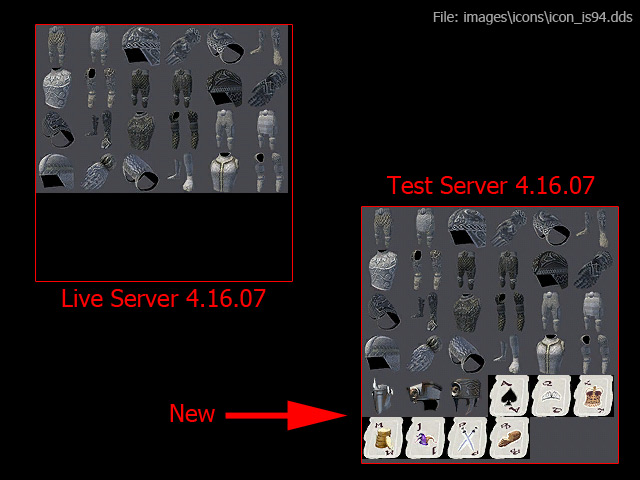
images\icons\icon_is94.dds

Zonx 04-24-2007 02:26 PM

A comment about the changes to eq2ui_hud_selection.xml...

Not sure, but I think this may be related to a request I made recently. The idea was to give modders a way to create a custom settings window and have those settings saved for later use. If working, this should avoid the need to use titlebar and frame settings to reconfigure windows.

Othesus 04-24-2007 03:49 PM

That new window is for saving and loading custom performance profiles.
http://eq2players.station.sony.com/n...s&locale=en_US
Quote:

See What You Want, When You Want
With GU34, you'll be able to save and load performance profiles, aiding in your ability to control what you see in game. With a simple command, you'll be able to toggle between certain saved profiles. The end result is that you will be able to view far off things while harvesting and turn them off when you are fighting in tight spaces to boost performance!
http://eq2players.station.sony.com/n...s&locale=en_US
Quote:

Save Your Custom Graphics Settings
EQII is a very beautiful game, but sometimes you just want pure performance and speed. It used to be that you would have to spend time in the Options window changing all the sliders and settings every time you wanted to change between impressive graphics, and insane speed. With the release of GU34 players will now be able to save their own performance profiles, and load them in a snap! This means switching between your raid, city, landscape, and screenshot configurations is as simple as a /load_uisettings command!
The buttons are at the bottom of the Options window.


All times are GMT -5. The time now is 05:54 PM.

vBulletin® - Copyright ©2000 - 2026, Jelsoft Enterprises Ltd.
© MMOUI