
|
Quote:
Back to the topic... I personally think 2 chat windows are useful and should be incorporated. Make one optional -- give it a place to be, but don't make it so integral that it looks wrong if it's not there. |
Quote:
|
Quote:
|
Of course with a slice of Gnome pie and some Pixieberry mojo...:nana: ;)
|
Quote:
Self.TimeSinceAutoAttack Self.TimeSinceSecondaryAutoAttack Self.TimeSinceRangedAutoAttack These will all have the following meaning: Float Val => milliseconds since last auto attack around Progress Value => Float Val / Weapon Delay Does that sound about right to everyone? |
Quote:
And regarding the progress bar would it not be better to have it count down instead of up?: Progress Value => 1 - Float Val / Weapon Delay |
Not a modder, but going to chime in
In vanguard and war, alot of the ui's have a ingame option panel aka control panel if you will. You can turn things on or off, change the look of the ui, scaling, save, load different settings, and other things. But with the panel, you could really cater to the new players and to the players that like the added info, or added features like click to cure or stats. Good way to hit both target audiences. I really havent seen anything like this in the eq2 uis. I think and correct me if im wrong, but profit has something similiar, but not as fleshed out with options. Also for me, coming back to eq2, I find it a little hard to find a ui that works. I love profit with vangurk skin. I think the author of vangurk would be a great addition to the ui since he can make a awesome skin for it thats easy on the eye. If you need people to test the ui out, let me know. Would happily test it out and give you feedback. |
Quote:
Quote:
|
Quote:
|
Quote:
Second point. Ive been noticing that and its sad to see since the game is better one out of the mmos that have come out lately. But still 4-6 really good ones out. |
rhyoin, is sounds like you want more of a addon/plugin based system through the UI options, where you can toggle different modifications on and off.
I agree this would be cool, but seems like something not accomplish-able through just a UI modification/reskin. |
Aye, i think that is what really made alot of ui's stand out in those games. Added tons of functionality (sp) to it. But I understand not every game can do that. DAoC had many great mods that were able to cater to both parties. Just took a little time and energy.
If I read write, you (modders) want to do a rekin/ui mod of the default ui that is more user friendly but also be something an advance user would want to use. Going to use profit ui because I think it gives the best example of what I am saying. Adding a auto updater and letting you choose different varients (sp?) Many post back where talking about removing click to cure and other features like that. YOu can do that with the main ui, but for people that want that feature, then can click on the varient and installs that window with the feature. Advance windows would be zip files with the xml/images and when you choose the window or mod (whichever you like to call it) it automatically installs. Believe profitui AU does this and works great. AU caters to the new players and existing players. Giving you the "basic" ui + different "windows" to the players that would like it. Which is your target goal. Making the Ui cleaner, more functional to both type of players. I agree the default UI needs some uplifting. |
Quote:
|
Looks like the AutoAttack timers will go out with GU51, Rothgar also took it upon himself to see about adding it to the default G15 windows.
|
Quote:
|
We're getting a little off-topic here, but its all good stuff so that's ok. :)
Has anyone had a chance to work on any UI mockups yet? I haven't had a chance to do mine, but I have one sketched out on my whiteboard I was showing to Zoltaroth. I should have time this weekend to sketch it up in Photoshop. I've also added a new page to the Logitech G15 to support Zoltaroth's auto-attack timers and its working great! I was just testing this out and its very cool, I think you guys will like it. We discussed whether or not we should support this in the default UI and decided we'd leave it for mods. It falls into the realm of advanced features and would be one extra window that new players and casual players would have to deal with. Something else I wanted to let you guys know. I'm finishing up the conversion of our INI files into XML format. It wont be done for 51 but hopefully will go out with 52. This new format will be much easier to view and tweak. It'll be more friendly for us as developers as well. This change will also pave the way for me to provide you guys with a method to save and load values from UI windows so your custom mods can save data between sessions. As long as your saved values don't conflict with values we expect to find, you should be able to save whatever you want in a player's UI settings file. It'll probably work something like this; any custom values you write to the main page will be serialized into the INI file and read back in when the UI is loaded. Unless of course you guys have some better ideas, I'm all ears. We could require that you create a data object with a specific name like "CustomData" and all values in that object would be written to the INI file. This might be a cleaner implementation. |
I posted what I think should be changed but I can post a graphic mock up easy if you prefer sir.
|
Yay for the xml settings, I admit I didn't believe I'd yet see them. :) Saves me from abusing the Add/Delete POI functionality for this. :p
Quote:
But if at all possible could you please store non-custom properties that have been changed by script as well? E.g. if I show, move or resize a window via script it would be great if that could be stored. For bonus points also the window settings modes None/Frame/Frame & Titlebar according to the visible status of the respective window elements (since we can't toggle it directly). |
Chat windows
I used to use multiple chat windows, but since I play a priest I have a zillion hotbars open for rezzes, buffs, etc. so I don't have a lot of screen space even with a 1440x900 monitor. I've consolidated it into one window with four tabs: General (channels, ooc, say, quest text, etc), Combat, Guild, and Tells.
One thing most casual players don't know about tabs that is very helpful: when you receive a new message in a nonactive tab, the tab label color changes. A change this small is often missed. If you decide to use tabs in this UI, perhaps we could see a small ! icon appear when there is new text in a tab. This would be more intuitive and noticeable. As for the combat tab...I rarely ever look at it. When you add in procs, haste, or other players, the amount of spam makes it far too fast to bother looking at during a fight. So personally I don't feel like it warrants a separate window, because as mentioned above you can keep track of that stuff just as easily with floating numbers. |
Quote:
Also I'm not sure that trying to save every modified value in script would work, or even give the behavior that many people would want. I think there are plenty of times you don't want things to persist. Also, this would require reproducing the structure of the UI page in XML so we would know how to apply the value changes. Like in the case of the "Text" field being changed on multiple elements. I think for this feature, its best to stick with a container and let you guys determine what gets saved and what doesn't. |
Quote:
|
Container is fine, only I mentioned the other idea because your first proposal was to save (and thus parse) everything.
And regarding the non-custom values I was only talking about those which get saved anyway if the user manipulates the window with the mouse. To make this clearer: If I move a window with the mouse the position currently gets stored to the uisettings.ini file. If I move a window via script the changed position will not be stored, but it would be great if it could, along with all the other tags which already get stored (size, visible, etc.). Of course we could store the values in your custom tree and apply them on first load via script but IMO that would unnecesarily duplicate the data in the settings file. |
Quote:
I see what you mean by values like location not saving. I think they should save if something caused the window to trigger a save of its values since you really are updating the location. The problem is that the windows only save their values when something in code modifies them. I could probably expose something like a function that you could call to force a window to save its data. This would let you make changes to visibility, location, size, etc., and make sure the window persists those values. |
Quote:
|
Quote:
|
Quote:
|
I'd have to do some digging on that issue.
A window only has one "size". When the uisettings file is saved, it grabs the actual values from the window. There's no hidden size field, so if the window size is modified I'm not sure what would cause it to not save. It shouldn't matter if it was modified in script or by a user. The only thing I can think of is that the window doesn't think any values have changed, so its not really being saved. Maybe try changing the size with script, then move the window with your mouse so the location changes. This will definitely trigger an update for that window. When you camp and come back I would expect the location is where you left it since you moved it with the mouse, but would the size revert back to the old size, or the new size that you set with script? |
Yes that's it, sorry should have mentioned that.
|
Quote:
If I understand gm9 he wants to have it save the changes made by scripts and buttons and all that. I wouldn't mind it either. |
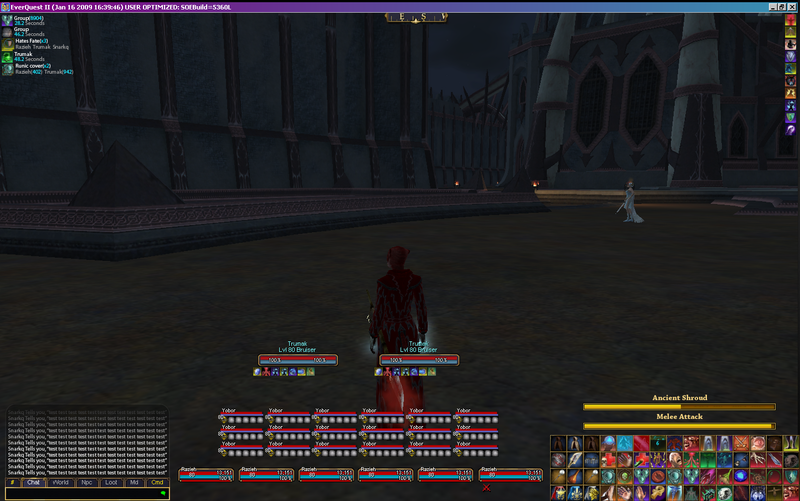 Well that got resized a bit I can post a bigger version if needed! Things to note! Maintained window Don't show until canceled buffs please move those to somewhere else I don't care. Raid window, please only show the three groups you AREN'T in then make it so you can drag and drop to the group window. This would free up a TON of space and still allow them to be moved separately. Hotkeys recast show or at least the option for it in hotbar settings, make out of range and out of power more visible( being colorblind Its to opaque for me to make out :( ) Show timers for items & item macros. Player/Group Why separate these? The red bar underneath is the pet health. Target window show hp and power percents. Compass ad a fancy orb or something where the arrow thing is and make that the start button. |
Quote:
|
when
so when are you guys going to start working on this beautiful idea? :D no offence but the standard UI in EQ2 aint even half good. we rly need a new or atleast an option that comes with the game itself.
|
Feedback thus far
This has been an interesting thread to see, I rarely come here anymore but wanted to see what was needed to make the new maps and saw this thread and got completely derailed.
Firstly - 1 chat window would be my recommendation. Reason: combat window is worthless, thats what ACT is for. If you need real time information concerning your combat log you arent going to get it from reading the scrolling text. I like the tabbed approach, its easy enough to click back and forth. Level 1-9 chat has become really the defacto chat channel on most servers it seems due to alt necessity. So many people I know anyway have one tab set up for combat, 1 for all chat channels, and the primary has group/guild/1-9/70-79/tells in it for the things you typically want to see anyway. (2) Agree that the primary benefits to the new UI should be increased functionality, minimalized foot print and lanscape usage. (3) With regards to advanced features such as click to cure. I think even though these are advanced features they are more helpful to newer and more casual players in understanding their class and getting some assistance in playing them. This is one of the most useful mods out there and personally I think it should be included. |
Quote:
I worked on some ideas this weekend but had the hardest time trying to make everything fit in a minimum spec of 1024x768. I really wish we could count on widescreen or at least 1280x1024 but statistics show that almost half of our users are still on 1024x768. Because of this limitation, I really don't see a way to incorporate more than 1 chat window unless there is a separate layout for larger resolutions. As soon as I have my mockup done, I'll post it. Has anyone else had time to work on any ideas? |
Quote:
That's really surprising. Judging from the downloads of the 1024x768 compatible version of ProfitUI (or rather it's bottom bar) less than 1% of its users use that resolution. That likely means that nearly all of the 1024x768 users are using the default UI (or other mods, but I'd assume the distribution is comparable for those). So it would appear rather important that you keep supporting them. PS: Is that display size or client size? Because I can imagine people running 1024x768 in windowed mode on a 1280x1024+ screen. |
Quote:
|
Quote:
|
Quote:
|
As far as the dynamic data goes few problems if you care!
It has the same flaw that my auto attack script did, Riposte triggers an auto attack swing even though that doesn't consume your auto attack. Making this 100% useless for tanks. Also if you get hasted the progress bars rate changes, which shouldn't happen. Being hasted mid cool down doesn't effect your time till next auto attack. Because of this you give the appearance that you should be auto attacking but really cant. They should also toggle visibility so you can update double bars, single bar, ranged or primary attack. Until all that gets fixed this dynamic data sadly might as well not have been put in. Edit: I SHOULD ADD They should also toggle visibility so you can update double bars, single bar, ranged or primary attack. That is the most important fix if you change that it solves all previous errors. Just make it so when they aren't filling up or counting down that they are not visible. If you ranged auto attack only it would become visible etc... |
1 Attachment(s)
Well I was working a bunch of layouts just for fun one night working with my own UI and releasing a full package.
Anywho... this is just a mock-up design done in photoshop. I just used my own pieces, as I'm not really good at gfx design or coming up with a style to fit everything. I'm a minimalist and don't like titlebars and extra spacing being taken up by frills. -The height of the bottom hud is about 300px (299). -It was created in a 1280x1024 resolution. (1 step above the statistic norm) -I included 2 chat windows just because.... I don't use 2, but this leaves more space for those like me. -6 hotbars shown. I use 5 plus smaller hotkeys for potions, etc. -compass, EQII button, heroic oppertunity window shown (scaled) and casting bar.... -mini map scaled abit. not sure what it's minimum size is. I just put things I thought were most used most often. Missing most importantly would be the Journal Helper window, the pet window, and effects window. Most have these pretty stretched out along the side of their screens however. Anyhow... here it is.... I hope it helps as some kind of start or "idea" starter for layout. Sorry for lack of design/style. |
| All times are GMT -5. The time now is 09:21 AM. |
vBulletin® - Copyright ©2000 - 2026, Jelsoft Enterprises Ltd.
© MMOUI