
|
I'm having this exact same problem after installing DrumsUI for the first time and I don't understand your solution above.
When I was running through the installer or download, I saw a big warning that said "If you find yourself unable to type, go to... " and of course I clicked right through it expecting not to need it or if I needed it, I expected I'd be able to find it again. But for the life of me, I can't. What did it say and where was it? I remember something about chat options. |
all you need to do is go to your chat box and right click and go to window settings and make sure that its set to "frame & title" in the drop down box. should fix all issues.
Hope this helps |
Quote:
Is there any desire by Mr. DrumsUI to have a more ProfitUI like login screen? |
You'll have to explain that request, as I'm unfamiliar.
|
1 Attachment(s)
Quote:
So the UI has a text file that you edit and include such things as account usernames, passwords (yes, bad idea I know) and character names. You select one and you get logged in. You can leave a field blank (like password) and it'll populate the boxes on the side where you'd type your password. If you leave the character blank (in the text file or in the fields on the side), you end up at the normal character selection screen. Edit: I should probably mention that you get to this by starting up EverQuest II using the short cut with '/patchme' appended as an option. This lets you start up the game w/o running the patcher (tricksie option name!). |
I will not support an addon that saves Passwords in plain text.
However, I can look into making something similar, but you will have to manually put the password in each time. It's too much of a security risk for users, and I recommend not saving your passwords in UI-related files. Also, you can always skip the patching by just executing the EverQuest2.exe rather than EQ2.exe (or whatever patcher you use). |
Quote:
|
Main menu bar
Think I posted this message on the wrong forum.
Hey drums, just downloaded and installed your UI and it's fantastic, except i can't find the main menu/ stat bar. Changed settings to make sure bars aren't allowed off screen and moved every bar but it's not there. Any help would be appreciated. thanks! |
try this:
/show_window MainHUD.StartButton |
Quote:
Nothing is coming up, I tried hitting f10 and checking for any boxes at all but it's almost like the bar just isn't there. |
It may be behind another window, it's very slim in height. I would suggest trying to load one of the supplied UI layouts at a last chance effort to show it up.
/load_uisettings filename_resolution.xml (using one of the file names) |
Quote:
|
Request
First, thanks for creating a wonderful UI!
Issues -After a /load_uisettings the "experience window" often reverts to a default location. It doesn't seem to consistently save its own location. -Menu/stat bar will often disappear after a /load_uisettings. Request I'm a big fan of redundant target and implied windows, so I manually use /show_window MainHUD.target and /show_window MainHUD.impliedtarget to bring up spare windows. DrumsUI windows (with full effects) I place at the top, the default (?) I place over my hotbar cluster. Unfortunately these "default" target windows are lacking in style and function. It looks silly having "Group" and the AA Star constantly up (regardless of what I target). I tried replacing them with various aftermarket windows yet I cant seem to change the windows I manually bring up. Is there a way you could naturally implement complex/simple redundant target windows? 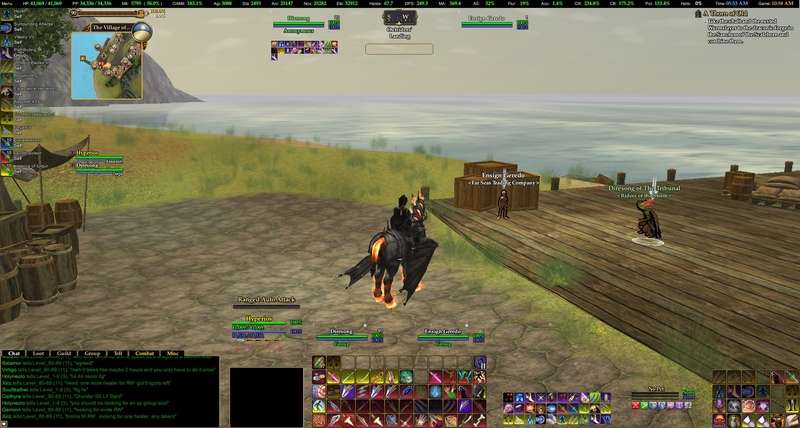 |
Quote:
|
Quote:
The biggest pet peeve for me is managing multiple verisons of the same window, so there is much doubt that I would ever get around to something like this, simply because I would not use it. If you or someone you know could do what you want, I could include it in say the Updater, and then leave it up to the coder to send me update when needed. Beyond that, I'll simply say no for now. |
Quote:
|
Quote:
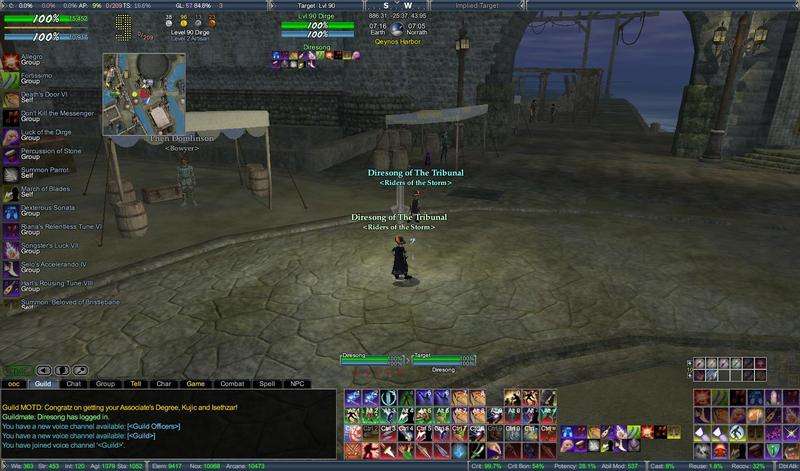 The goal is for people with very large monitors to focus on the "meat-n-potatoes" portion of the UI (hp/power, target, hotbars, detriments) with minimal data clutter. The only difference is they put click-2-cure on the players redundant (not on the primary w/ the concentration slots). |
I gotcha. My issue with that is the minimalism overall is reduced by having more duplicate data, and the extra elements on screen eat more away the precious FPS of any given user. Every extra window simply reduces performance of the game's UI engine.
I understand the function of it, but am unlikely to get to something like that anytime soon on my own free time coding/messing with the UI. |
Actually...
Those "minimalistic" dataelements from profit is nothing new .. here is how it works in profit The Small bars with <Me> <Target> <implied Target> in profit is in actuallity the "Player Window" which have expanded elements to contain target and implied target - which is why you cant interact with anyone but yourself when right clicking it. The left top is the XP window with expanded info to function as a "Player window" |
:) just wondering if there is any progress on the whole 'list of toons/servers' thing.. about the only thing im missing to permanently switch
|
Quote:
|
So been playing with DrumsUI for my one account, and i gotta admit i like it.
Just one small ... thing ... the condensed <self><Target><implied> that profit got... holy i figured out that its probably THE hardest thing to live without :( in my profit setup its hovering right above my hotkeys make it so i never have to move my eyes from that area of the screen unfortunately i cant achieve that with Drums it would seem unless i overlooked something. Will cookies help? .. LOTS of cookies? |
I like cookies :p
I've had people ask this, and the most likely thing to happen is for me to add it as an option toggled from the main menu or something like that. I haven't been messing with coding much lately or playing as much, but I'll write it down. |
Tracking Issue
Not sure if I'm posting this in the right place - I'll submit a bug if needed, just let me know. I'm a noob here ;)
Downloaded the full UI, patched, re-patched eq2maps, looks fantastic and so excited about having some of the features I've happened upon or that have been recommended to me by friends. Thanks! Problem is my tracking - when I click tracking icon, I get the pop-up window, however, I can't seem to click a target and have it track. I've tried re-sizing window, changing click-through, locked, etc settings on the window, and can't get it to work. It's default for me is to act like a "change size" (icon with four little arrows on the directions), and when I click an npc to track nothing shows in the top, or goes to track. Heeeellllllp pleeeeease!! I'm a lil fae ranjurette and rely heavily on my in-game tracking (yes, and on my GPS irl.... I'm directionally challenged.... *sighs and rolls her eyes*) If it helps, I'm running 64bit Win 7.... friend has tracking and Drumsui and it works just fine for him. Not sure what sys he's running though.... Thanks in advance! ~ Tala :) |
When you mouse over the window, you get the color con toggles, and the square button to the side of those is the Track button.
|
Woots!
Told ya I was a noob :p :rolleyes: So used to double-clicking with the orig ui..... thank you so much for the quick response!
*tacklehugs* ~ Tala :o |
I can not get the UI to work or the updater. Updater gets to the downloading application window then an error pops up, unable to run application. If I am seeing this correctly, the UI will NOT work unless the updater updates it correct? If that is indeed the case, why does the updater crash and how do I fix it?
I've been back to the game for almost 3 months after a 6 year leave and never had these UI problems before. Now I can not get any custom UI's to work at all and can not seem to get help anywhere. This is my last resort. Any and all help will be greatly appreciated!! |
What error are you getting exactly?
Are you using Windows Vista/Windows 7? Are you running the updater As Administrator (right click menu, or shortcut properties). Do you have the latest Java installed? |
Yes I have Java and everything needed to execute the program however, all it tells me is that it is "Unable to launch the application." Nothing more nothing less. I get that from clicking the launch button on the link:
http://www.advancedmod.com/DrumsUI/ It begins the download, then it pops up that window about not being able to launch it. Is there a different link where I can actually DL the updater itself and save to my files? If so I'd like to be able to manually try it instead of going through the above link. Tnx again for you cooperation with this!! :) Oh my OS is Windows 7 Pro. Machine is an M17xR2 Quad Core. (4 i7 Processors) Errors: Could not load argument exception: at com.sun.javaws.Main.launchApp(Unknown Source) at com.sun.javaws.Main.continueInSecureThread(Unknown Source) at com.sun.javaws.Main$1.run(Unknown Source) at java.lang.Thread.run(Unknown Source) java.io.FileNotFoundException at java.io.FileInputStream.open(Native Method) at java.io.FileInputStream.<init>(Unknown Source) at java.io.FileInputStream.<init>(Unknown Source) at com.sun.javaws.jnl.LaunchDescFactory.buildDescriptor(Unknown Source) at com.sun.javaws.Main.launchApp(Unknown Source) at com.sun.javaws.Main.continueInSecureThread(Unknown Source) at com.sun.javaws.Main$1.run(Unknown Source) at java.lang.Thread.run(Unknown Source) Those are the details of the error. Makes no sense to me even tho I have a degree in Java and Web Design. Medications screwed up my memory so all my schooling went out the window :-/ Anyhow hope you can make sense of it all as I would like to get some kind of custom UI to work... |
Don't know much about those errors, but here is the direct link to the download:
http://updater.pala.de/drumsui.jnlp |
That link gives the exact same thing with the same errors as the previous link. I am left to believe that the UI just doesn't like my machine :( however, I will keep trying with other UI's and see if I can get any of them to function w/o either crashing my game client or not working at all!!! Tnx for the help!!
|
Hey Drum do you ofer a stand alone tracking mod ?
I see it listed in the full interface and was just wondering if it was available as such ? great work as always you make eq2 rock |
Quote:
|
ok thanks will do
|
:) its me again.. guess what ?
*rattles the cookiejar* |
xmas cookies?!
|
Quote:
while your at it.. - i can fix it myself for now - but could your remover the padding on the spell effects window i think it is ? its ... rather large would preffer my buffs to be RIGHT at the frame not 16-20 pixels from it. |
Spell effects icons "should" be right on the border that is closest to the edge of the screen. They don't stick to only the left side. I'll look into them not sitting near the border though.
|
Quote:
|
New release: Version 1.31
Finally got around to updating the manual downloads for the Full Release and individual pieces. Enjoy. Update Log: v1.31 - 2011.12.11 - Update [Chat]: The chat window now defaults to always showing Chat Input. To get the version with the toggleable input for secondary chat windows, see the Alternatives folder. - Update [Persona]: Dungeon Finder, Mercenary, and Warder tabs added. EQII Share options added to default Options page (GU62 additions). Weapon/Spell Weapon toggle button moved to sit next to the Toggle Bags button. - Update [Persona]: Added a toggle button for Spell Weapon stats. Added Spell Weapon stat to PVP page. Added Rare Harvest stat to Tradeskill page. - Update [MainMenu]: Connection Stats button now toggles the window. Removed "Target Cast" button since there is checkbox. Added a EQ2 Options button. - Update [Community]: Friends list tab now has a Save Friends and Load Friends button. - Fix [Raid]: Drag/right-click handle is now hidden upon first opening the raid window. - Update [Gfx]: Updated include image files to support House Ratings system. Removed one unnecessary DDS file. - Update [TargetCasting]: The Implied target cast bar should now display correctly when targeting through another player. - Update [Tooltips]: Increased maximum height (GU62 change). - Update [Merchant]: Added tabs for Reforging additions (GU62 addition). - Update [Guild]: Updated image icons included in XML (GU62 addition). - Update [Pet]: DynamicData updates in XML (GU62 change). - Update [EditableFields]: Click cast/cure buttons, Item Notes, etc, have been increased from 5 to 10 max lines in the popup window. - New [BeastlordHotbar]: Added a grab-handle to the default window when the Frame is set to on. Allows moving window around in Minimized mode. - New [Savagery]: Now just a simple bar which can be resized horizontally and vertically. Shows savagery level and current percent. - Update [Broker]: Beastlord support added for dropdown and Set Class/Level button. But save these files to backup your Quick Button settings, Item Notes, and Spell Timers: - /POI/drumsui_textsettings.xml - /POI/drumsui_itemnotes.xml - /POI/drumsui_spelltimer.xml (If you had any saved from 1.30 or previous) Be sure to check out the DrumsUI Updater. The updater automatically ignores the custom settings files if you already have them, so you don't have to worry about overwriting important saved buttons :) |
| All times are GMT -5. The time now is 09:28 AM. |
vBulletin® - Copyright ©2000 - 2026, Jelsoft Enterprises Ltd.
© MMOUI